


Epson Projector No Signal Troubleshooting: The Ultimate 2026 Home Cinema Guide
August 20, 2026
How to Fix a Blurry Epson Projector Image: A 2026 Home Cinema Guide
August 22, 2026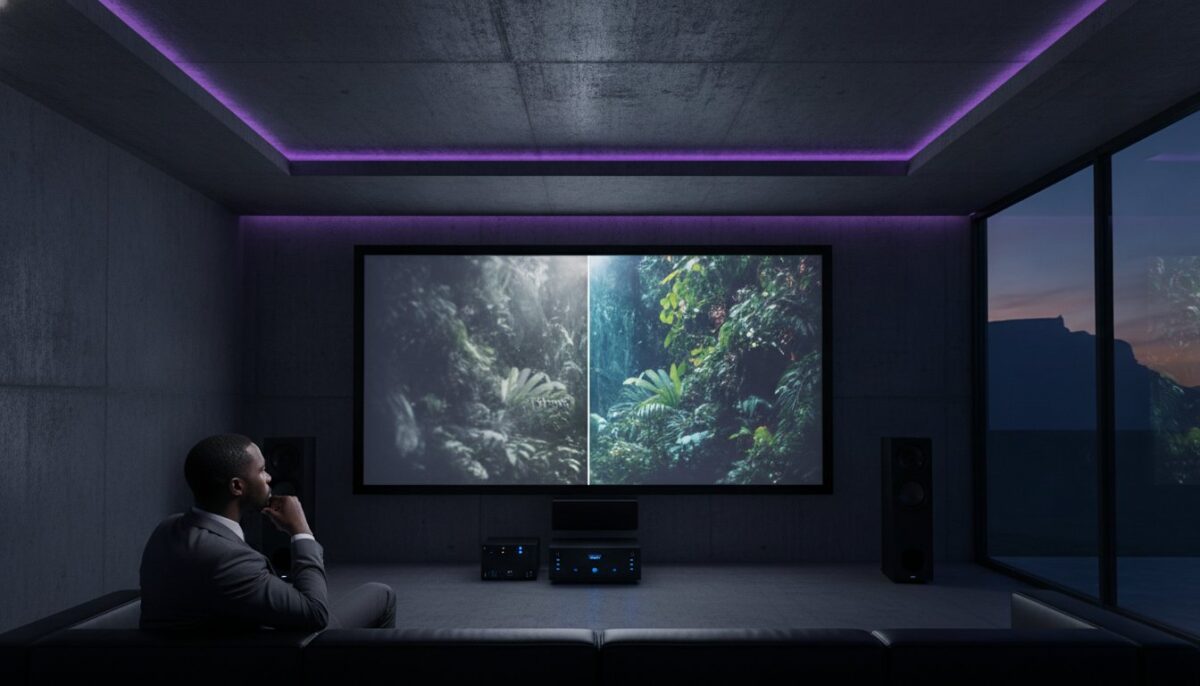
That dimming image on your screen might not be a sign of a dying system; it could be a simple, R1,800 fix that restores your home cinema to its former glory. You have likely spent years perfecting your viewing environment, so it is naturally frustrating when your favourite films start to look dull or washed out. Identifying the specific signs you need a new Epson projector versus a simple lamp replacement is essential to avoid wasting money on unnecessary hardware or struggling with a failing unit.
We understand the anxiety surrounding mercury-containing bulbs and the confusion over generic versus genuine parts in the South African market. This 2026 guide provides the technical clarity you need to make an informed decision. We will audit your current image quality, explain the impact of South Africa’s latest e-waste regulations, and help you determine if your setup requires a fresh lamp or a professional upgrade to the latest laser technology. By the end of this article, you will have the confidence to restore a crisp, bright display to your home whilst ensuring your equipment remains efficient and compliant with local environmental standards.
Key Takeaways
- Learn to decode specific chassis indicator lights and lumen dimming that serve as the primary signs you need a new Epson projector or a fresh lamp.
- Master the safe lamp replacement process by following a structured cool-down protocol to protect your hardware and handle sensitive components correctly.
- Understand why genuine ELPLP lamps are essential for protecting your 3LCD panels from UV damage and maintaining calibrated voltage performance.
- Extend the lifespan of your home cinema equipment through proactive vent cleaning and strict adherence to the critical cool-down cycle.
- Recognise when to transition from DIY maintenance to professional South African support for complex repairs and genuine Epson parts.
Recognising the Warning Signs: When to Replace Your Epson Lamp
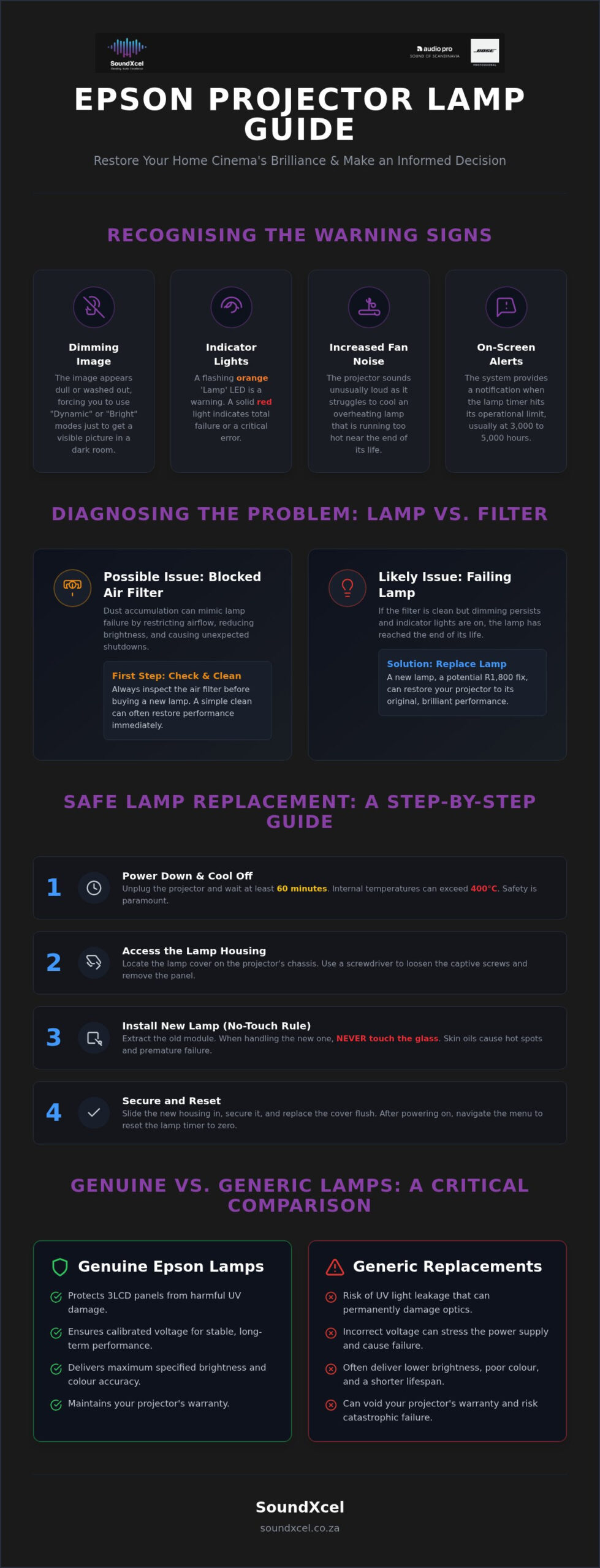
Your Epson projector is designed to communicate its health through a specific set of visual and audible cues. Ignoring these signals can lead to unexpected downtime during your favourite series. The most obvious indicator is the “Lamp” LED on the chassis. A flashing orange light typically serves as a warning that the bulb is nearing its end, whilst a solid red light indicates a total failure or a critical error. Understanding these triggers will help you identify the signs you need a new Epson projector before the hardware fails entirely.
Beyond the lights, pay attention to the screen. If you find yourself switching to “Dynamic” or “Bright” colour modes just to get a visible image in a dark room, your lamp has lost significant lumen output. This gradual dimming is one of the clearest signs you need a new Epson projector if the performance doesn’t recover with a simple maintenance check. Listen to the fan; a projector that sounds louder than usual is likely struggling to cool a lamp that is running too hot. Epson systems also provide an on-screen notification once the lamp timer hits its operational limit, usually at the 3,000 to 5,000-hour mark depending on your specific model’s specifications.
The Difference Between a Dimming Lamp and a Blocked Filter
Don’t rush to buy a new bulb until you have inspected the air intake. Dust accumulation is common in South Africa, and it can restrict airflow, causing the projector to dim the lamp automatically to prevent heat damage. A blocked filter mimics lamp failure by reducing brightness and causing the unit to shut down unexpectedly. Always check the air filter status before committing to an expensive lamp purchase. A clean filter is essential for the new lamp’s thermal management and ensures you get the full value out of your investment.
Understanding Epson Lamp Life Ratings
Actual lamp longevity depends heavily on your settings. Running in “Eco Mode” can extend the life of your Video projector technology by thousands of hours compared to “Standard Mode”. For residents in high-altitude areas, enabling “High Altitude Mode” in the settings is essential. This increases fan speed to compensate for thinner air, protecting the lamp filament from overheating. Additionally, frequent power cycling caused by load shedding can stress the lamp filament. If your projector is frequently cut off mid-use without a proper cool-down cycle, the lamp life will drop significantly. These environmental factors are often the primary reasons a lamp fails sooner than the manufacturer’s estimate.
Step-by-Step Guide: Safely Replacing Your Epson Projector Lamp
Replacing an Epson lamp is a precision task that requires patience and the right environment. Recognising the signs you need a new Epson projector or a simple lamp failure is the first step in maintaining your home theatre’s performance. Before you begin, ensure your projector is completely powered down and has cooled for at least 60 minutes. This wait time is non-negotiable; internal temperatures can exceed 400 degrees Celsius, and rushing the process risks both personal injury and hardware damage. Once cooled, locate the lamp cover, which is usually found on the side or top of your specific Epson model. Use a standard screwdriver to loosen the captive screws. These screws are designed to stay attached to the cover, so you don’t need to worry about losing them. Gently extract the old lamp housing using the integrated handle. If the unit resists, check for missed screws rather than applying force.
Installing the New Lamp Module
Align the new lamp housing with the internal connectors carefully. It should slide into place with minimal resistance. Follow the “No-Touch” rule strictly: never touch the glass of the new bulb with your bare hands. Skin oils create hot spots on the quartz surface, which can cause premature failure or even a small explosion when the lamp reaches operating temperature. If you suspect you have touched the glass, clean it gently with a lint-free cloth and isopropyl alcohol. Once seated, secure the housing and replace the outer cover. Ensure the cover is perfectly flush, as most Epson models have a safety switch that prevents the projector from firing up if the door is slightly ajar. For those unsure about the process, consulting a Guide to Projector Lamp Replacement can provide additional technical context on OEM specifications.
How to Reset the Epson Lamp Timer
Replacing the physical hardware is only half the job. You must reset the lamp timer to tell the projector’s software that a new bulb is present. This clears the warning lights on the chassis and allows the cooling fan logic to return to its standard profile. Follow this sequence to reset your unit:
- Access the On-Screen Display (OSD) menu via your remote control.
- Navigate to the ‘Reset’ or ‘Maintenance’ submenu.
- Select the ‘Reset Lamp Hours’ command.
- Confirm the action when the prompt appears.
- Verify that the status lights on the projector chassis have returned to normal.
If the warning lights persist after a reset, these may be signs you need a new Epson projector rather than just a bulb, as internal power supply issues could be the culprit. If you need assistance sourcing genuine components or require professional advice, you can contact our specialised team for support.
Genuine Epson Lamps vs. Generic Replacements: A Comparison
Choosing between a genuine Epson lamp and a generic replacement is often framed as a simple cost-saving exercise. However, in 2026, the financial matrix for maintaining high-end AV equipment has shifted significantly. With genuine lamps like the ELPLP97 priced at R1,740, the decision to repair an older unit must be weighed against the performance of modern laser-based hardware. If your current unit displays permanent yellowing or purple tinting on the edges of the screen, these are undeniable signs you need a new Epson projector rather than a fresh bulb. These visual artefacts suggest that previous use of low-quality, generic lamps may have already caused irreversible UV damage to the 3LCD panels.
Genuine Epson ELPLP lamps are engineered to match specific voltage curves. This precision ensures that the projector’s power supply unit (PSU) operates within its intended thermal and electrical parameters. Non-branded bulbs often lack this calibration, forcing the PSU to overcompensate, which leads to premature component failure. Worse still, generic bulbs frequently omit the high-quality UV coatings found on official parts. This allows UV radiation to leak into the light path, “sunburning” the delicate 3LCD panels and permanently degrading colour accuracy. Consult the official Epson lamp maintenance guide to understand how these technical failures manifest as visible error codes or performance drops.
Identifying Counterfeit Epson Lamps
Protect your investment by verifying the authenticity of any replacement part. Genuine Epson lamps feature a distinct holographic seal on the packaging that shifts colour when tilted. Inspect the build quality of the plastic housing and the metal connectors; counterfeit units often use brittle plastics and poorly aligned pins that can arc and cause fire hazards. Always purchase from authorised South African dealers to ensure you receive a product backed by a valid local warranty and technical support.
Performance Metrics: Brightness and Colour Accuracy
Cinema enthusiasts rely on the D65 colour temperature to view films as the director intended. Genuine lamps are the only way to maintain this standard, as generic bulbs often lean towards a cool, blueish tint that ruins skin tones. You might also notice a “flicker” in the image, which is a symptom of the unstable arc gap found in low-quality replacements. Lumen stability is the hallmark of genuine Epson lamps because it provides a predictable, steady brightness that resists the rapid decay seen in unbranded alternatives. If your brightness continues to fluctuate after a lamp swap, these are signs you need a new Epson projector due to internal ballast failure.
Maximising Longevity: Maintenance Tips After Replacement
Effective maintenance begins the moment you install your new lamp. In South Africa, our unique power challenges require a proactive approach to protect your hardware. One of the most critical habits to form is respecting the “Cool Down” cycle. After you turn off the projector via the remote, the internal fans continue to run to dissipate residual heat from the lamp. Never unplug your unit at the wall immediately after use. Cutting the power prematurely traps heat inside the chassis, which can warp delicate internal optics and lead to early signs you need a new Epson projector.
Given the frequency of power fluctuations, a dedicated Uninterruptible Power Supply (UPS) is an essential investment for any premium home cinema. A UPS provides the necessary battery backup to allow your projector to complete its cooling cycle during a sudden power cut. It also acts as a buffer against high-voltage surges that occur when the grid returns. Beyond power management, ensure you clean the air intake and exhaust vents every three months. Dust acts as an insulator, forcing the fans to work harder and reducing the overall lifespan of your new bulb. Keep the projector in a well-ventilated area with at least 50cm of clearance to ensure optimal thermal management.
The Role of Eco Mode in Lamp Preservation
Switching to Eco Mode is a highly effective way to extend your lamp’s life, often increasing operational hours from 3,000 to 5,000 or more. This setting reduces the lamp’s power consumption and lowers the fan speed, resulting in a quieter environment for an immersive movie experience at home. Whilst the image may be slightly less bright, the gain in longevity and the reduction in ambient noise often make it the preferred choice for dark-room viewing. You can always toggle back to “High” brightness for daytime sports or gaming sessions when ambient light is higher.
Professional Calibration Post-Replacement
A fresh lamp often has a different colour profile compared to the aging bulb it replaced. You will likely need to tweak your brightness, contrast, and colour saturation settings to account for the increased lumen output. This is the perfect time to ensure your visuals are perfectly synchronised with a bose sound system setup for a truly cinematic feel. Re-check your focus and lens shift alignment after the physical intervention to ensure the image is perfectly square on your screen. If you want to ensure your system is performing at its peak, you can book a professional maintenance service with our expert team to handle the calibration for you.
Professional Epson Projector Support in South Africa
While lamp replacement is a manageable DIY task, certain technical hurdles require a specialised Epson technician. If you have replaced the bulb but still see a dim image, or if the chassis lights continue to flash, these are clear signs you need a new Epson projector or an advanced internal repair. Attempting to fix internal power ballasts or optical engines without the proper tools can lead to permanent damage. SoundXcel provides a professional alternative, offering premium AV maintenance that prioritises the longevity of your high-end equipment.
Our team focuses on protecting your Epson projector price South Africa investment through precision handling and genuine parts. We don’t just swap lamps; we conduct comprehensive system health checks. This includes cleaning internal optics, testing cooling efficiency, and verifying the synergy between your Epson visuals and your Bose audio integration. Ensuring that your Bose Lifestyle Collection performs in perfect harmony with your visual display is the hallmark of a truly curated home cinema experience.
National Reach for Epson Maintenance
SoundXcel serves the entire South African market, ensuring you can source genuine ELPLP lamps regardless of your location. We provide expert advice on whether a repair is economically viable or if it’s time to transition to the latest Epson 4K PRO-UHD models. If your current unit is showing signs you need a new Epson projector, such as persistent panel degradation or motherboard errors, we help you navigate the upgrade path with ease. Our expertise extends beyond visuals; we are also a specialised provider for Bose Repairs, allowing you to maintain your entire entertainment ecosystem through a single, reliable partner.
Book Your Epson Service Today
Securing professional support is a straightforward process designed around your convenience. Whether you need a simple lamp replacement or a complete system optimisation, our technicians handle your hardware with the care it deserves. You gain peace of mind knowing that every component used is authorised and every calibration is performed to industry standards. This methodical approach ensures your equipment remains compliant with 2026 e-waste regulations, as we manage the responsible disposal of hazardous mercury lamps. Don’t let technical glitches interrupt your viewing schedule. Contact SoundXcel for professional Epson projector support today and ensure your home cinema remains the centre of your lifestyle.
Revitalise Your Cinematic Experience
Maintaining a premium home cinema requires a balance between proactive maintenance and knowing when to invest in the latest technology. We have explored how simple steps like vent cleaning and using genuine ELPLP lamps can prevent premature failure. However; persistent issues like panel discolouration or internal power errors are clear signs you need a new Epson projector rather than another replacement bulb. Making the right choice ensures your visuals remain as sharp and vibrant as the day you first installed your system.
SoundXcel is your trusted partner for premium AV integration across South Africa. As an authorised retailer of Epson home cinema projectors and a provider of specialised Bose repair services nationally, we ensure your entire entertainment ecosystem performs at its peak. Our expert team is ready to guide you through a lamp swap or a full hardware upgrade to the latest 4K PRO-UHD standards. Upgrade your home cinema with SoundXcel’s Epson and Bose solutions today and enjoy the peace of mind that comes with professional support and genuine parts. Your next movie night deserves nothing less than perfection.
Frequently Asked Questions
How many hours does an Epson projector lamp typically last in 2026?
Most modern Epson lamps last between 3,000 and 5,000 hours in standard mode. If you utilise Eco Mode, this can extend to 7,500 or even 10,000 hours on specific home cinema models. Check your specific manual for the rated life. Once you hit these limits, the dimming image is one of the primary signs you need a new Epson projector or a fresh lamp module to maintain brightness.
Can I replace an Epson projector lamp myself or do I need a professional?
You can replace the lamp yourself if you follow the safety protocols mentioned earlier. Most Epson units feature a user-accessible lamp door secured by a few screws. However, if the unit is ceiling-mounted or requires internal cleaning of the 3LCD panels, calling a professional is safer. Professional assistance ensures the chassis safety switch is engaged correctly and the cooling system is verified for optimal performance in our climate.
Why is my Epson projector still saying “Replace Lamp” after I installed a new one?
Your projector doesn’t automatically detect a new bulb; you must manually reset the lamp timer in the menu. Navigate to the “Reset” section of the On-Screen Display and select “Reset Lamp Hours” to clear the notification. If the message persists after a reset, it could indicate a faulty lamp or an internal ballast issue. These persistent errors are often signs you need a new Epson projector or specialised technical repair.
Is it dangerous if an Epson projector lamp explodes inside the unit?
While a lamp “explosion” sounds alarming, it’s usually a small pop caused by the quartz glass breaking under pressure. The main risk is the small amount of mercury vapour released and the sharp glass shards. If this happens, power off the unit, unplug it, and ventilate the room for at least 30 minutes. Don’t use a vacuum cleaner to pick up the glass, as this can spread mercury vapour throughout your home.
What is the difference between a bare bulb and a full lamp module?
A full lamp module includes the bulb already seated inside a plastic housing with pre-aligned connectors. A bare bulb is just the glass component, which requires you to dismantle the old housing and wire the new bulb in manually. We strongly recommend full modules for Epson units. They ensure perfect alignment with the optics and prevent the risk of UV leakage that often occurs with poorly fitted bare bulbs in a home cinema.
Will using a generic lamp void my Epson projector warranty in South Africa?
Yes, using unbranded or generic lamps typically voids your manufacturer’s warranty. Epson’s warranty only covers defects arising from normal use with genuine parts. If a generic lamp leaks UV light or causes a power surge that damages the 3LCD panels, the repair costs will be your responsibility. Stick to genuine ELPLP lamps to protect your investment and ensure you remain eligible for local South African support if any technical issues arise.
How do I dispose of my old Epson projector lamp safely?
You must dispose of projector lamps at a licensed e-waste facility because they contain mercury. In South Africa, it’s illegal to throw electronics or hazardous lamps into general waste bins. Many specialised retailers and municipal drop-off points accept e-waste for responsible recycling. This process ensures that harmful materials are recovered safely, complying with NEMWA regulations. Always check for your nearest certified recycling centre to ensure you remain legally compliant.
Can I clean my old lamp to make it brighter instead of replacing it?
No, you cannot clean the internal chemical structure of a lamp to restore its brightness. The dimming occurs because the electrodes inside the quartz tube degrade over time; it’s not caused by external dust on the glass. Attempting to open the lamp housing or clean the bulb with chemicals can actually cause it to shatter when it reaches high temperatures. Once the lumen output drops significantly, replacement is the only viable technical solution.
