

Bose Home Cinema Sound System South Africa: The Ultimate Buyer’s Guide
September 19, 2026
The Ultimate Bose Home Cinema Setup Guide for 2026
September 21, 2026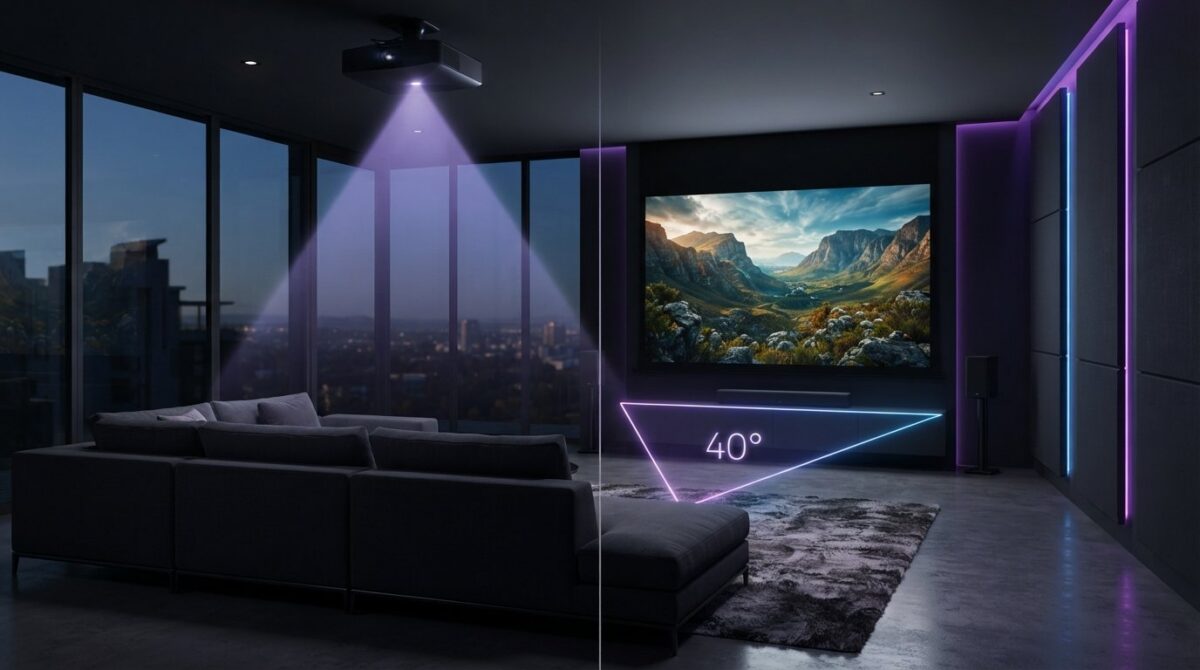
A bigger screen doesn’t always guarantee a better experience. Sitting too close to a massive projection can turn a cinematic masterpiece into a pixelated headache. You’ve likely spent hours researching the latest hardware, yet you’re still worried that your room layout might compromise the final result. This projector viewing distance guide simplifies the complex mathematics of home cinema design. Discover how to calculate the ideal seating position to create an immersive, high-definition environment that rivals any professional theatre in your South African home.
We help you distinguish between throw distance and viewing angles whilst addressing the fear of seeing individual pixels on large screens. You’ll learn to use the official Epson Projector Throw Distance Simulator to optimise your space with precision. We also provide a clear formula for seating that aligns your visual field with the premium performance of the Bose Smart Ultra Soundbar or Lifestyle Collection. From technical THX standards to professional repair services that ensure your system’s longevity, this guide ensures your home cinema feels polished, sophisticated, and perfectly tailored to your lifestyle.
Key Takeaways
- Learn the vital difference between throw distance and viewing distance to prevent installation errors in your home cinema.
- Use this projector viewing distance guide to calculate the optimal 4K UHD seating position using the “Screen Width x 1.2” rule.
- Organise your furniture according to THX standards to achieve a 40-degree field of view for total cinematic immersion.
- Synchronise your seating with the Bose Smart Ultra Soundbar to benefit from precise Dolby Atmos height channels and AI Dialogue Mode.
- Calculate the exact mounting point for your Epson projector by understanding how throw ratios interact with your specific screen size.
Throw Distance vs Viewing Distance: Clearing the Confusion
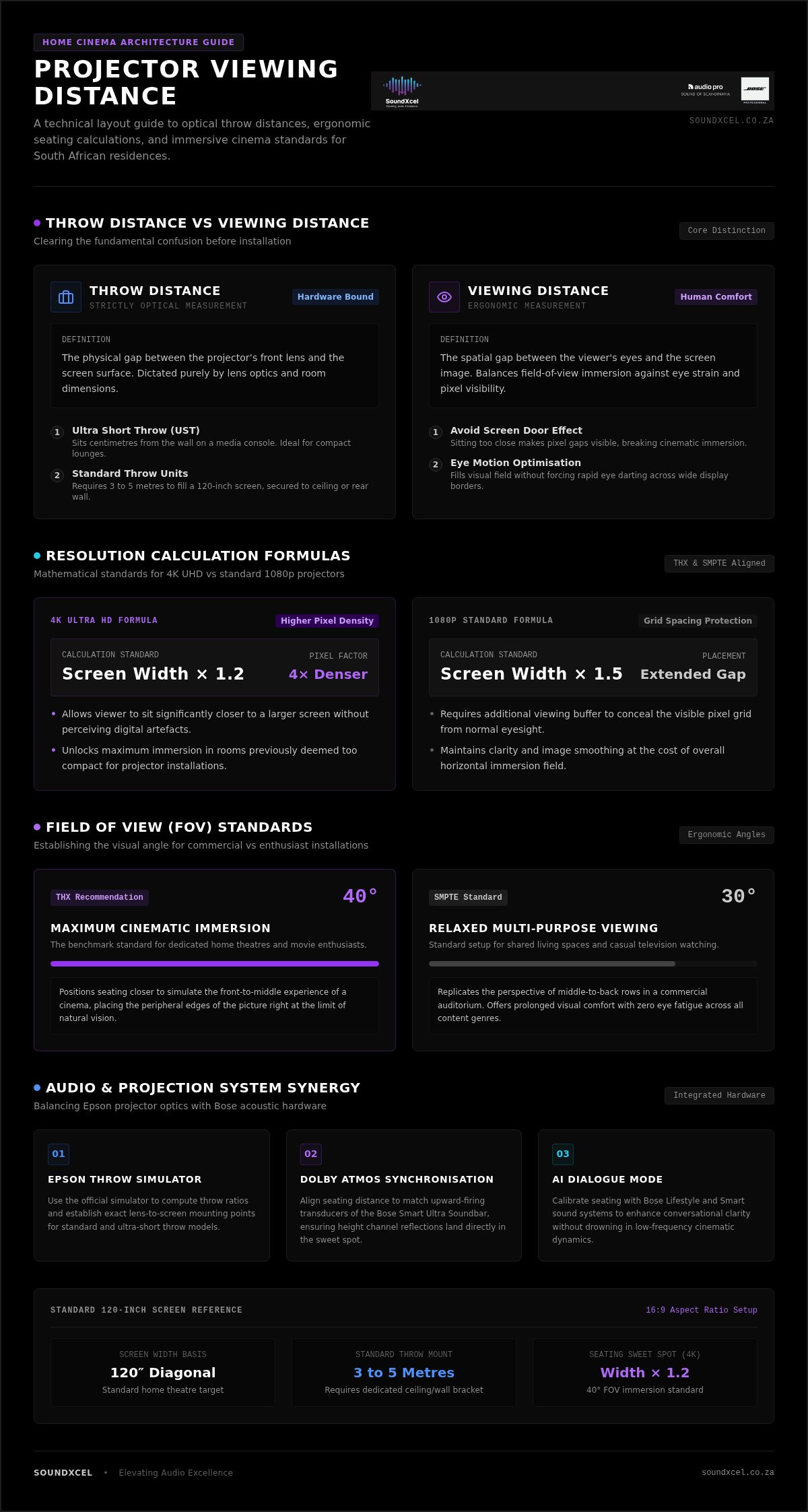
Understanding the difference between where your projector sits and where you sit is the first step toward a professional setup. Throw distance is the physical gap between the projector’s front lens and the screen surface. This measurement is strictly an optical calculation. Viewing distance, however, is the ergonomic space between your eyes and the image. Getting both right is essential for a sharp, comfortable image that doesn’t strain your eyes. This projector viewing distance guide helps you navigate these two distinct measurements to ensure your Epson home cinema projectors perform at their peak.
To better understand how these spatial relationships affect your theatre experience, watch this helpful video:
Why Throw Distance Matters for Installation
The lens type of your projector dictates exactly where it must be mounted. Epson offers a versatile range of optics, from Ultra Short Throw (UST) models to standard long-throw units. UST projectors are designed to sit just centimetres from the wall, often on a media console. These are perfect for smaller South African lounges where ceiling mounting isn’t an option. Standard throw models typically require a distance of three to five metres to fill a 120 inch screen. You’ll need to purchase high quality mounting brackets separately to secure these units to your ceiling or rear wall. Choosing the wrong mounting point can lead to a blurry image or a picture that doesn’t align with your screen borders.
The Role of Viewing Distance in Visual Comfort
If you sit too close to the screen, you’ll experience pixelation. This is the “screen door effect” where the gaps between pixels become visible, breaking the cinematic illusion. Industry experts follow optimum viewing distance guidelines to balance immersion with visual clarity. Your field of vision must be filled enough to feel involved in the action without forcing your eyes to dart back and forth across the screen. Modern 4K resolution has changed the rules of room design. Because 4K pixels are four times denser than 1080p, you can sit significantly closer to a large screen without seeing any digital artefacts. This allows for a much larger, more immersive image in rooms that previously felt too small for a projector setup.
Calculating Your Ideal Viewing Distance: The 4K and 1080p Rules
Establishing the right seating position requires more than just moving a sofa. You must balance the technical limits of your eyes with the resolution of your projector. This projector viewing distance guide relies on standards set by THX and the Society of Motion Picture and Television Engineers (SMPTE). These organisations define the “theatre feel” based on your horizontal field of view. For a 4K UHD experience, use the formula: Screen Width x 1.2. This allows you to sit closer to enjoy the finer details. If you use a standard 1080p projector, increase this to Screen Width x 1.5 to prevent seeing the pixel grid. Consult the Epson throw distance and positioning guide to see how these optical rules apply to specific lens types.
A 30-degree to 40-degree field of view is the target for most home cinemas. A 30-degree angle provides a relaxed, multi-purpose viewing experience similar to a commercial cinema’s middle-to-back rows. Aiming for a 40-degree angle creates the intense immersion preferred by movie enthusiasts. If you are uncertain about your room’s potential, you can view our professional advice on Epson projector setups to help you decide.
Seating Distance Comparison Table
Use this table to find the ideal range for the most common screen sizes. These figures assume a standard 16:9 aspect ratio and 4K UHD resolution for the “Sweet Spot” calculation.
| Screen Size (Diagonal) | Min Distance (4K) | Max Distance (1080p) | Sweet Spot |
|---|---|---|---|
| 100-inch | 2.7 metres | 3.4 metres | 3.0 metres |
| 120-inch | 3.2 metres | 4.0 metres | 3.6 metres |
| 150-inch | 4.0 metres | 5.0 metres | 4.5 metres |
Adjusting for Personal Preference
Mathematics provides the baseline, but your personal comfort is the final authority. Some viewers love the “front row” intensity where the image fills their entire peripheral vision. Others prefer sitting further back to maintain a sense of space. Don’t bolt your seating to the floor immediately. Test your distance by sitting in a temporary chair for a full movie. True cinematic immersion occurs when the screen occupies a 40-degree horizontal field of vision, effectively removing the room’s boundaries from your peripheral sight. This ensures you’re focused on the story, not the walls of your lounge.
Optimising Your Room Layout for Maximum Comfort
Organising your space involves more than just placing a chair. You must align your furniture with the Bose Lifestyle and Epson projector setup to ensure audio and video converge perfectly. This integration works best when using the Bose Lifestyle Collection to fill the room with immersive sound. In many South African homes, the debate between using a dedicated projector screen or a plain white wall is common. Whilst a wall is convenient, a high-quality screen provides much better light rejection and contrast. This is especially vital in lounges with large windows where ambient light can wash out the image. This projector viewing distance guide recommends using blackout curtains or motorised blinds to maintain deep black levels. Position your screen so the bottom third is at eye level. This prevents neck strain and keeps the action comfortably within your natural line of sight.
Light control is the foundation of a high-end cinema. In South Africa’s bright climate, even a small amount of stray light can degrade the perceived contrast of your Epson projector. If you sit further back, you may notice this loss of detail more acutely. Using an Ambient Light Rejecting (ALR) screen can mitigate this, allowing for a crisp image even in partially lit rooms. When selecting furniture, consider low-profile designs that don’t block the projector’s path or interfere with the soundstage. Maintaining your equipment is just as important as the initial layout. Regular maintenance and professional repair services ensure your system remains a reliable centrepiece of your home for years to come.
Seating Rows and Sightlines
Manage multiple rows of seating by installing tiered risers. This ensures every guest has an unobstructed view of the Epson screen without looking at the back of someone’s head. Use the Dolby speaker setup guides to verify that your rear rows still fall within the audio sweet spot. Choose furniture that balances comfort with acoustic properties. Overstuffed fabric sofas often absorb excess sound, helping to reduce room echo and improve clarity. Ensure your primary seating row remains the focus of your layout, as this is where the system’s calibration will be most effective.
Managing Cables and Clutter
Keep your floor clear by utilising wireless home audio solutions. Modern systems reduce the need for long cable runs across the room, maintaining a sleek and professional look. For the cables that remain, use hidden trunking or in-wall conduits. This polished finish is a hallmark of a premium installation. When planning your budget, refer to our guide on Epson projector price South Africa to account for both hardware and installation accessories. Professional installation ensures your technology integrates seamlessly into your lifestyle without the distraction of messy wiring.
Balancing Visuals with Immersive Bose Audio Performance
Synchronising your seating distance with your speaker layout is the final step in creating a truly immersive theatre. If your ears aren’t aligned with the acoustic sweet spot, even the most impressive 4K image will feel detached. This projector viewing distance guide ensures that your physical position supports the complex spatial processing of modern audio hardware. The Bose Smart Ultra Soundbar excels at creating a wide soundstage that matches the scale of a 120 inch or 150 inch screen. It features upward-firing transducers that bounce sound off your ceiling to create height channels. This effect is most convincing when your seating is positioned correctly relative to your screen height.
The AI Dialogue Mode in modern Bose systems is particularly useful for those who prefer sitting further back. This technology intelligently balances vocal clarity against explosive surround effects, ensuring you never miss a word during intense action scenes. To achieve this, use the included ADAPTiQ headset. This system measures how sound reflects off your walls and furniture from your specific seating position. It then automatically adjusts the output for your room’s unique acoustics. This calibration ensures that your viewing distance and listening distance are perfectly aligned for maximum impact.
Audio-Visual Synchronisation
Dialogue clarity can often diminish as you move further from the screen. The Bose Lifestyle Collection solves this by creating a seamless bubble of sound around the viewer. When placing rear speakers, ensure they are slightly behind and above your primary seating row. This heightens the perception of surround effects, making the audio feel as large as the visuals. If you find your audio feels “small” compared to your projection, it is essential to choose a Bose sound system that matches the scale of your Epson screen. This balance prevents the sound from feeling like it is coming from a separate source.
The Impact of Room Acoustics
Room geometry affects more than just where you place your projector. Hard surfaces like tiled floors or large windows can cause echoes that muddy the sound. Soft furnishings such as rugs and heavy curtains improve audio clarity whilst also reducing light reflections on your screen. In larger rooms, adding a second bass module can provide the physical impact needed to match a massive cinematic image. Our expert Bose repair services ensure that your investment maintains its premium performance over time. If your system ever requires attention, professional technicians can restore the precise calibration needed for your specific room layout. Explore our premium Bose audio range today to complete your home cinema transformation.
Step-by-Step Guide to Positioning Your Epson Projector
Precision is the difference between a casual setup and a true home cinema. Before picking up a drill, confirm your desired screen size and viewing distance. This projector viewing distance guide has already established that your seating dictates the screen’s scale. Now, you must translate those ergonomics into physical placement. Use the Epson throw ratio, usually found in the user manual or online simulator, to find the exact mounting point. This ratio tells you the distance required to fill your specific screen width. If your projector has a 1.5:1 ratio and your screen is 2 metres wide, your lens must be exactly 3 metres away.
Align the lens centre with the horizontal centre of the screen. Whilst digital keystone correction is available, it often degrades 4K clarity by compressing pixels. Aim for a perfectly square physical alignment first. If the projector must sit off-centre, use optical lens shift to move the image without losing resolution. Finalise your physical installation by running a full audio calibration and conducting a light test. This ensures that your Epson visuals and Bose audio are perfectly synchronised before you settle in for your first film.
Mounting and Hardware
Decide between a ceiling mount or shelf placement based on your room’s aesthetics. Ceiling mounts offer a permanent, professional look that keeps the projector out of your line of sight. Shelf placement is easier for maintenance but requires a stable, level surface. Ensure there is at least 20cm of clearance around the exhaust vents to prevent overheating. Adequate ventilation extends the life of your lamp or laser significantly. If your integrated audio system requires attention during the installation process, professional Bose repairs are available to ensure your sound remains as crisp as your picture.
Fine-Tuning the Image
Use optical zoom rather than digital zoom whenever possible. Optical zoom moves the internal glass elements, preserving every bit of 4K detail. Adjust the focus ring or motorised focus until the image is sharp across the entire screen. Project an internal grid test pattern and stand close to the screen to verify that the lines are perfectly sharp and free from chromatic aberration. Once the geometry is locked, adjust the brightness and contrast settings to suit your room’s specific lighting conditions. This methodical approach ensures your hardware delivers the premium experience you expect.
Master Your Home Cinema Layout
Precision transforms a standard room into a professional cinema. You now understand how to distinguish between throw distance and viewing angles whilst aligning your seating with modern high-resolution standards. This projector viewing distance guide provides the foundation for a room that feels both immersive and sophisticated. By integrating Epson’s visual clarity with the spatial power of the Bose Lifestyle Collection, you create a world-class theatre in your own home.
As an authorised Bose and Epson dealer, we provide a curated selection of high-end gear designed for peak performance. Our professional repair services for Bose equipment protect your investment and maintain system longevity. We pride ourselves on being a knowledgeable guide for your home technology journey. Trust in our expertise to help you navigate the complexities of audio-visual integration with ease.
Explore our range of Epson Home Cinema Projectors and Bose Sound Systems to find the perfect fit for your space. Your ultimate cinematic experience is now within reach.
Frequently Asked Questions
What is the best viewing distance for a 120-inch projector screen?
The ideal viewing distance for a 120-inch screen typically ranges between 3.2 and 4.0 metres. According to this projector viewing distance guide, sitting at approximately 3.2 metres for 4K UHD allows you to appreciate increased pixel density without experiencing strain. If you use a 1080p projector, sitting closer to 4.0 metres is advisable to avoid seeing the pixel structure. This range ensures the image fills your field of vision comfortably.
Can I sit too close to a 4K projector?
You can sit too close to a 4K projector if the image begins to exceed your comfortable peripheral vision or causes you to move your head to follow the action. Whilst 4K resolution allows for much closer seating than 1080p, sitting too near can lead to eye fatigue. We suggest maintaining at least 1.0 to 1.2 times the screen diagonal to balance immersion with long-term visual comfort.
How do I calculate throw distance for an Epson projector?
Calculate the throw distance by multiplying your screen width by the projector’s specific throw ratio. For example, a lens with a 1.5:1 ratio requires a 3-metre gap to project onto a 2-metre wide screen. We recommend using the official Epson Projector Throw Distance Simulator for precise measurements. This tool accounts for lens shift and zoom limits, ensuring your mounting point is accurate before you begin installation.
Does seating distance affect the sound quality of my Bose system?
Seating distance significantly impacts how you perceive audio from your Bose Lifestyle Collection or Bose Smart Ultra Soundbar. Sound is timed to arrive at a specific sweet spot in the room. If you sit too far back or off-centre, you may lose the precise spatial effects of Dolby Atmos. Use the ADAPTiQ headset included with your system to calibrate the audio specifically for your chosen seating position.
Is it better to sit in the centre or at the back of a home cinema?
Sitting in the centre is generally preferred for the most accurate audio-visual experience. This position aligns your ears with the centre tweeter and your eyes with the lens axis, providing the best reference experience. Sitting at the back offers a more relaxed view but can diminish the impact of surround sound height channels. Most enthusiasts aim for the middle-to-front rows to maximise the immersive qualities of their Epson and Bose hardware.
What happens if my viewing distance is shorter than recommended?
Sitting shorter than the recommended distance often results in the screen door effect, where the gaps between pixels become visible. You might also find yourself physically moving your head to see different parts of the screen, which leads to neck strain. Additionally, your eyes may struggle to process the rapid movement in high-action scenes, potentially causing motion sickness or significant fatigue during extended viewing sessions.
Do I need a special screen for 4K viewing at close distances?
High-resolution 4K viewing at close distances benefits from a screen with a fine surface texture. Standard screens or painted walls can sometimes have a grain that interferes with the tiny pixels of a 4K image. We recommend using an Ambient Light Rejecting (ALR) or 4K-optimised screen to maintain maximum contrast. This ensures that the deep blacks and vibrant colours of your Epson projector remain crisp even when sitting close.
How can I prevent eye strain during long movie marathons?
Prevent eye strain by ensuring your screen is positioned so your eyes align with the bottom third of the image. This maintains a natural downward gaze and reduces muscle tension in the neck and eyes. Control your room’s ambient light to avoid glare, and ensure your projector is properly focused. Taking short breaks between films also helps your eyes recover from the intense light output of high-lumen Epson models.
