

The Ultimate Projector Viewing Distance Guide: Perfect Your Home Cinema
September 20, 2026
How to Choose a Projector Screen: The Complete 2026 Home Cinema Guide
September 22, 2026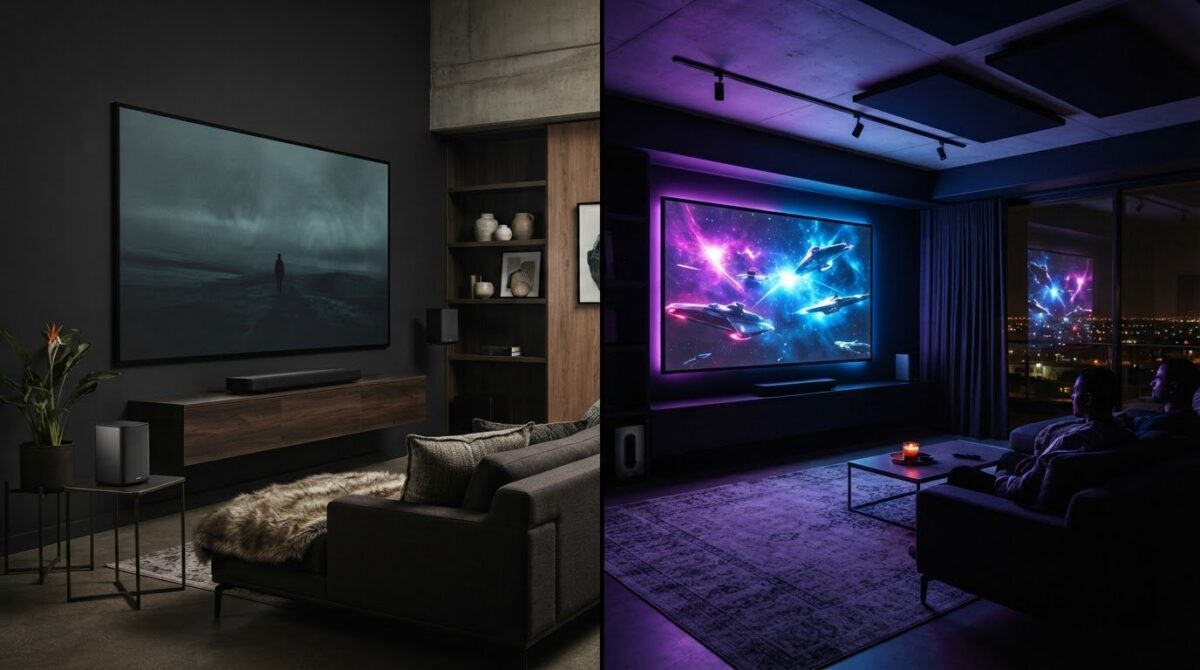
Why does your high-end soundbar still struggle to make dialogue audible over a simple explosion? It’s incredibly frustrating when you’ve invested in premium gear only to find yourself constantly fiddling with the volume remote. You likely want a system that just works, blending seamlessly into your home without a chaotic web of cables or confusing technical settings. This Bose home cinema setup guide will transform your living room into a professional-grade theatre. We’ll help you master everything from HDMI eARC configurations to the strategic placement of wireless speakers in open-plan layouts.
You’ll gain total confidence in using advanced features like ADAPTiQ calibration and Bose SimpleSync for private listening. We’ll walk you through the essential steps to achieve crystal-clear dialogue and immersive surround sound, ensuring your technology finally matches your lifestyle. From pairing Epson projectors to optimising bass modules, this comprehensive walkthrough covers every detail you need for a perfect 2026 entertainment experience. Let’s start by clearing the confusion around connections and calibration to unlock the true potential of your sound system.
Key Takeaways
- Select the ideal foundation for your theatre by choosing between the flagship Bose Smart Ultra Soundbar or more compact modules for smaller living spaces.
- Use this Bose home cinema setup guide to master ADAPTiQ calibration and AI Dialogue Mode for perfectly balanced vocals in any room layout.
- Discover the technical requirements for pairing Epson home cinema projectors with your audio system to create a cohesive visual and sonic environment.
- Optimise your acoustic performance through strategic speaker placement and learn how to enable private listening modes with Bose QuietComfort Ultra Headphones.
- Explore the benefits of professional South African support and how curated pre-loved equipment provides a sustainable entry into premium home cinema.
Planning Your Bose Home Cinema Setup: The Essentials
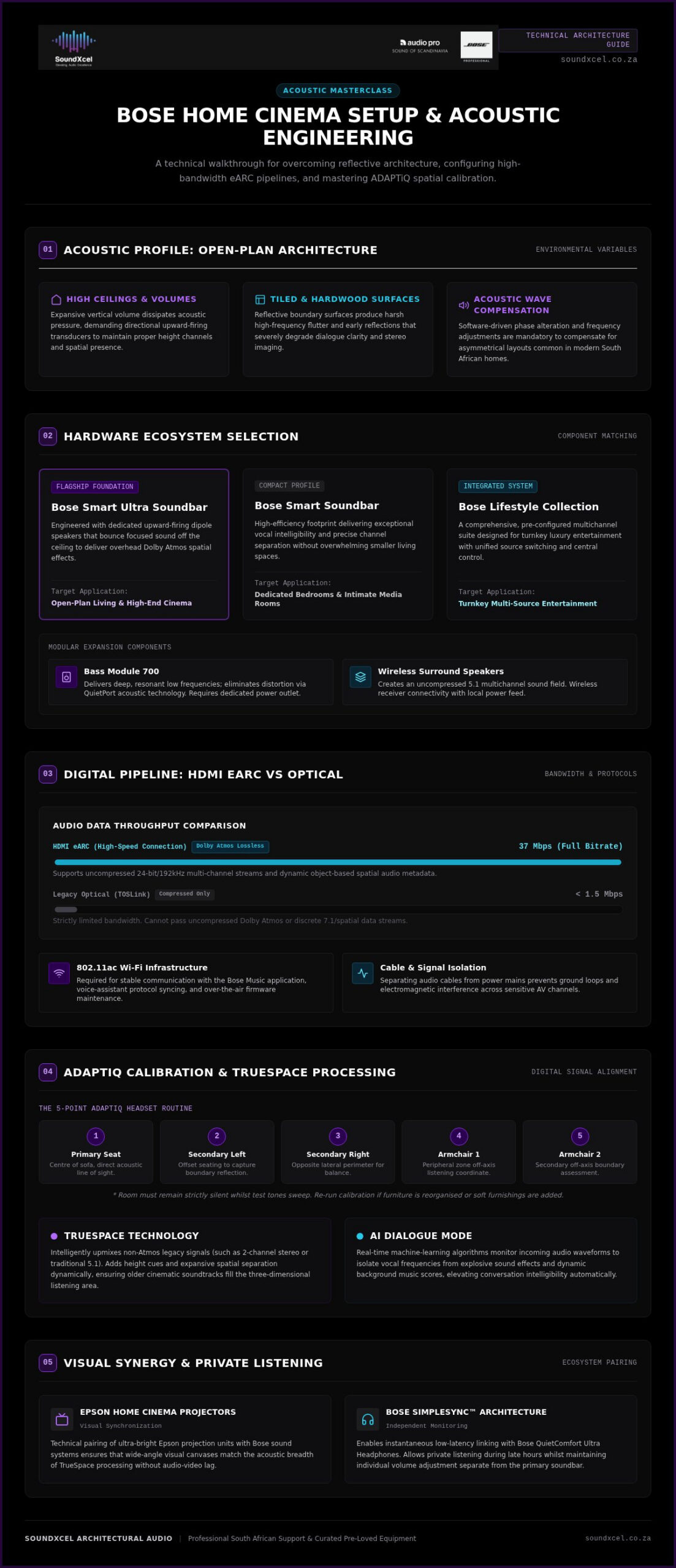
Creating a high-performance audio environment begins with a clear blueprint. Many South African homes feature open-plan architecture with high ceilings and tiled floors, which creates unique acoustic challenges like sound reflection and echo. This Bose home cinema setup guide helps you navigate these variables by selecting components that adapt to your specific space. Modern home cinema systems rely on a central hub to manage audio distribution, and choosing the right soundbar is your most critical decision.
To better understand how to begin your installation, watch this helpful unboxing and configuration video:
The Core Components Checklist
Identify your primary audio source based on room size and desired immersion. The flagship Bose Smart Ultra Soundbar features upward-firing dipole speakers that bounce sound off the ceiling to create a realistic overhead effect. If you have a more compact media room, the standard Bose Smart Soundbar offers exceptional clarity without the larger footprint. For those seeking a total solution, the Bose Lifestyle Collection provides a pre-configured premium experience. Don’t forget to check your box for the ADAPTiQ headset; this tool is vital for calibrating your system to your room’s specific dimensions. Expansion is straightforward. You can add the Bass Module 700 for deep, resonant low frequencies or pair Surround Speakers for a true 5.1 multichannel environment.
Connectivity and Cable Management
Your connection choice determines your audio quality. Use a high-speed HDMI eARC cable to ensure you’re receiving lossless Dolby Atmos signals. Whilst older Optical connections are reliable, they lack the 37 Mbps bandwidth required for uncompressed multichannel audio. Organise your power sources early to keep your aesthetic sleek and professional. Most expansion modules connect wirelessly to the main soundbar, but they still require local power outlets. Ensure your home network supports 802.11ac Wi-Fi. This provides the stable connection needed for the Bose Music app, voice assistants, and seamless software updates. Proper cable management isn’t just about looks; it prevents signal interference and keeps your entertainment area tidy.
Acoustic Calibration: Mastering ADAPTiQ and TrueSpace
A successful Bose home cinema setup guide must prioritise the digital calibration that happens after the cables are plugged in. Sound quality isn’t just about the speakers; it’s about how those speakers interact with your room’s unique surfaces. High ceilings and hardwood floors often distort audio, but Bose technology compensates for these variables automatically. TrueSpace technology is a standout feature in this ecosystem. It intelligently upmixes legacy stereo or 5.1 content, adding height and spatial separation even if the source isn’t native Dolby Atmos. This ensures a consistent, immersive experience across all your favourite media. For the best results, always align your physical layout with Dolby speaker placement guidelines before starting the digital calibration process.
Setting Up ADAPTiQ Calibration
ADAPTiQ is your secret weapon for bespoke sound. Put on the included headset and the system will play a series of tones to measure how sound reflects off your walls and furniture. You must find your five favourite listening positions, such as the centre of the sofa or a specific armchair, to give the system a complete acoustic map. Ensure the room is completely silent whilst the system runs these tests. If you decide to reorganise your lounge or add a thick rug, run the calibration again. These small environmental changes significantly alter acoustic behaviour and require a fresh analysis to maintain peak performance.
Optimising AI Dialogue Mode
Difficulty hearing dialogue over loud background music or explosive effects is a common frustration. AI Dialogue Mode solves this by using machine learning to identify and elevate vocal frequencies in real-time. It’s particularly effective for older films that weren’t originally mixed for modern multichannel systems. You can toggle this feature easily within the Bose Music app to achieve ultra-crisp vocal clarity. If your system feels out of balance or you’re using legacy components, requesting a professional Bose repair or health check can ensure your hardware is capable of supporting these advanced software features.
Keep your system performing at its peak by checking for firmware updates regularly. Use the Bose Music app to download the latest EQ enhancements and feature patches. These updates often improve the precision of the AI Dialogue algorithms and TrueSpace processing. Following this Bose home cinema setup guide ensures your software is as polished as your hardware, providing a seamless bridge between your components and your ears. Digital refinement is the final step in transforming a collection of speakers into a true cinematic powerhouse.
Visual Synergy: Integrating Epson Projectors with Bose Audio
Pairing high-fidelity audio with a large-format image creates the ultimate private theatre. Epson home cinema projectors serve as the ideal visual partner for a Bose system, delivering 4K resolution that matches the precision of Bose spatial audio. This Bose home cinema setup guide highlights the importance of synchronising these two worlds. The Bose Smart Ultra Soundbar, with its polished glass top and metal grille, provides a sophisticated aesthetic that complements a premium projector installation. Beyond looks, the combination allows for massive screen sizes without compromising on acoustic separation.
Managing the physical connection is the first hurdle. Dedicated cinema rooms often require a long-distance HDMI run from a ceiling-mounted projector to the soundbar. You must use a certified High-Speed HDMI cable with at least 18 Gbps bandwidth to prevent signal dropouts or handshake issues. Independent soundbar performance testing confirms that maintaining a clean digital signal is essential for uncompressed audio formats like Dolby Atmos. Using a single-cable eARC connection ensures that your high-bandwidth audio reaches the soundbar without degradation.
The Perfect Projector Pairing
Select an Epson model that supports HDMI eARC/ARC, typically found on the HDMI 2 port. This allows the projector to send multichannel audio back to your soundbar through a single cable. Position your soundbar directly beneath the centre of the screen. This ensures dialogue feels like it’s coming from the characters’ mouths rather than from the floor. For complex ceiling mounts or specific room alignments, consult an authorised dealer to ensure your projector and soundbar are perfectly calibrated for your seating area. Proper alignment is the difference between a simple screen and a truly immersive environment.
Wireless Audio for Projector Setups
Wireless expansion modules are particularly useful in projector environments. Using Bose wireless bass modules and surround speakers eliminates the need to run long speaker wires across the floor or through walls to the back of the room. This maintains a clean aesthetic whilst providing deep, resonant low frequencies and rear-channel immersion.
- Maintain a clear line-of-sight for the remote control or use the Bose Music app for effortless volume adjustment.
- If you experience lip-sync delays, use the app’s Audio Delay settings to synchronise the sound with the visual projection.
- Ensure all wireless components are within the 9-metre range of the main soundbar for a stable connection.
Wireless connectivity simplifies the installation whilst keeping the room’s aesthetic clean and professional. It allows you to focus on the film rather than the hardware. By integrating these two premium brands, you create a seamless entertainment hub that is both visually stunning and sonically powerful.
Strategic Placement and Private Listening Modes
Physical layout dictates the success of your audio stage. This Bose home cinema setup guide ensures your hardware performs exactly as the engineers intended. Many South African homes feature expansive open-plan designs that require careful speaker positioning to avoid acoustic dead zones. Upward-firing dipole speakers in the Bose Smart Ultra Soundbar require a clear path to the ceiling to reflect sound effectively. If your TV frame overhangs the soundbar, you’ll lose the height channels that make Dolby Atmos truly immersive. Keep the area above the soundbar completely clear to allow the sound to bounce and create that coveted overhead sensation.
Step-by-Step Speaker Placement
Positioning your components correctly is the most effective way to improve audio quality without buying new gear. Follow these steps for an optimal layout:
- Soundbar: Place the unit at ear level on your media console. Ensure the top glass remains unobstructed by the TV bezel to allow the upward-firing dipoles to function.
- Bass Module 700: Situate the module on the floor. Placing it near a wall or in a corner enhances deep resonance through boundary loading.
- Surround Speakers: Mount these at the rear, slightly above ear level. This creates a convincing 360-degree sound field.
Whilst the expansion speakers receive audio signals wirelessly, they still require access to local power outlets. Note that mounting brackets are not included in the box and should be sourced separately for wall-mounted configurations. Proper spacing ensures that every seat in the room becomes the best seat in the house.
Configuring SimpleSync for Private Cinema
Late-night movie marathons shouldn’t force you to lower the volume to a whisper. Use Bose SimpleSync to pair your Bose QuietComfort Ultra Headphones directly with your soundbar for a personalised experience. This feature allows for independent volume control. You can enjoy a thunderous action sequence at full volume whilst the rest of your household sleeps in total silence. It’s a game-changer for shared living spaces. Enable Immersion Mode on your headphones to maintain a spatialised audio experience that feels like it’s coming from the room rather than inside your ears.
The Bluetooth 5.3 connection provides a stable range of up to 10 metres, so you won’t lose audio if you step away for a drink. You can even expand your system into other rooms. Group your soundbar with a Bose Portable Home Speaker via the Bose Music app to synchronise your audio across the entire home. This creates a seamless flow of sound as you move between the lounge and the kitchen. Shop the Bose QuietComfort Ultra Headphones to unlock this level of private listening versatility.
Professional Support and Sustainable Audio in South Africa
Investing in a premium audio system requires a long-term perspective. This Bose home cinema setup guide isn’t just about the initial unboxing. It’s about protecting your investment through local South African support and authorised warranties. South Africa’s strict e-waste regulations, enforced since August 2021, make the repairability of your electronics more important than ever. Landfill diversion targets now place more accountability on owners and distributors to maintain equipment rather than discarding it. Choosing an authorised retailer ensures you have access to genuine parts and expert technicians who understand the specific circuitry of your Bose Lifestyle Collection.
The SoundXcel Advantage
SoundXcel provides a unique bridge between luxury and sustainability. You can access specialised Bose-specific repair services to extend the life of your equipment by years. This is a vital service for those with legacy systems that simply need a professional tune-up to regain their original clarity. If you’re building a system on a budget, exploring curated pre-loved equipment is an excellent way to achieve premium performance whilst being environmentally conscious. You can get expert, personalised advice on choosing a Bose sound system in South Africa to ensure your setup matches your room’s acoustics and your specific lifestyle needs. This tailored approach helps you avoid unnecessary purchases and focuses on components that truly enhance your environment.
Legacy System Integration
Technology moves fast. Your older components don’t have to become obsolete just because a newer model exists. You can restream vinyl or older analogue inputs by connecting them to newer Bose multi-room speakers. This allows you to enjoy the warmth of a record player in every room of your home via your Wi-Fi network. If you’re still using an older SoundTouch system, consider an upgrade to the modern Smart Soundbar range. This transition gives you access to the Bose Music app and advanced features like AI Dialogue Mode that weren’t available in previous generations.
For those looking to modernise their visual experience, upgrading your Bose Lifestyle and Epson projector setup ensures you’re ready for 4K content and lossless audio. Many older systems require specific HDMI configurations or software patches to handle 2026 visual standards without lag. Consulting experts for bespoke residential AV installations can help you navigate these complex transitions smoothly. Professional guidance ensures your high-end equipment continues to deliver exceptional value and performance for another decade.
Elevate Your Home Entertainment Experience
Mastering your living space requires a balance of strategic placement and digital precision. By following this Bose home cinema setup guide, you’ve learned how to harness ADAPTiQ calibration and AI Dialogue Mode to overcome common acoustic hurdles. You now understand the vital synergy between Bose audio and Epson visual technology, ensuring a cohesive and professional-grade theatre that complements your lifestyle.
Maintaining your system is just as critical as the initial installation. SoundXcel serves as an Independent Authorised Bose Dealer and Specialised Bose Repair Centre, providing national South African support for both new configurations and legacy system maintenance. Protecting your investment ensures your audio remains crisp and immersive for years to come.
Book your professional Bose home cinema consultation with SoundXcel today to fine-tune your configuration for the ultimate 2026 cinematic experience. Your dream theatre is now within reach, ready to deliver the depth and clarity your favourite films deserve.
Frequently Asked Questions
Does the Bose Smart Ultra Soundbar support Dolby Atmos?
Yes, the Bose Smart Ultra Soundbar fully supports Dolby Atmos. This technology provides spatial audio separation by isolating instruments, dialogue, and sound effects to different parts of the room. The soundbar uses custom-engineered upward-firing dipole speakers to reflect sound off the ceiling, creating a realistic overhead effect. This ensures a truly immersive experience, making your home entertainment feel as though the action is happening all around you in a three-dimensional space.
Can I add more speakers to my Bose home cinema later?
You can certainly expand your system over time. Bose home cinema components are designed to be modular, allowing you to start with a standalone soundbar and add expansion units when you’re ready. To achieve full 5.1 immersion, you might add a wireless Bass Module 700 for deeper low frequencies or a pair of Surround Speakers for rear-channel effects. This flexibility is a core benefit of the modern Bose home cinema setup guide.
What is the difference between Bose TrueSpace and Dolby Atmos?
Dolby Atmos is a specific audio format that uses spatial metadata to place sounds in a 3D space. In contrast, Bose TrueSpace is a proprietary technology that intelligently upmixes content not originally mixed for Atmos, such as stereo or 5.1 signals. TrueSpace adds height and separation to these older formats, ensuring you receive a multi-channel experience regardless of what you are watching. Both technologies work together to provide consistent immersion across all media.
How do I use my Bose QuietComfort Ultra Headphones with my soundbar?
You can pair your Bose QuietComfort Ultra Headphones with your soundbar using Bose SimpleSync technology. This is ideal for late-night viewing as it allows for independent volume control. You can enjoy a cinematic experience through your headphones whilst the soundbar itself is muted or set to a lower level. Simply use the Bose Music app to group the devices and enable Immersion Mode for a spatialised audio sensation that mimics a full speaker layout.
Do I need a special cable for my Bose home cinema setup?
A high-speed HDMI eARC cable is essential for supporting high-bandwidth audio formats like Dolby Atmos. Whilst an optical cable is included in the box, it cannot carry the uncompressed data required for a modern home cinema experience. You should use a cable rated for at least 18 Gbps to ensure a stable connection between your soundbar and TV. This prevents audio lag and ensures you get the full benefit of lossless multichannel sound without signal dropouts.
Can I wall-mount my Bose soundbar and surround speakers?
Both the soundbar and surround speakers are designed for wall-mounting to maintain a sleek, clutter-free aesthetic. You should ensure the soundbar is placed at ear level and that its upward-firing speakers aren’t obstructed by the TV frame. It’s important to remember that mounting brackets are not included in the box and must be purchased separately. Professional installation is recommended to ensure your speakers are securely fastened and perfectly aligned with your primary seating area.
Is it better to use a wireless or wired bass module?
Wireless modules are generally preferred for their flexibility and clean aesthetic. The Bose Bass Module 700 connects wirelessly to your soundbar, allowing you to place it in a corner or near a wall to enhance resonance without running cables across the floor. However, a wired connection is available as a backup if you live in an environment with significant wireless interference. Both methods deliver the same deep, impactful bass needed for a high-end cinematic feel.
How does the ADAPTiQ calibration improve my sound quality?
ADAPTiQ calibration customises your system’s output to the unique acoustic profile of your room. It analyses how sound reflects off your walls, floors, and furniture, then adjusts the EQ settings to compensate for these variables. This process ensures that your audio remains balanced and clear, even in challenging open-plan spaces. By following a proper Bose home cinema setup guide, you ensure that every seat in your lounge receives the best possible sound quality.
