

How to Convince Your Partner You Need a Home Cinema: A Practical Guide
October 13, 2026
Authorised Bose Repair Agent in South Africa: A Clear Guide to Bose Repairs
October 15, 2026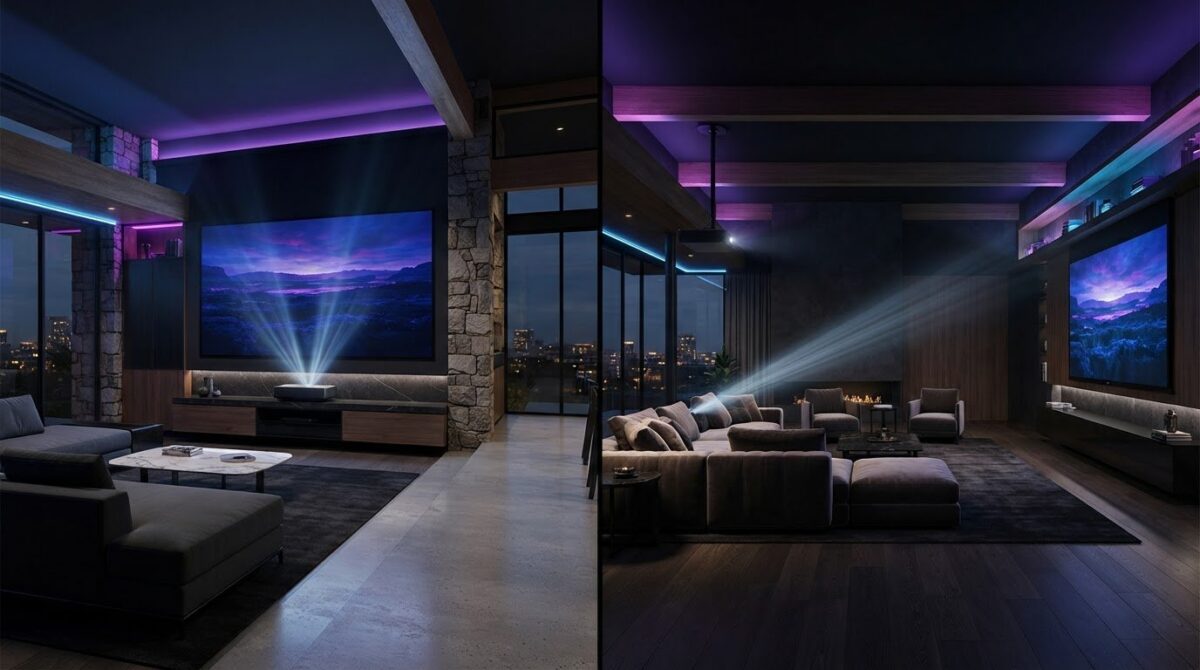
The projector that sits closest to the screen isn’t automatically the best choice for a small room. In the short throw vs long throw projector decision, the right fit depends on the distance between the projector and screen, and how that position works with furniture, walkways and seating.
It’s easy to assume that a shorter distance is always better in a compact space. But throw ratio, which compares projector-to-screen distance with image width, determines how large a picture a particular model can create from a given position. Short throw can help keep the beam clear of people crossing the room, whilst long throw suits spaces where the projector can sit farther back.
This guide explains throw distance in plain English, compares the practical trade-offs and shows how to match projector placement to your room and viewing plans. You’ll also learn how ultra-short throw differs from standard short throw, and which specifications to check before choosing an Epson home cinema projector.
Key Takeaways
- The short throw vs long throw projector choice is about room fit and placement, not a simple ranking of picture quality.
- Use throw ratio to relate projector-to-screen distance to your intended image width, then compare your measurements with the model’s specified range.
- Assess furniture, walkways, screen position and viewing habits to see which setup works naturally in your room.
- Ultra-short throw is a distinct option from standard short throw, designed to project from very close to the screen.
- Before exploring Epson home cinema projectors, note your available distance and preferred image size so you can compare them with each model’s specifications.
Short throw vs long throw projector: what does the difference mean?
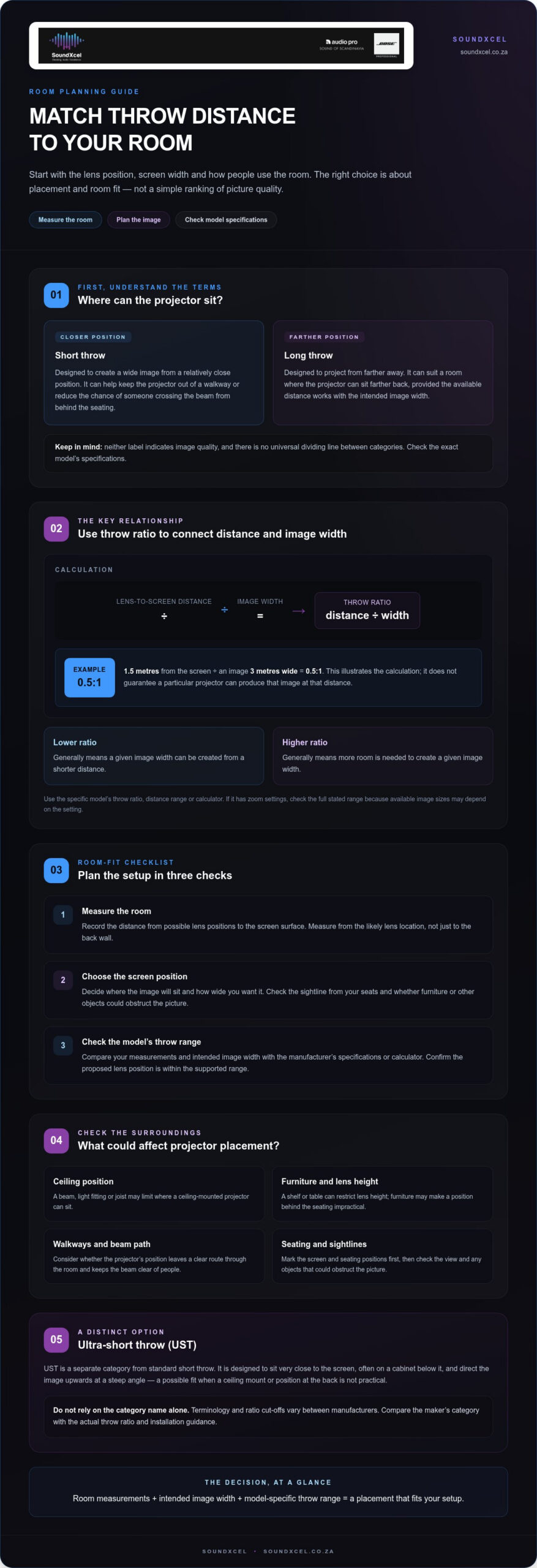
How far can a projector sit from your screen without blocking a walkway, competing with furniture or compromising image size? That room-planning question is the starting point for choosing between short and long throw. Throw distance is measured from the projector’s lens to the screen. A short-throw model is designed to create an image from a relatively close position; a long-throw model needs more distance to produce an image of comparable width.
Short throw describes a projector designed to create a wide image from a closer position, whilst long throw describes one designed to project from farther away. Neither term, on its own, indicates image quality. There is no universal dividing line between the categories. Manufacturers may classify models differently, so use the label as a guide and check the exact model’s specifications before deciding where it can go.
For a visual overview of how projection distance relates to image size, watch this video:
What is projector throw ratio?
Throw ratio describes the relationship between the lens-to-screen distance and the width of the projected image. Calculate it by dividing distance by image width. For example, if a projector is 1.5 metres from the screen and creates an image 3 metres wide, the ratio is 0.5:1. This illustrates the calculation; it does not guarantee that a particular projector will produce that image at that distance.
A lower ratio generally means the projector can create a given image width from a shorter distance; a higher ratio means it needs more room. The video projector overview explains the concept, but for planning your setup, rely on the model-specific throw ratio and distance range in its manual or specification sheet. If the projector has zoom settings, check the full stated range because the image sizes available may depend on the setting.
Where does ultra-short throw fit?
Ultra-short throw (UST) is a separate category, not another name for standard short throw. A UST projector is designed to sit very close to the screen, often on a cabinet below it, and direct the image upwards at a steep angle. That placement can suit a room where a ceiling mount or position at the back isn’t practical.
Terminology and ratio cut-offs vary between manufacturers, so don’t assume one number defines every UST or short-throw model. Compare the maker’s category with the actual throw ratio and installation guidance. The short throw vs long throw projector decision becomes clearer when you consider those specifications alongside your available space, rather than treating the category label as a quality rating.
How throw distance changes projector placement and image size
A projector’s position affects how wide its image appears, but distance alone doesn’t tell you what size you’ll get. Image size at a given distance depends on the projector’s throw specification. Use the exact model’s throw ratio or distance calculator to check whether it can create your preferred image from a position your room allows.
Start with the room, not an assumed mounting point. A ceiling beam, light fitting or joist may limit where a ceiling-mounted projector can sit. A shelf or table can restrict lens height, whilst furniture and walkways may make a position behind the seating impractical. Mark the screen and seating positions first, then identify where a projector could realistically go.
- Measure the room. Record the distance from possible lens positions to the intended screen surface. Measure from the likely lens location, not just to the back wall.
- Choose the screen position. Decide where the image will sit and how wide you want it. Check the sightline from your seats and whether furniture or other objects could obstruct the picture.
- Check the model’s throw range. Compare your measurements and intended image width with the manufacturer’s specifications or calculator. Confirm that the proposed lens position falls within the supported range.
How to estimate projector-to-screen distance
Measure from the projector lens to the screen surface. Measuring from the rear of the unit can give you the wrong figure because the lens may sit forward or back from its casing. Enter the lens-to-screen distance into the selected model’s calculator, or use its throw ratio to estimate image width. Treat the result as a planning guide, then account for the model’s lens and installation limits in its specification.
For example, if a calculator indicates that a proposed position can produce your intended image width, verify that the distance is within the projector’s stated range. Don’t assume every model offers the same adjustment or accepts the same placement. There’s no single extra allowance that applies to all projectors, so follow the manufacturer’s guidance for the specific unit.
What changes when the projector sits close to the screen?
A closer position can make it easier to keep the projector out of a walkway or avoid mounting it at the back of the room. It may also reduce the chance of someone crossing the beam from behind the seating. These are placement advantages, not guarantees of a better picture. The projector’s position, screen surface and room lighting still affect the viewing experience.
That’s why the short throw vs long throw projector choice should begin with your room measurements and intended image size, then move to model specifications. Once you have a realistic lens position, compare it with the throw range of Epson home cinema projectors to explore options that could suit your layout.
Short throw vs long throw projector: compare the room-fit trade-offs
The best fit depends on where a projector can sit in relation to your screen, seating and furniture. A compact room doesn’t automatically call for short throw, just as a large room doesn’t guarantee that long throw is the right choice. Compare the placement each model allows with the layout you want to create.
| Type | Typical placement | Room fit | Practical trade-off |
|---|---|---|---|
| Standard short throw | Relatively close to the screen | Rooms where a rear position is difficult or space is limited | Can keep the projector nearer the screen, but the specific throw range and image size depend on the model. |
| Ultra-short throw | Very close to the screen, often on furniture below it | Layouts where a conventional ceiling or rear mount doesn’t suit | Uses a distinct placement approach; screen position and the projector’s installation requirements need careful planning. |
| Long throw | Farther from the screen, often behind the seating area | Rooms with a suitable rear shelf or mounting position | Allows a more distant projector position, but needs enough clear space along the projection path. |
These are general placement descriptions, not fixed definitions or guarantees. Manufacturers may classify throw types differently, so check the exact projector specification. None of the categories alone tells you whether an image will be sharper or more pleasing. Picture performance depends on the model and the complete viewing setup, not just the distance between lens and screen.
When a short-throw projector may suit the room
Consider standard short throw if the available lens-to-screen distance is restricted, or if placing a projector behind the seating would obstruct a walkway. A position closer to the screen can also reduce the chance of someone crossing the beam from behind the audience. However, a nearby coffee table, cabinet or other object may still limit placement, so map the projector, screen and furniture together before deciding.
Short throw doesn’t remove every room constraint. The beam still needs a clear path, and ambient light affects the viewing experience. Brightness, screen characteristics and room lighting all play a part, so don’t assume a close position will compensate for every condition.
When a long-throw projector may suit the room
A longer lens-to-screen distance can work well in a dedicated cinema layout, especially if there’s a suitable mounting position behind the seating and a clear projection path. It can keep equipment away from the front of the room, but the available distance must match the intended screen size and the model’s specified range.
Long throw doesn’t automatically create a larger or better image. A room may offer plenty of distance yet lack a workable mount, or the chosen model may not suit the intended image width. In the short throw vs long throw projector comparison, prioritise a feasible lens position and model specification over assumptions based on room size alone.
How to choose between short throw and long throw for your setup
Let the room guide the choice. Before comparing projector categories, separate fixed features, such as walls, ceiling fittings and existing furniture, from preferences you can adjust, such as screen width or seating. This helps you see whether a short-throw or long-throw model could fit without making the room awkward to use.
Work through these checks in order:
- Measure the usable distance. Measure from likely lens positions to the screen surface. Note possible ceiling mounts, shelves or furniture positions, and mark obstructions along the projection path, including lights and ceiling features.
- Choose your screen position and intended image size. Record the usable wall area and the width you’d like the picture to be. Keep this as a preference until you’ve checked what the available projector positions can support.
- Map the lens position. Identify where the projector could sit without blocking a walkway or getting in the way of seating. For a ceiling position, work out where the lens would be rather than assuming it aligns with the centre of the room.
- Factor in viewing habits. Think about where people sit, whether they move through the room during a film and how often the space serves other purposes. A position that works for a dedicated cinema setup may be awkward in a shared living area.
Which measurements should you take first?
Start with fixed dimensions: the available lens-to-screen distance, the planned screen width and the locations of potential mounts or shelves. Then note preferences such as seating arrangement and desired image size. Keeping these separate helps you see which choices could change if your first projector position doesn’t suit the screen width you want.
What should you check on a projector specification sheet?
Find the exact model’s throw ratio and supported projection-distance range. Compare those figures with your room measurements and intended image size, using the manufacturer’s calculator if available. The proposed lens position must fall within the model’s stated range for the image you want. Don’t rely on a category label alone: specifications can differ between models described as the same throw type.
Read the installation guidance too. It can clarify how the manufacturer defines lens-to-screen distance and what placement limits apply. If a model’s range doesn’t suit your measurements, revisit a preference such as screen width or consider another feasible lens position. Don’t assume an adjustment will make an unsupported distance workable.
For broader planning, the Epson projector setup guide can help you think through the wider home cinema arrangement. The projector screen and wall comparison offers further reading as you research projector options. Once your measurements are clear, explore Epson home cinema projectors and compare each model’s throw specification with your room plan.
Explore Epson home cinema projectors with the right throw distance
You’ve mapped the room and identified where a projector could sit. Now turn those measurements into a shortlist. Rather than choosing a projector because its label says “short throw” or “long throw”, match your available lens-to-screen distance and preferred image size to the exact model’s throw specification.
That model-by-model check matters because category labels don’t show the full placement range. Two projectors described in similar terms may have different specifications. Use the information for the individual model and make sure the supported distance works with both your intended image width and the position your room allows.
Match the projector specification to your room
Keep your measurements together as you browse: usable lens-to-screen distance, intended image width, screen position and possible mounting location. Compare these with the model’s throw ratio and stated projection-distance range. If the specification includes a calculator or image-size chart, use it to check the relationship between distance and picture width, then read the relevant placement guidance. The category label alone won’t confirm the fit.
If the range doesn’t suit your room, revisit the parts you can change. A different screen width or projector position may create a workable match, provided the resulting layout remains practical for seating and movement. If neither can adapt, consider another model rather than relying on a distance its specification doesn’t support.
For the next stage of your research, the Epson projector price guide offers a related buying resource. Keep the emphasis on specifications as you compare options: establish room fit first, then consider the other details that matter to your home cinema plans.
Take the next step with SoundXcel
SoundXcel offers Epson home cinema projectors to customers across South Africa. With your room requirements noted, you can explore the range with a clearer idea of the placement and image size you’re working towards. This helps focus your research on models whose specifications align with your space.
The short throw vs long throw projector decision is ultimately a room-fit decision. Use your measurements as a practical reference and compare each Epson model’s own throw details rather than assuming every model fits the same way. Check the specifications against your viewing plans before settling on a category.
When you’re ready, explore Epson home cinema projectors and use your room measurements to guide your shortlist.
Turn your room plan into a confident choice
Your room doesn’t need to conform to a projector category. The right setup is the one that supports the way you want to watch without making everyday use awkward. Treat your measurements as a practical starting point, then let the exact model specification shape your shortlist.
Before choosing, picture a typical viewing evening. Is the projector position clear of foot traffic? Does the screen suit your seating? Can the intended image size work from the available lens position? These real-life checks are more useful than relying on a label alone. The short throw vs long throw projector decision becomes less abstract when it reflects how you’ll actually use the room.
SoundXcel offers Epson home cinema projectors to explore as you refine your setup. Compare your room requirements with the product options and their specifications.
Explore Epson home cinema projectors and move closer to a home cinema arrangement that feels right for your space.
Frequently Asked Questions
What is the difference between short throw and long throw projectors?
A short-throw projector can create an image from closer to the screen than a long-throw model, but the usable distance depends on the specific projector and intended image width. In the short throw vs long throw projector comparison, the category is only a starting point. For example, if a room has a fixed seating area, compare each model’s supported image size from a lens position that won’t disrupt sightlines or room use.
Is a short-throw projector better for a small room?
It can suit a small room if there isn’t much space between the projector and screen, but room size alone doesn’t decide the best fit. Check whether the intended image width works from a practical lens position, and consider shelves, tables and seating. A long-throw model may still work in a compact room if its specified range matches the layout, so compare actual measurements before ruling it out.
Can a short-throw projector be ceiling-mounted?
Some short-throw projectors support ceiling mounting, but mounting options and orientation vary by model. Before planning a bracket position, read the manufacturer’s installation instructions and check how the projector’s throw-distance range applies to the intended image size. Measure from the planned lens position, allowing for where the mounted projector will actually sit. Don’t assume ceiling installation is suitable simply because a model is labelled short throw.
Does a short-throw projector need a special screen?
Not necessarily. Suitability depends on the projector, screen material and room conditions, and ultra-short-throw models can have different requirements from standard short-throw models. If you’re considering an ambient-light-rejecting screen, check the screen maker’s compatibility guidance for the projector’s projection angle. A category name alone won’t tell you whether a particular pairing is appropriate; assess the exact projector and screen together.
Will a short-throw projector prevent shadows on the screen?
No projector placement can guarantee a completely shadow-free image. A short-throw position may keep the projector closer to the screen and change how people move through the beam, but someone or something can still interrupt the light path. For example, consider whether a standing viewer or nearby object could cross the beam during use. Plan the projector position alongside the screen and seating layout.
How do I calculate the throw distance for a projector?
Start with the lens-to-screen distance available in your room and the image width you want. Use the exact model’s throw ratio or manufacturer calculator to see whether those measurements are compatible. For instance, a calculator can help compare a proposed shelf position with the width you’re aiming for. Treat general online examples as illustrations, not guarantees, because supported distances and image sizes vary between models.
