


Troubleshooting a Bose Remote Control Not Working: A Complete Guide (2026)
August 4, 2026
Bose Speaker Foam Rot Repair: A Professional Guide to Restoring Your Sound
August 6, 2026
Imagine settling in for your favourite film on a Saturday night, only to find your premium audio system has gone completely silent. It’s a common frustration when your soundbar fails to appear in the Bose Music App or the remote stops responding during a crucial scene. Learning how to reset Bose soundbar hardware is the most effective way to clear these software bugs and restore the high-fidelity performance you expect from your investment.
We know you want to fix these glitches quickly whilst protecting your personalised audio calibrations. This guide provides the exact steps for every model, including the latest 2026 updates for the Smart Soundbar Ultra and the 300 series. Whether you’re facing persistent audio lag or synchronisation issues with the latest Bose Music App version 13.1.7, we have the solution.
We’ll start by explaining the difference between a simple reboot and a full factory reset. This tiered approach ensures you can resolve most performance issues without losing your settings, giving you a functional system and total peace of mind.
Key Takeaways
- Distinguish between a soft reboot and a full factory wipe to protect your personalised audio settings whilst resolving minor performance glitches.
- Access specific, model-dependent instructions for the latest Smart Soundbar range, including the Ultra and 900 models.
- Master the unique button sequences required for legacy Bose systems like the Solo and CineMate series.
- Discover how to reset Bose soundbar hardware to fix persistent “Product Not Found” errors within the Bose Music App.
- Identify critical signs of hardware failure that require professional intervention rather than software troubleshooting.
Understanding Why Your Bose Soundbar Needs a Reset
Bose systems are engineered for precision, but even the most sophisticated technology from the Bose Corporation can encounter digital hiccups. In South Africa, our home audio hardware faces unique challenges. Frequent power fluctuations and the sudden onset of load shedding can cause internal processors to hang or become unresponsive. Understanding how to reset Bose soundbar units is essential for maintaining that signature sound quality when your system encounters a Bluetooth loop or becomes invisible to your network.
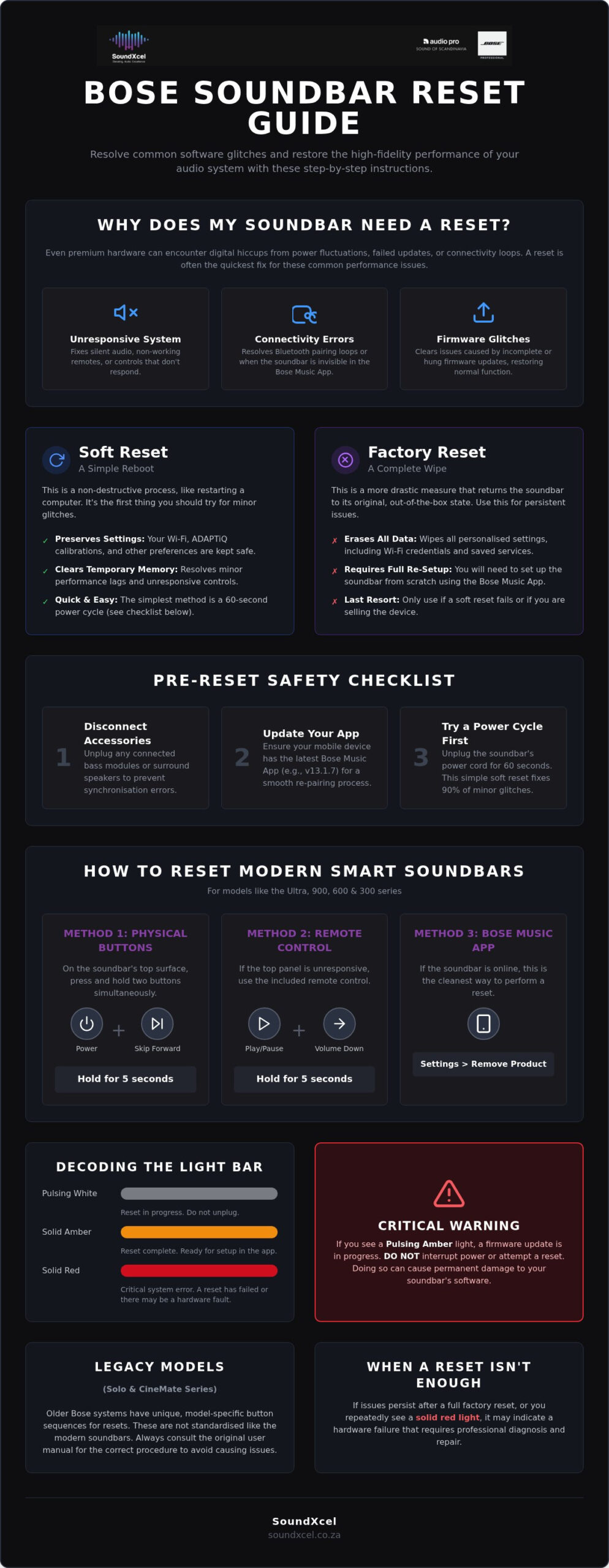
Hardware resets are generally triggered by three main issues. Firmware update hangs often occur if your Wi-Fi signal drops during a download, leaving the soundbar in a state of limbo. Bluetooth pairing loops can prevent new devices from connecting, whilst app invisibility makes it impossible to adjust your EQ or settings. However, you must exercise caution. Never attempt a reset if you see a pulsing amber light on the front bar. This indicates an active firmware update. Interrupting this process can permanently damage the internal software.
Soft Reset vs. Factory Reset: Which One Do You Need?
Choosing the right method depends on the severity of the glitch. A soft reset, or reboot, is a non-destructive process. It clears the temporary memory without touching your personalised Wi-Fi credentials or ADAPTiQ room calibrations. It’s the best place to start for minor connectivity lags or unresponsive touch controls.
A full factory reset is a more intensive data wipe. This process returns the soundbar to its original out-of-the-box state. You’ll need this method if you’re passing the equipment to a new owner or if a soft reset fails to resolve persistent system crashes. Be prepared to perform a complete re-setup in the Bose Music App once the process finishes, as all your saved preferences will be erased.
Preparing Your System for a Safe Reset
Don’t rush into the button sequences. Take a moment to organise your setup for a clean transition. Disconnect any accessory speakers or bass modules from their power sources first. This prevents synchronisation errors when the main bar comes back online. Ensure your mobile device is running the latest version of the Bose Music App, currently version 13.1.7, to guarantee a smooth re-pairing process.
A simple power cycle remains the most effective first-line fix for 90% of common glitches. Before committing to a full wipe, unplug the power cord from the back of the soundbar for at least sixty seconds. This allows the internal capacitors to discharge fully. If the issue remains after you plug it back in, you’ll know it’s time to move on to the more advanced steps for how to reset Bose soundbar hardware.
How to Reset Bose Smart Soundbars (Ultra, 900, 600, 300)
Modern Bose Smart Soundbars rely on a unified firmware ecosystem to deliver high-end features like AI Dialogue Mode and immersive spatial audio. This CNET review of the Bose Smart Ultra Soundbar highlights how these units lead the market in single-speaker performance, yet their complex software can occasionally require a fresh start. Learning how to reset Bose soundbar hardware ensures that temporary glitches don’t interfere with your home cinema experience.
Resetting via the Physical Buttons
Most modern units feature touch-sensitive controls on the top surface. To initiate a factory reset, press and hold the Power and Skip Forward buttons simultaneously for five seconds. Watch the light bar closely. It will pulse white repeatedly to signal the process has begun. Once the light bar slides to the centre and glows solid amber, the system is ready for a fresh setup. If you see a solid red light, this indicates a critical system error. In such cases, you may need to consult a specialist for Bose repairs to address potential hardware faults.
If your touch controls are unresponsive or your specific model lacks physical buttons, you can use the remote control. Press and hold the Play/Pause and Volume Down buttons for five seconds. The light bar will react in the same manner, indicating the reset has commenced. This is a vital backup method when the top panel fails to register your touch.
Resetting via the Bose Music App
If your soundbar is still visible on your network, the app is the cleanest way to wipe the system. Open the Bose Music App and select your product. Navigate to the Settings menu and scroll to the bottom to find the Remove Product option. Confirm the deletion. This step is vital because it clears the cloud-based association between your account and the hardware. Without this, you might encounter “Product Already Registered” errors when attempting to re-install.
Troubleshooting cases where the app cannot see the soundbar requires a different approach. Ensure your mobile device is on the same 2.4GHz or 5GHz Wi-Fi band as the soundbar. If the app still fails to detect the unit, revert to the physical button method described above. After the reset, your soundbar will behave as if it’s brand new. You’ll need to go through the “Add Product” flow in the app again, which includes reconnecting to Wi-Fi and running the ADAPTiQ calibration to optimise the sound for your specific room layout.
Resetting Legacy Bose Models: Solo and CineMate Systems
Older Bose systems remain popular for their robust build and reliable audio. If your Solo 5 or CineMate 15 begins to stutter, the process for how to reset Bose soundbar hardware differs significantly from the app-driven Smart range. These legacy systems rely on physical connections and infrared remotes rather than cloud synchronisation. They require a more manual approach to clear internal errors and restore factory defaults.
Before trying complex button sequences, use the 60-second unplug rule. Power down your soundbar and remove the cable from the wall socket. Waiting a full minute is essential because it allows the internal capacitors to discharge completely, clearing the volatile memory. This simple step often resolves “frozen” status lights or unresponsive volume controls. If the system remains glitched after you reconnect the power, you’ll need to use the remote-specific reset commands.
The Bose Solo 5 Reset Procedure
The Solo 5 is a favourite for its simplicity. To reset it, ensure the system is powered on. Hold the Power button on the remote control for ten seconds. The status LED on the front of the bar will blink or change colour to acknowledge the command. Once the system restarts, you must manually “forget” the soundbar in the Bluetooth settings of your phone or TV. This ensures a clean reconnection without any residual pairing data causing interference.
CineMate and SoundTouch System Resets
Systems like the CineMate 120 use a dedicated control console to manage audio processing. If the console becomes unresponsive, unplug both the console and the Acoustimass module simultaneously. For the SoundTouch 300, which acts as the predecessor to the modern Smart 300, press and hold the Teletext button on the remote for 10 seconds. This clears the internal pairing list and resets the network adapter settings. You may need to re-sync your universal remote after this process by following the original pairing instructions found in your manual.
If your legacy system continues to fail despite multiple resets, it might be time to consider an upgrade to a newer model. You can explore modern alternatives in The Ultimate Guide to Choosing a Bose Sound System in South Africa. Many users find that switching to the latest Smart range provides more reliable connectivity whilst maintaining the premium audio profile they love. For those who prefer their current setup, ensuring your remote has fresh batteries is the final check before assuming a hardware fault exists.
Troubleshooting Common Reset Failures and App Issues
Sometimes, the standard sequences for how to reset Bose soundbar hardware don’t yield immediate results. If your soundbar remains unresponsive or the light bar stays stuck on a specific colour after a reset attempt, the issue often lies within your local network or device cache. A “Product Not Found” error in the Bose Music App is rarely a hardware death sentence. It’s usually a communication breakdown between your router, your mobile device, and the soundbar’s network card.
Your home Wi-Fi router plays a critical role in successful synchronisation. In many South African homes, load shedding can cause routers to reboot frequently, leading to IP address conflicts. If the app cannot “see” the soundbar, try restarting your router before attempting another reset. Ensure your phone isn’t automatically switching to a guest network or mobile data, as the Bose Music App requires all components to be on the same subnet to complete the handshake. If these network tweaks fail, you may need professional Bose repairs to investigate a potential internal Wi-Fi module failure.
Clearing the Bluetooth Cache
Residual data in your phone’s Bluetooth menu often prevents a clean re-pairing after a system wipe. You must “Forget this Device” in your iOS or Android Bluetooth settings before trying to reconnect. Simply resetting the soundbar isn’t enough; the phone still tries to use the old security key, which is now invalid. To clear the soundbar’s own internal memory, press and hold the Bluetooth button on the unit or remote for 10 seconds until you hear a tone or see a blue light pulse.
Be mindful of environmental interference. Modern kitchens and living rooms are filled with 2.4GHz devices, including microwaves and older cordless phones, which can disrupt the pairing process. Move your mobile device within one metre of the soundbar whilst performing the initial setup to ensure a strong, uninterrupted signal. This proximity helps bypass local congestion and establishes a stable link for the Bose Music App version 13.1.7 to complete its configuration.
Force-Updating Firmware via USB
Reset failures can occasionally stem from corrupted firmware files. If an over-the-air update like the v11.0.40 release from April 2026 was interrupted, the soundbar might enter a boot loop. You can bypass the app by using the service port on the back of the unit. This requires a micro-USB or USB-C cable and a computer to manually “push” the update file from the Bose support website. Manual updates should only be performed if the app update fails repeatedly, as this method bypasses the standard safety checks built into the mobile interface.
When a Reset Isnt Enough: Professional Bose Repairs in South Africa
Whilst learning how to reset Bose soundbar hardware resolves most software-based glitches, certain symptoms indicate a deeper hardware crisis. A permanent red status light often signals a critical system error that a button sequence cannot clear. If you notice popping sounds, distorted audio at low volumes, or a faint burning smell, disconnect the power immediately. These signs point to failing capacitors or amplifier modules. Such components require specialised diagnostic equipment to resolve safely and effectively.
DIY software fixes have clear limitations. You cannot reset a blown fuse or a damaged internal power supply. In the South African context, power grid instability is a constant factor. Internal components often bear the brunt of voltage spikes during load shedding cycles. SoundXcel provides a sophisticated alternative to total replacement. Our national repair service is designed to restore both legacy systems and the latest smart models to their original acoustic precision.
Expert Bose Repair Services
Our team possesses specialised knowledge for premium audio maintenance. We focus on high-end systems, including the QuietComfort and Lifestyle ranges. Every repair meets strict performance standards to ensure your soundstage remains immersive. Access our expertise regardless of your location. We facilitate national coverage, allowing owners from across South Africa to send their equipment to our specialised technicians. Choosing a dedicated expert over a generic electronics shop protects the delicate circuitry that makes Bose world-class.
Upgrading Your Audio Experience
Sometimes, a hardware failure is the perfect catalyst for a system refresh. If your older CineMate or Solo system has reached the end of its functional life, exploring the Bose Lifestyle Collection can transform your home entertainment. These systems offer unparalleled surround sound and seamless integration with modern streaming platforms. We also offer a curated selection of pre-loved Bose equipment. This is an excellent route for those seeking premium performance with a more accessible investment.
Our pre-loved inventory is meticulously checked by our repair team. We ensure every pre-owned soundbar or speaker set performs like new before it reaches your living room. Mastering how to reset Bose soundbar units is the first step in troubleshooting, but knowing when to call the experts is just as vital. Protect your investment by choosing specialised care for your premium audio gear.
Contact SoundXcel today for professional Bose repairs or to explore our latest range.
Restore Your Premium Audio Experience
Mastering how to reset Bose soundbar hardware is your most effective tool for resolving connectivity drops and firmware hangs. Always begin with a non-destructive soft reset to protect your ADAPTiQ settings before moving to a full factory wipe. This tiered approach ensures your system remains optimised whilst clearing temporary software bugs that disrupt your home cinema enjoyment.
If persistent red lights or unresponsive controls remain after a reset, it’s time to consult the experts. As an authorised premium AV retailer, SoundXcel provides national South African service for both legacy and modern systems. Our specialised Bose repair technicians understand the unique challenges posed by local power fluctuations and can restore your circuitry to its original precision. Don’t let a hardware glitch silence your favourite films.
Book a Professional Bose Repair with SoundXcel today and reclaim the immersive soundstage your home deserves. We’re here to ensure your technology works seamlessly for years to come.
Frequently Asked Questions
Will resetting my Bose soundbar delete my ADAPTiQ calibration?
A soft reset preserves your settings, whilst a full factory reset erases all personalised data. If you perform a factory wipe, you must run the ADAPTiQ calibration again to ensure the audio is correctly tuned to your room’s unique acoustics. This process ensures the soundbar accounts for furniture placement and wall reflections to deliver the best possible surround sound experience after a total system clear.
Why is my Bose soundbar not showing up in the app after a reset?
Your soundbar enters “Setup Mode” after a factory reset and must be re-added to your account manually. Learning how to reset Bose soundbar hardware is only the first step; you must also ensure your mobile device is on the same 2.4GHz or 5GHz Wi-Fi network to complete the re-pairing process. Ensure your Bose Music App is updated to version 13.1.7 to avoid discovery errors during this phase.
How do I reset my Bose soundbar remote control?
Remove the batteries from the remote for at least 60 seconds to discharge the internal capacitors and clear the memory. For universal remotes, you may need to re-enter the manufacturer codes or re-pair the remote with the soundbar using the specific button sequences found in your manual. This simple power cycle often resolves unresponsive buttons or infrared signal drops without needing to touch the soundbar itself.
What does a solid red light on my Bose soundbar mean?
A solid red light indicates a critical hardware error that a standard reset cannot resolve. This usually points to an internal power supply failure or a corrupted firmware chip that prevents the system from booting correctly. If this light persists after a 60-second power cycle, you should avoid further DIY attempts and seek a professional diagnostic to prevent damaging the sensitive internal audio processors.
Can I reset my Bose soundbar without the remote?
Yes, you can initiate a reset using the physical touch controls on the top of the unit. Press and hold the Power and Skip Forward buttons for five seconds until the light bar pulses white to indicate the process has begun. This method is particularly useful if your remote batteries are flat or if the infrared receiver on the soundbar is obstructed by your television stand.
How often should I power cycle my Bose audio system?
Power cycle your system only when you experience connectivity drops or unresponsive controls. Frequent power cycling isn’t necessary for system health, though it is a highly effective first-line fix for 90% of software glitches. In South Africa, it’s often beneficial to power cycle the system after a load shedding event to ensure the soundbar re-establishes a clean handshake with your Wi-Fi router.
Does a factory reset fix audio lag issues with my TV?
A factory reset can resolve audio lag by clearing the soundbar’s internal processing buffer and synchronising the digital handshake. However, persistent lag is often caused by external TV settings such as HDMI-CEC or digital output delays. Check your television’s audio settings for a “Lip Sync” or “Digital Delay” feature to ensure the two devices are communicating at the same speed after the reset.
What is the difference between the Bose Music App and the SoundTouch App for resets?
The Bose Music App manages modern Smart Soundbars like the Ultra and 900 series, whilst the SoundTouch App is for legacy models like the SoundTouch 300. Knowing how to reset Bose soundbar hardware correctly depends on which app your system uses for its network interface. Using the wrong application will prevent you from accessing the settings menu required to perform a software-based wipe or firmware update.
