

Are Noise-Cancelling Headphones Bad for Your Ears? The Facts
September 27, 2026
Best Office Conference Call Headphones: 2026 Buying Guide
September 29, 2026
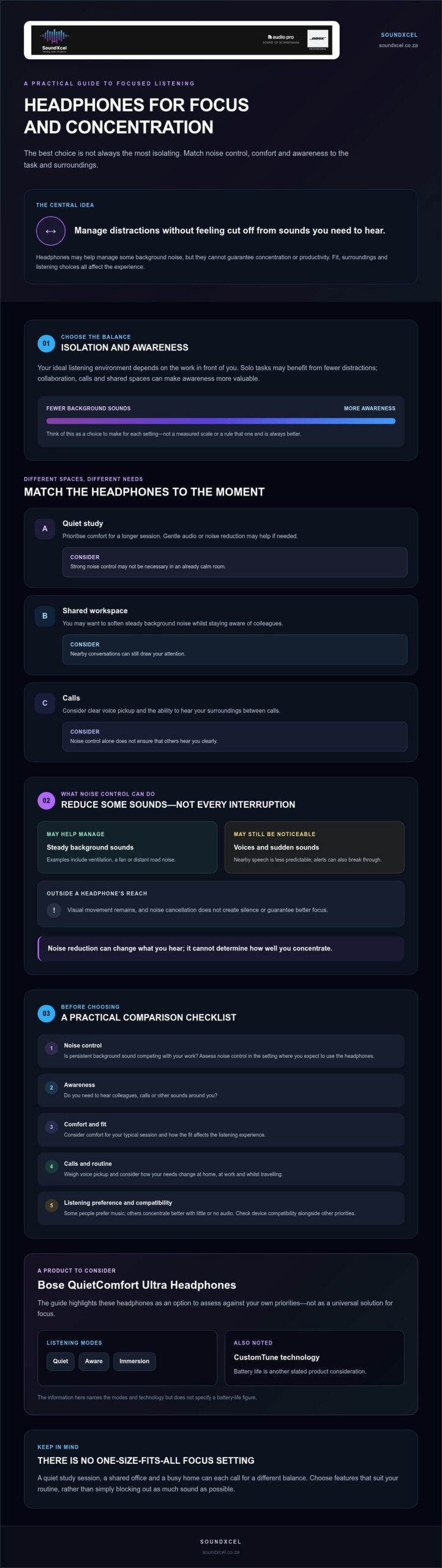
The most isolating headphones aren’t always the best choice for focused work. The right headphones for focus and concentration should help manage distractions without making every task feel cut off from your surroundings. A study session, a shared office and a busy home can each call for a different balance.
If background noise breaks your concentration, it’s natural to look for stronger noise cancellation. But comfort, awareness and the audio you choose matter too, and headphones can’t guarantee better focus. The aim is to find features that suit your routine, not simply to block out as much sound as possible.
This guide compares noise control, listening modes, comfort and call features across study, office and home settings. It also looks at the Bose QuietComfort Ultra Headphones, including their Quiet, Aware and Immersion modes, CustomTune technology and stated battery life. Use the practical checks to decide which features matter most for your day.
Key Takeaways
- Choose headphones for focus and concentration by matching noise control, comfort and awareness to the task, rather than seeking maximum isolation.
- Compare listening modes against your surroundings, from a quiet study space to a shared office where awareness may matter.
- Use a practical checklist to weigh comfort, calls and device compatibility alongside noise control.
- Consider how your routine changes at home, at work and while travelling before deciding whether noise-cancelling headphones are a good fit.
- Assess whether the Bose QuietComfort Ultra Headphones suit your priorities, including their Quiet, Aware and Immersion modes and CustomTune technology.
What makes headphones useful for focus and concentration?
“Focus headphones” describes how someone uses a pair, rather than a separate technical category. The best headphones for focus and concentration suit the sounds, tasks and level of awareness in your day. You might want to soften a steady fan or distant traffic while studying alone, or hear colleagues clearly between calls in a shared office.
Headphones can help manage some sound distractions, but they can’t guarantee concentration or productivity. Fit, surroundings and listening choices all affect the experience. They won’t address visual interruptions or make every nearby sound disappear, either.
For a visual introduction to headphones for study and concentration, watch:
Which distractions can headphones help manage?
Active noise cancellation uses microphones and sound processing to reduce some incoming noise. This technology, also called active noise control, can be useful for steady background sounds such as ventilation or distant road noise. Nearby speech is less predictable, so voices may still be audible. Alerts can also break through, while visual movement remains outside a headphone’s reach.
Results depend on the fit around your ears, the sounds in the room and the listening mode you choose. If possible, assess noise control in the setting where you plan to use the headphones. Treat it as one part of your setup, not a switch that removes every distraction.
| Situation | What to consider | Trade-off |
|---|---|---|
| Quiet study | Comfort for a longer session; gentle audio or noise reduction if needed. | You may not need strong noise control in an already calm room. |
| Shared workspace | Reducing steady background noise whilst staying aware of colleagues. | Nearby conversations may still draw your attention. |
| Calls | Clear voice pickup and a way to hear your own surroundings between calls. | Noise control alone doesn’t ensure others hear you clearly. |
Does focus mean blocking out every sound?
Not necessarily. Uninterrupted solo work may suit a quieter listening environment, while collaborative tasks, calls or working near other people can require conversation and environmental awareness. Your preference matters too: some people find music helpful, whilst others concentrate better with little or no audio.
“Noise reduction can change what you hear; it can’t determine how well you concentrate.” Keep that distinction in mind when comparing options. Alongside noise control, consider whether the headphones feel comfortable for your typical session and whether you can hear the people or sounds you need to notice. The right balance depends on the task, not a universal rule.
How noise control and listening modes affect focused work
Active noise cancellation (ANC) uses microphones and sound processing to counter some incoming noise. It can make steady sounds, such as a fan or road hum, less prominent, but it doesn’t create silence or guarantee better focus. Voices, sudden sounds and other interruptions may still be noticeable.
That difference matters in a noisy home, a shared office or while travelling. A student working through a reading task may prefer fewer background sounds, whilst someone sharing a workspace may need to hear a colleague. EdTech Magazine explores the benefits of noise-canceling headphones for students, but the best setting for you still depends on your surroundings and preferences.
When might active noise cancellation suit focused listening?
Consider ANC if persistent background sound competes with your work, whether that’s activity at home, office noise or the steady sound of travel. Its effect varies with the type of noise, how the headphones fit and your individual circumstances. Try them in the setting where you expect to use them, and check whether the change feels useful without making you feel cut off from sounds you need to hear.
Task demands shape noise-control preferences: solo reading may call for fewer distractions, whilst collaboration can make awareness more valuable.
Quiet Mode, Aware Mode and Immersion Mode explained
The Bose QuietComfort Ultra Headphones offer Quiet, Aware and Immersion modes. Treat them as listening options to assess against your preferences, rather than as a promise that one mode will improve concentration. Check the product information and controls to understand each mode, then consider which settings suit the tasks and surroundings you encounter.
Mode names alone don’t tell you exactly how each setting will behave in your environment. For example, your preferred listening setup for solo work may not suit a conversation with someone nearby. Reassess your choice when your needs change, and don’t rely on a particular mode to make you aware of every sound around you.
Choosing headphones for focus and concentration is about matching noise control to the moment, not selecting the most isolating setting by default. If you’re comparing options, you can explore SoundXcel’s Bose audio range and consider how the listening modes fit your routine.
How to compare headphones for concentration before buying
Start with your actual routine, not a universal “best” feature list. A student working in a quiet room may value comfort and simple controls more than strong noise reduction. Someone taking calls in a shared workspace may place greater weight on voice pickup and the ability to stay aware of nearby activity. Use the comparison below to decide which features deserve your attention.
Rank these features by importance to your work, then check the product specifications against that list. Treat advertised performance claims as specifications to verify, not guarantees of a particular experience. Fit and sound preference are subjective, so assess them for yourself where practical. If hearing your surroundings is a priority, open-ear listening may be worth exploring. Read the Bose Ultra Open Earbuds complete guide to consider that style of listening.
Which features matter for study, office work and calls?
For study or extended desk sessions, prioritise a comfortable fit and controls you can use easily. In shared spaces, weigh reduced background distractions against the need to notice colleagues. For calls, the Bose QuietComfort Ultra Headphones have a multi-mic system that filters background noise for voice pickup. Consider how that feature fits your call routine, without assuming it will remove every sound.
How should buyers assess comfort and connectivity?
Check how the fit feels and whether the materials suit you. Comfort is personal, so a specification alone can’t settle it. Consider whether touch or button controls are practical for your habits, and check the product instructions for how they work. The Bose QuietComfort Ultra Headphones use Bluetooth 5.3, with a range of up to 10 m (33 ft), and integrate with the Bose Music app. Confirm that these details suit your devices and usual setup.
Are noise-cancelling headphones right for your focus routine?
Active noise cancellation (ANC) can make some background sounds less prominent, but it isn’t a universal fix for distraction. It won’t remove visual interruptions, prevent every nearby voice from being heard or guarantee that you’ll concentrate. Treat it as one tool to consider alongside your task, surroundings and listening preferences.
Use this situation-based checklist to decide whether noise-cancelling headphones suit your day:
- Home study: Do steady sounds from household activity interrupt reading or revision? ANC may be worth considering, but check whether you still need to hear someone nearby.
- Shared workspace: Would reducing general office noise help, or do you need to notice colleagues and conversations? Balance fewer distractions against awareness.
- Calls: Is clear voice pickup your priority, or do you also need to hear activity around you between meetings? Compare the product’s confirmed call features with your actual needs.
- Travel: Are persistent sounds around you distracting? Consider noise control, comfort and whether you need to remain aware of announcements or people nearby.
When could noise cancellation be a poor fit?
If your work involves frequent conversation, collaboration or awareness of surrounding activity, stronger noise reduction may feel inconvenient. You might prefer a listening option that lets more environmental sound through, or simply use headphones selectively. Comfort matters too: fit and materials are personal, so consider how they feel during your usual tasks. Keep listening volume at a level that feels comfortable, rather than turning it up to overpower your surroundings.
Headphones can help manage sound, but they don’t treat attention or sensory conditions. If a particular style or listening approach doesn’t feel right for you, that’s a valid reason to choose another setup.
A simple checklist for choosing by environment
Before comparing products, note the sounds and interruptions you encounter most often. Then ask yourself:
- Do I need a quieter listening experience, or to remain aware of my surroundings?
- Will I mainly study, collaborate, take calls or travel?
- Which matters most: comfort, call clarity, noise control or flexible listening?
- Can I check the specifications and try the fit where practical?
Use verified product details to confirm features, then judge subjective qualities such as comfort and sound preference for yourself. The best headphones for focus and concentration are the ones that fit your routine, not a universal ranking. If the Bose QuietComfort Ultra Headphones are on your shortlist, explore them at SoundXcel and compare their features with the needs you’ve identified.
Bose QuietComfort Ultra Headphones: a considered option for focused listening
The Bose QuietComfort Ultra Headphones are worth considering if their confirmed features align with the way you study or work. They aren’t a guaranteed concentration solution. Evaluate their listening options against your environment, comfort preferences and need to stay aware.
Which confirmed QC Ultra Headphones features are relevant?
Active noise-cancelling is available with Quiet, Aware and Immersion modes. These give you different listening options to consider as your surroundings or tasks change. The best fit is personal, so check the product controls and instructions to understand how to operate the modes before relying on them for study, calls or desk work.
CustomTune analyses your ear shape and adapts sound performance. This is one factor to weigh when comparing headphones, but it doesn’t promise a particular focus outcome. The headphones also have a premium design with luxe materials, touch and button controls, and integration with the Bose Music app. Consider whether the fit and controls feel practical for your routine, rather than assuming they will suit everyone.
For calls, the multi-mic system filters background noise for voice pickup. That may be useful if calls form part of your workday, but it doesn’t mean every sound is removed or that every call will be distraction-free. Check the features against your workspace and call needs.
What should buyers know before choosing this model?
Battery life depends on the listening setup, so use the stated figures as product specifications, not a guarantee of a particular work session. Battery life is up to 24 hours per charge, or up to 18 hours with Immersive Audio enabled. A 15-minute charge provides up to 2.5 hours of playback, or up to 2 hours with Immersive Audio.
Before deciding, compare these details with your priorities: how long you typically listen, whether the modes fit your work settings, and whether the comfort and controls suit you. You can also review the Bose QuietComfort Ultra Headphones for more product detail.
If they look like a match for your headphones for focus and concentration shortlist, explore the Bose QuietComfort Ultra Headphones at SoundXcel.
Choose a listening setup that fits your day
The right headphones for focus and concentration are the ones that suit your tasks, surroundings and comfort preferences. Noise cancellation may help manage some background sounds, but it can’t guarantee concentration. Consider whether you need a quieter listening experience or must stay aware of conversations and activity nearby.
The Bose QuietComfort Ultra Headphones offer active noise-cancelling with Quiet, Aware and Immersion modes, giving you options to assess against different listening situations. CustomTune analyses ear shape and adapts sound performance, whilst the multi-mic system filters background noise for voice pickup. These are features to weigh against your routine, not promises of better focus or distraction-free calls.
If the features match your priorities, explore the Bose QuietComfort Ultra Headphones at SoundXcel. Compare their confirmed features with your routine and choose a listening setup that supports the way you work.
Frequently Asked Questions
Are noise-cancelling headphones good for focus and concentration?
They can help manage some background noise, which may make certain tasks feel less distracting. Results depend on the sounds around you, the headphones’ fit and the listening mode you choose. ANC won’t remove every sound or guarantee concentration. If you need to hear colleagues, announcements or activity nearby, consider an awareness option rather than blocking out your surroundings completely.
Can headphones help you concentrate while studying?
Headphones may help you manage interruptions during study, particularly if steady background sounds are distracting. Try them during the kind of task you do most, such as reading in a shared space or revising at home. Some people prefer quiet, while others choose audio. Keep the volume comfortable, and remember that headphones can’t remove visual interruptions or guarantee better concentration.
What features should I look for in headphones for concentration?
Prioritise features that match your routine: noise control for persistent background sounds, a comfortable fit for your usual listening sessions, and awareness options if you need to hear people nearby. If you take calls, check the voice-pickup details. Also confirm device compatibility, controls and any app integration. The best headphones for focus and concentration depend on your tasks, not a universal feature ranking.
Is active noise cancellation better than listening to music for focus?
Neither is automatically better. Active noise cancellation reduces some incoming noise, while music adds audio that you may or may not find helpful. You can use noise control without playing music, or listen to audio at a comfortable volume if you prefer. Consider the task and surroundings: music may not suit detailed reading, and noise cancellation may be inconvenient if you need to follow conversations.
Can I use Bose QuietComfort Ultra Headphones for calls while working?
Yes. The Bose QuietComfort Ultra Headphones have a multi-mic system that filters background noise for voice pickup. This is relevant if you take calls in a work setting, but it doesn’t mean every sound will disappear or guarantee call quality in every environment. Consider where you usually speak, and check the headphones’ controls and instructions so you can manage your listening setup during the workday.
How long does the Bose QuietComfort Ultra Headphones battery last?
The Bose QuietComfort Ultra Headphones offer up to 24 hours of battery life per charge, or up to 18 hours with Immersive Audio enabled. Actual listening time depends on the selected setup, so treat these as maximum stated figures rather than a guaranteed session length. A 15-minute charge provides up to 2.5 hours of playback, or up to 2 hours with Immersive Audio.
