

Headphones for Focus and Concentration: How to Choose the Right Pair
September 28, 2026
Dedicated Home Theatre Room Setup: The Ultimate 2026 Guide
September 30, 2026
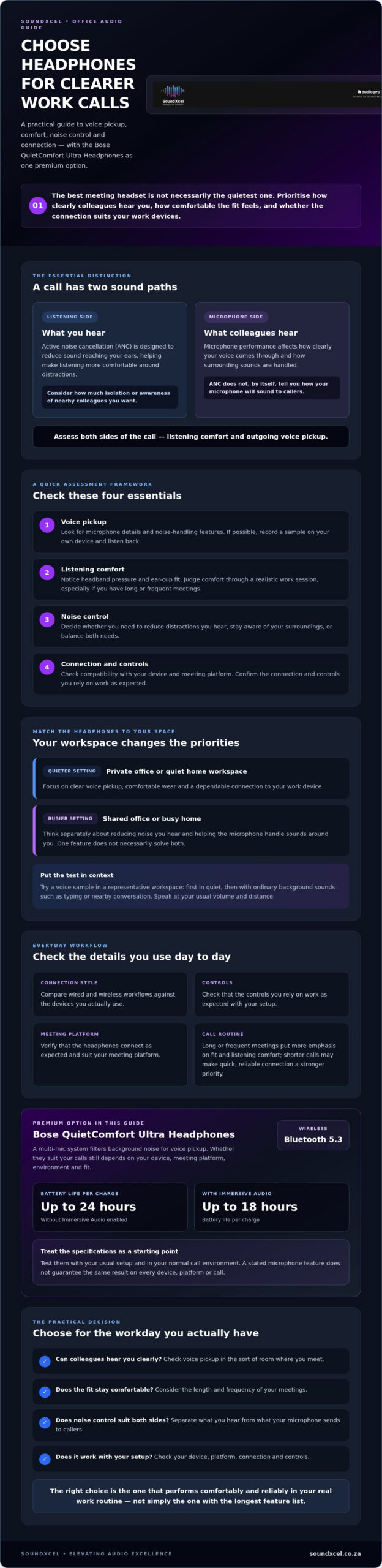
The quietest headphones don’t always make the best meeting headset. The best headphones for office conference calls should help colleagues hear you clearly, feel comfortable through back-to-back meetings and connect reliably to your work devices. Headline specifications alone won’t tell you how a microphone performs in a busy room or whether a fit will stay comfortable by mid-afternoon.
If you’ve struggled to be heard over office noise, or aren’t sure whether premium everyday headphones can handle a full meeting schedule, look beyond ANC. Compare voice pickup, comfort and connection options against your actual workspace, meeting habits and devices.
This guide also assesses the Bose QuietComfort Ultra Headphones as a premium option. Their multi-mic system filters background noise for voice pickup, and they offer Bluetooth 5.3 with up to 24 hours of battery life per charge, or up to 18 hours with Immersive Audio enabled. Your device, meeting platform and environment still matter, so test them with your usual setup before deciding. Read on for a practical way to weigh everyday comfort against the voice-focused features your calls demand.
Key Takeaways
- Choose the best headphones for office conference calls by prioritising voice pickup, all-day comfort and a connection that suits your devices.
- Test how your speech sounds in a representative workspace, including with the background noise you encounter during a typical day.
- Compare wired and wireless workflows, then check the connection, controls and meeting-platform support you need.
- In a shared office, assess outgoing voice pickup separately from how well the headphones reduce noise you hear.
- Use the practical checklist to decide whether the Bose QuietComfort Ultra Headphones suit your fit, setup and call routine.
What makes the best headphones for office conference calls?
Your colleagues need to hear your speech clearly, whether you’re presenting from a private office or joining a quick call at home. Office-call headphones handle both sides of a meeting: they play sound from your computer or phone and use a microphone to capture your voice.
That dual role matters. Comfortable fit and clear playback won’t compensate if your microphone picks up distracting sounds or makes your speech hard to follow. The best headphones for office conference calls should suit your workspace, call frequency, comfort needs, connection and meeting-platform requirements.
For an overview of how listening-side noise reduction works, watch this video:
Why noise cancellation is not the same as microphone performance
Active noise cancellation (ANC) is designed to reduce the sound reaching your ears. It can make listening more comfortable around office chatter or other distractions. Learn more about the technology in this overview of noise-cancelling headphones.
Microphone performance is a separate consideration. It affects what colleagues hear, including how clearly your voice comes through and how background noise is handled. A headphone’s ANC may improve your listening environment without reducing the noise callers hear.
ANC manages noise you hear; microphone pickup shapes the voice and surrounding sound your callers hear. Consider both sides of the call when comparing features.
Which office and home-working situations change the choice?
In a quiet private office, you may have fewer distractions to manage. Focus on clear voice pickup, comfortable wear and a dependable connection to your work device. In a shared office or busy home, consider two separate needs: reducing noise you hear and helping your microphone handle sounds around you. Don’t assume one feature solves both.
Your routine matters, too. Long or frequent meetings make fit and listening comfort more important, while shorter calls may put more emphasis on quick, reliable connection. If you need to hear colleagues nearby, choose a listening mode or design that suits that awareness rather than automatically seeking maximum isolation.
Before choosing, check your meeting platform and device requirements. Confirm that the headphones connect as expected and that the controls you rely on work with your setup. The right fit is the one that performs comfortably through your actual workday, not simply the one with the longest feature list.
How to assess microphone, noise control and comfort for work calls
Use a practical test, not a feature list alone. The best headphones for office conference calls should sound clear to colleagues, feel comfortable through a realistic work session and connect reliably to the computer or mobile device you use for meetings.
Check these four areas before choosing:
- Voice pickup: Look for details about the microphone design and how it handles background noise. If possible, record a voice sample on your own device and listen back.
- Listening comfort: Assess headband pressure, ear-cup fit and how the headphones feel after extended wear.
- Noise control: Decide whether you need to reduce distractions you hear, stay aware of your surroundings, or both.
- Connection: Verify compatibility with your device and meeting platform, and check that the controls you rely on work as expected.
A stated microphone feature is useful information, not a guarantee of how you’ll sound on every call. Your room, device and platform can all affect the result. For a broader professional-headset checklist, HP also outlines essential features for all-day comfort.
How to judge microphone voice pickup before buying
Test in the kind of room where you’ll actually meet. Record a short sample in quiet, then repeat it with ordinary background sounds, such as typing or nearby conversation. Speak at your usual volume and distance from the microphone. If you can’t test in advance, review the product’s microphone details and confirm whether your computer or phone recognises the headphones as the call’s input device.
Listen for whether your words remain easy to follow, not just whether the microphone captures sound. If you take calls across multiple devices or platforms, check each setup separately where possible.
How comfort and noise modes affect a working day
Try headphones for a realistic work session, especially if meetings run back-to-back. Notice pressure from the headband, contact around your ears and whether you’re comfortable keeping them on between calls. Fit is personal, so a brief try-on may not reveal how they’ll feel over time.
The Bose QuietComfort Ultra Headphones offer Quiet Mode, Aware Mode and Immersion Mode. Quiet Mode may suit focused listening; Aware Mode can help you stay more attuned to your surroundings. Immersion Mode is a listening feature, not confirmation of meeting-platform compatibility. The headphones also have a multi-mic system that filters background noise for voice pickup. Testing with your own device and platform is still the best way to assess your setup.
If these criteria match your routine, you can explore the Bose QuietComfort Ultra Headphones through SoundXcel, a South African retailer of Bose audio products, then check the fit and call behaviour against your needs.
Compare office-call headphones by connection, controls and daily workflow
The best headphones for office conference calls should fit the way you work, not just the way you listen. Compare the setup you’ll use most often, then verify each model’s connection options and controls before buying. Wired and wireless designs can both suit work calls, but their everyday trade-offs differ.
| Criteria | Why it matters | What to verify |
|---|---|---|
| Connection type | A wired setup avoids managing a wireless link; wireless can give you more freedom to move. | Does the product support the connection you need with your computer or mobile device? |
| Wireless range | Your connection needs to remain usable when you step away from your desk. | Does the stated range suit your workspace, and are there obstacles between you and your device? |
| Meeting controls | Easy-to-use controls can help you manage calls without interrupting your flow. | Can you reliably find and use the controls you need, such as volume or mute? |
| Battery life | Frequent meetings make charging habits part of your daily routine. | How does the stated battery life compare with your typical listening and call use? |
| Device and platform | A connection alone doesn’t confirm that every call feature will work as expected. | Have you checked compatibility with your main device and meeting platform? |
What to check about Bluetooth and meeting-device compatibility
Start with the computer, phone or tablet you use for most meetings. Check the headphone maker’s compatibility information for both that device and your meeting platform. If you move between devices, confirm how switching works rather than assuming it will suit your routine. Don’t treat Bluetooth support alone as proof of platform certification or specific call controls.
The Bose QuietComfort Ultra Headphones use Bluetooth 5.3 and have a stated range of up to 10 m (33 ft). Consider whether that range suits your desk arrangement and typical movement, and verify compatibility with your own setup before choosing.
Which controls and battery details matter during a busy day?
Controls should feel intuitive when you need to adjust volume or manage a call. Try the touch or button controls, where available, and check whether they’re easy to use without looking. Don’t assume a control will synchronise with your meeting platform unless that capability is confirmed.
The QC Ultra Headphones offer up to 24 hours of battery life per charge, or up to 18 hours with Immersive Audio enabled. Compare those figures with your expected daily use and remember that your settings and listening habits may affect how often you need to charge. Choose a connection and control setup that feels straightforward across your working day.
Choose headphones for your office-call routine with a practical checklist
A clear shortlist starts with your actual workday. Define where you take calls, identify the devices you use, rank the features that matter most, then test suitable options against the same criteria. This keeps the search for the best headphones for office conference calls focused on your needs rather than a long list of specifications.
A shortlist checklist for shared offices and hybrid work
- Describe your workspace: Note whether you work in a quiet room, shared office or changing home-work environments. Record the background sounds you encounter during calls.
- List your devices: Include the computer, phone or tablet you use for meetings, along with the platforms you rely on. Check compatibility for each relevant setup.
- Set your priorities: Rank voice pickup, comfort, awareness of your surroundings and wireless convenience. If you take frequent or long meetings, give comfort and easy-to-use controls more weight; consider whether the battery suits your schedule.
- Separate the noise concerns: In a shared space, assess how clearly your microphone captures your voice separately from how well the headphones reduce noise reaching your ears.
- Compare consistently: Apply the same priorities to every option. Don’t let a strong score for one feature hide a mismatch elsewhere.
This simple ranking helps you spot trade-offs. For example, you may value staying aware of nearby colleagues more than maximum isolation, or prefer wireless freedom while planning for charging.
How to test a shortlist in your own setup
Where possible, try each option in a room similar to your usual workspace. Record a short voice sample in quiet and with typical background noise, then listen back for clear, natural speech. If colleagues can help, ask them how your voice sounds during a test call. Treat this as a practical check, not a guarantee of performance in every meeting.
Next, connect the headphones to the devices you use for work. Confirm that the meeting platform selects the correct microphone and playback output, then try the controls you expect to use. If you switch between devices, test that routine too.
Finally, wear the headphones through a representative work session. Notice pressure, ear-cup comfort and whether you need to adjust the fit. Make a brief note after each test. Comparing those notes can help you choose with confidence, especially if you move between home and a shared office.
Once you’ve set your priorities, explore Bose QuietComfort Ultra Headphones at SoundXcel as one option to assess against your shortlist and work setup.
Are Bose QuietComfort Ultra Headphones a fit for office conference calls?
The Bose QuietComfort Ultra Headphones may suit people who want premium everyday listening features alongside meeting use, but they won’t be an automatic fit for every office. Compare them with your priorities: comfort, listening-side noise control, connection and, most importantly, how your voice sounds through your own meeting setup.
Where the QC Ultra Headphones align with office-call priorities
The QC Ultra Headphones have a multi-mic system that filters background noise for voice pickup. That describes how the system handles sound around the microphone, but it doesn’t guarantee how clearly colleagues will hear you in every room, on every device or through every platform. Treat it as a feature to assess, then test your voice in the environment where you usually take calls.
For listening, Quiet Mode and Aware Mode let you choose between different levels of awareness of your surroundings. Quiet Mode may suit focused listening, while Aware Mode may be preferable if you want to remain more attuned to nearby activity. These modes relate to your listening experience, not confirmed call performance.
The headphones also offer premium design and comfort with luxe materials, the Bose Music app, and touch and button controls. Those features may be useful across a working day, but personal fit and ease of use matter more than the feature list. Try the controls and wear the headphones for a representative work session before deciding.
What to verify before making the final choice
Check compatibility with the computer or mobile device you use for meetings, as well as your chosen platform. Product information doesn’t confirm compatibility with a specific conference platform, so verify it for your setup rather than assuming every call function will work as expected.
Then make a practical voice-pickup test. Record a short sample or join a test call in a room similar to your office. Listen for how your speech comes through, and repeat the check with ordinary background noise if that reflects your workspace. Also confirm that your device selects the headphones as the microphone and audio output.
Comfort is personal. Check the fit around your ears and the feel of the headband over a realistic work session. If voice pickup, fit and compatibility all meet your needs, the QC Ultra Headphones could be a considered option. If meeting-specific integration is your priority, verify those functions before you buy.
Ready to assess them against your office-call routine? Explore the Bose QuietComfort Ultra Headphones through SoundXcel, and check that the fit and setup suit the way you work.
Choose headphones that fit your working day
The best headphones for office conference calls should match your workspace, devices and meeting routine. Prioritise microphone voice pickup separately from the noise control you hear, then check comfort, connection and platform compatibility before choosing. A short test in your usual environment can reveal more than specifications alone.
The Bose QuietComfort Ultra Headphones are one premium option to assess. Their multi-mic system filters background noise for voice pickup, and Bluetooth 5.3 connectivity has a range of up to 10 m (33 ft). Battery life is up to 24 hours per charge, or up to 18 hours with Immersive Audio enabled. These features don’t guarantee a particular call result, so test voice pickup and verify compatibility with your own device and meeting platform.
Ready to see whether they suit your setup? Explore Bose QuietComfort Ultra Headphones at SoundXcel and compare their features with your everyday call needs. With the right checks, you can choose a comfortable, considered option for more confident meetings.
Frequently Asked Questions
What headphones are best for office conference calls?
The best choice depends on your workspace, meeting frequency and devices. If voice clarity is the priority, consider a headset with a microphone designed for speech and check how it handles background noise. Also weigh comfort for longer meetings, connection reliability, controls and platform compatibility. The best headphones for office conference calls are the ones that perform well in your real setup, not just on a specification sheet.
Does noise cancellation improve what other people hear on a call?
Not necessarily. Active noise cancellation primarily reduces sound reaching your ears, helping you listen in a noisy space. What callers hear depends on the microphone and how it handles your voice and surrounding sounds. Assess these as separate features: consider listening-side noise control for your own comfort, then test microphone pickup to judge outgoing speech. A quieter listening experience alone doesn’t guarantee clearer audio for colleagues.
Are Bluetooth headphones suitable for work meetings?
Yes, Bluetooth headphones can suit work meetings if they connect reliably to your meeting device and work as expected with your chosen platform. Check the product’s compatibility information, microphone selection and call controls before buying. Also consider whether the stated wireless range suits your desk and how often you’ll need to charge. For example, Bose QuietComfort Ultra Headphones use Bluetooth 5.3 and have a stated range of up to 10 m (33 ft).
How can I test headphone microphone quality before buying?
Where possible, connect the headphones to the computer or mobile device you use for meetings and record a short voice sample. Test in a quiet room, then repeat with ordinary background noise similar to your workspace. Listen back for speech that’s easy to follow, and check that your device selects the headphones as its microphone. A test call with a colleague can also help you assess how your voice comes through.
Can Bose QuietComfort Ultra Headphones work with my meeting platform?
Check compatibility with your specific computer or mobile device and meeting platform before choosing. The product information confirms Bluetooth 5.3 connectivity, but doesn’t confirm compatibility with particular conference platforms or every meeting control. If possible, test the headphones with your usual setup. Confirm that your device recognises them for both microphone input and meeting audio, and verify any controls you rely on rather than assuming they’ll integrate.
Are Bose QuietComfort Ultra Headphones comfortable for long conference calls?
The Bose QuietComfort Ultra Headphones are described as having premium design and comfort with luxe materials, but comfort varies from person to person. Fit, headband pressure and how the ear cups feel during extended wear all matter. If you can, try them for a representative work session rather than judging from a brief fit check. Notice whether you need to adjust them or feel discomfort as the session continues.
How long does the battery last on Bose QuietComfort Ultra Headphones?
Bose QuietComfort Ultra Headphones provide up to 24 hours of battery life per charge, or up to 18 hours when Immersive Audio is enabled. Compare these figures with your typical listening and meeting schedule, and consider your charging routine. Actual use may differ depending on settings and listening habits. If you expect long or frequent calls, check whether the stated battery life suits your working day.
