


How to Fix a Blurry Epson Projector Image: A 2026 Home Cinema Guide
August 22, 2026
How to Calibrate Your Epson Home Cinema Projector: The Ultimate 2026 Guide
August 24, 2026
What if the loud whirring of your projector’s fan isn’t just a background annoyance, but a sign that your home cinema is at risk? In the heat of a South African summer, an overheating unit can turn a relaxing movie night into a stressful cycle of sudden shutdowns. For homeowners in South Africa, the choice between an Epson laser projector and a traditional lamp model is often the single biggest factor in effective thermal management. It’s a common frustration to deal with distracting noise or the fear of a costly hardware failure during a critical scene.
You deserve a system that remains whisper-quiet and reliable, regardless of the ambient temperature. This 2026 guide provides the exact steps to troubleshoot thermal alerts and optimise airflow for our local climate. We will explore the thermal benefits of modern laser technology, which offers up to 30,000 hours of life while running significantly cooler than traditional lamps. You will learn how to establish a maintenance routine that keeps your Epson hardware performing at its peak. Discover how to transition from a struggling, hot system to a professional, cool-running cinema experience.
Key Takeaways
- Identify specific light sequences on your control panel to distinguish between a routine maintenance prompt and a critical thermal emergency.
- Master a safe cleaning routine for intake vents and air filters to prevent dust from restricting essential airflow during the peak South African summer.
- Enable “High Altitude Mode” in your projector settings to increase fan speed and safeguard internal hardware in warmer local climates.
- Compare the Epson laser projector vs lamp South Africa market to discover why laser technology offers superior thermal stability and a quieter viewing experience.
- Learn how professional mounting and placement can significantly improve heat dissipation for a more reliable home cinema setup.
Deciphering the Warning Signs: What Your Epson Projector is Telling You
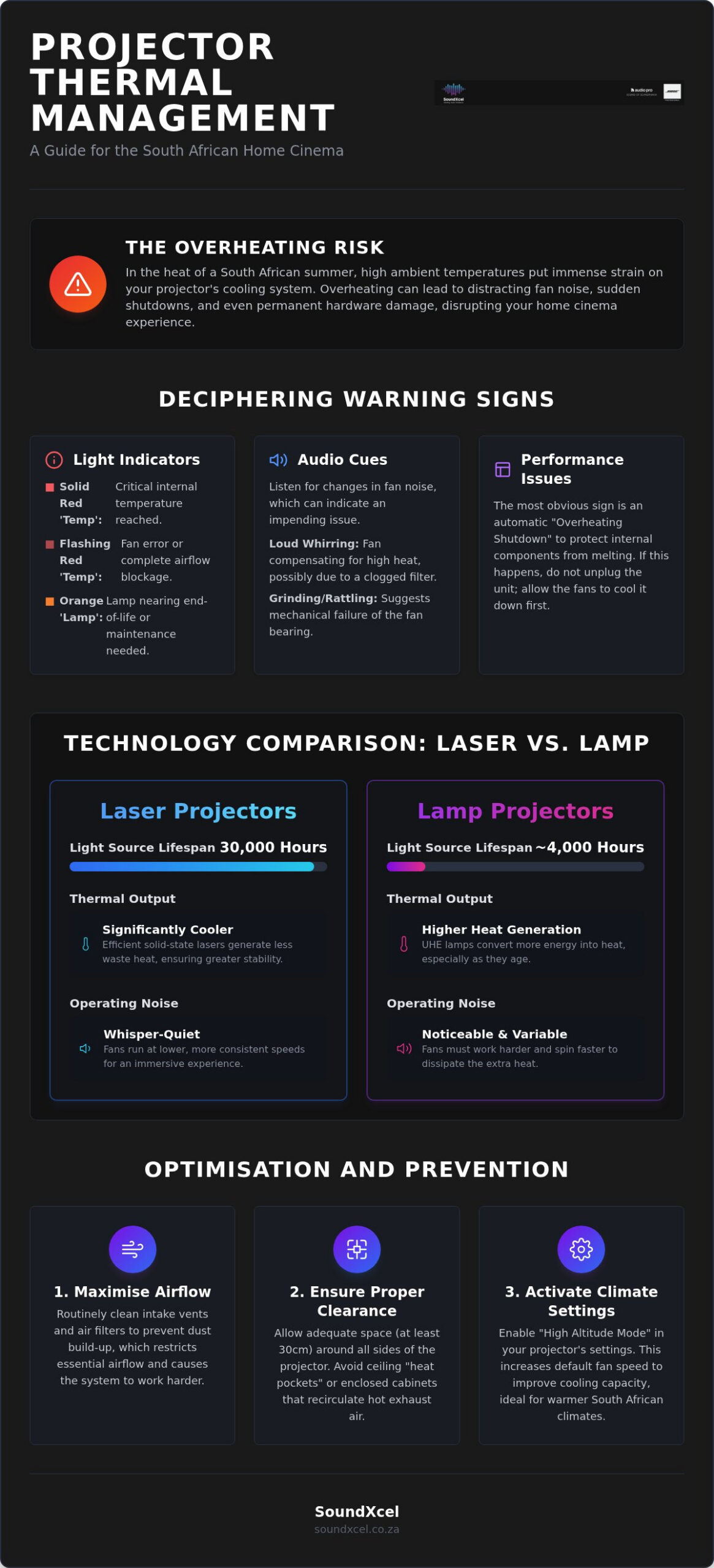
Your Epson projector’s control panel acts as a sophisticated diagnostic centre. It uses specific light sequences to communicate its health status, primarily through the “Temp” and “Lamp” indicators. Understanding these signals is the first step in preventing permanent hardware damage. Whilst a routine maintenance reminder might simply suggest a filter check, a thermal emergency involves an immediate “Overheating Shutdown”. This drastic measure exists to protect the internal LCD panels and polarisers from literally melting under extreme heat. A “False Overheat Warning” is a rare sensor calibration issue where the unit triggers a shutdown despite being physically cool.
When comparing an Epson laser projector vs lamp South Africa, the way the system manages these warnings varies. Laser models often provide more stability, but both technologies rely on these sensors to survive our local climate. Gaining a deeper knowledge of underlying video projector technologies will help you identify why your specific model reacts to heat in a certain way. Recognising these patterns early ensures your home cinema remains operational for years to come.
To better understand this concept, watch this helpful video:
The Blinking Red Light: Emergency vs. Warning
Differentiating between light patterns is vital. A solid red “Temp” light usually indicates an “Internal Temperature Error”, meaning the unit has reached its thermal limit. A flashing red light typically signals a “Fan Error”, suggesting a mechanical failure or a complete blockage. If your projector enters a shutdown cycle, leave it plugged into the power source. The fans often continue to spin to clear residual heat from the optics. Unplugging the cord immediately traps that heat inside the chassis, which can warp delicate components or shorten the lifespan of the light source.
Audio Cues: Increased Fan Noise and Whirring
Your projector’s internal logic automatically increases fan voltage to compensate for rising temperatures. This results in a noticeable jump in decibel levels. High fan noise can ruin the immersion of your Bose sound system, forcing you to increase the volume just to hear dialogue. Listen closely to the character of the sound. A “death rattle” or grinding noise suggests a failing bearing within the fan assembly itself. Conversely, a high-pitched, strained whirring usually indicates the fan is struggling to pull air through a filter clogged with dust and debris. Addressing these audio cues early can prevent a full thermal shutdown.
Why Epson Projectors Overheat: Common Culprits and Environmental Factors
Identifying why a unit fails starts with the environment. High ambient temperatures during the South African summer months put immense pressure on cooling systems. When the air being pulled in is already warm, the projector struggles to dissipate heat from the internal optical engine. This is particularly problematic for traditional lamp-based units. As UHE lamps age, they become less efficient, converting more electricity into waste heat rather than light. This thermal degradation is a key consideration when researching the Best Projector 2026 listings, as laser models maintain a more consistent thermal profile over their lifespan. Choosing between an Epson laser projector vs lamp South Africa requires an understanding of how these light sources handle our local climate.
Mounting height also plays a critical role in temperature management. Hot air rises, often creating a “heat pocket” near the ceiling. If a projector is mounted too close to the surface without adequate clearance, it suffers from “heat soak”, where it re-circulates its own exhaust. This effect is worsened if nearby AV receivers or power amplifiers are dumping heat into the same space. Without a clear path for hot air to escape, the internal sensors will eventually trigger a safety shutdown to prevent permanent damage.
Dust Buildup: The Invisible Cinema Killer
Microscopic particles are the primary cause of restricted airflow. In South African households, dust from open windows or pets accumulates amongst the fine mesh of the air filters. This buildup creates “hot spots” on internal components, which can lead to permanent hardware failure. The air filter is your first line of defence. Regular checks ensure that the cooling system doesn’t have to work overtime to keep the internal temperature within safe limits. If you’re concerned about long-term maintenance, SoundXcel offers expert advice on premium Epson models designed for durability.
Ventilation and Placement Mistakes
Placement is just as important as cleanliness. Never tuck your projector into a closed cabinet or a tight bookshelf. These environments trap hot air, leading to a rapid rise in internal temperature. Epson home cinema models typically require a minimum clearance of 20-30cm on all sides to breathe properly. Ensure that the intake and exhaust vents remain completely unobstructed. When deciding between an Epson laser projector vs lamp South Africa, remember that whilst laser units run cooler, they still require professional placement to ensure the longevity of the sophisticated 3LCD hardware. Poor ventilation is a common mistake that even the most advanced cooling systems cannot overcome.
Step-by-Step: How to Resolve Epson Projector Overheating Issues
Resolving heat issues requires a methodical approach rather than guesswork. Whilst the choice between an Epson laser projector vs lamp South Africa often comes down to light source preference, both technologies require a clean environment to function. Start by establishing a weekly routine to inspect the external chassis and intake vents. Use a dry, lint-free cloth to wipe the exterior, ensuring no visible dust blankets the ventilation slats. This simple habit prevents loose particles from being sucked into the delicate internal optical engine during operation. If your unit has already triggered a warning, you must move beyond surface cleaning to the internal filtration system.
Software logic also plays a role in thermal management. Occasionally, a projector might report high temperatures due to outdated sensor calibration. Check the Epson support website for firmware updates specific to your model. These updates often refine the fan speed curves and improve how the unit interprets data from its internal thermistors. Always perform these updates via a stable connection to ensure the system’s core logic is optimised for the current environmental conditions.
Use a low-powered vacuum rather than compressed air for the filter to avoid forcing microscopic debris deeper into the lens assembly and LCD panels.
Cleaning the Air Filter Safely
The air filter is the most critical component in your cooling system. Follow these steps to ensure it remains effective:
- Step 1: Power down the unit and allow it to cool for at least 30 minutes. Cooling is essential because the plastic components can become brittle when hot, increasing the risk of snaps or cracks during disassembly.
- Step 2: Locate the filter cover, usually on the side or front of the chassis. Gently slide the latch to remove the cover and extract the mesh frame. Handle the frame by its edges to avoid putting pressure on the delicate mesh.
- Step 3: Use a soft brush or a low-suction handheld vacuum to lift away debris. Never use water, soaps, or liquid detergents. Moisture can destroy the electrostatic properties of the filter and lead to mould growth inside the projector.
Resetting the Maintenance Timers
Once the hardware is clean, you must update the internal software. Access the Epson menu and navigate to the “Reset” section to clear the “Filter Usage” clock. This ensures the projector doesn’t continue to display “Clean Filter” warnings after the maintenance is complete. It’s vital to reset the lamp timer only when a new lamp is actually installed. Doing so prematurely can lead to the unit running an old, hot lamp past its safety rating. If thermal error codes persist after cleaning, perform a “Hard Reset” through the system menu to restore factory thermal thresholds.
Advanced Prevention: Optimising Your Home Cinema for Maximum Airflow
A premium home cinema requires more than just high-quality hardware. It needs an environment designed for thermal efficiency. When evaluating the Epson projector price South Africa, you must account for the installation context. A high-end unit placed in a poorly ventilated room will underperform and age prematurely. Proper cable management is a simple yet overlooked preventative measure. Ensure your power and HDMI cables are neatly routed away from exhaust vents. A “nest” of wires can trap hot air against the chassis, leading to the heat soak issues discussed in previous sections.
Installation height and angle also dictate how well a unit breathes. When choosing between an Epson laser projector vs lamp South Africa, remember that both technologies rely on a clear path for air movement. Obstructions within 30cm of the intake or exhaust can cause the internal fans to spin at maximum velocity, creating distracting noise. Optimising the physical space around your hardware is the most effective way to prevent thermal shutdowns before they occur.
Using High Altitude Mode Effectively
Projector manuals often reserve “High Altitude Mode” for locations above 1,500 metres. However, South African users in coastal or low-lying regions should consider enabling this during peak summer heatwaves. This setting increases the fan voltage, which shifts the cooling curve to move air more aggressively through the chassis. Whilst this does result in slightly higher fan noise, the trade-off is superior protection for your internal components. It’s a proactive way to manage the thermal load. Laser models benefit from this extra airflow just as much as lamp units to preserve the delicate light source diodes and polarisers.
Professional Installation and Active Cooling
SoundXcel ensures long-term thermal stability through strategic projector positioning. A level, professional ceiling mount is critical because internal heat pipes are designed to function best when the unit is properly aligned. If a projector is tilted excessively without professional calibration, the cooling system can become inefficient. For custom cinema furniture, we often recommend integrated cabinet cooling fans. These active systems pull fresh air into the enclosure and push hot exhaust out, preventing the build-up of stagnant heat. This is essential for maintaining the quiet, immersive environment that premium AV hardware is designed to provide.
If you are planning a new cinema build, contact SoundXcel for a professional installation consultation to ensure your hardware stays cool and quiet.
Beyond the Repair: Comparing Epson Laser vs Lamp Projectors for Thermal Stability
Choosing between an Epson laser projector vs lamp South Africa often comes down to how each technology manages heat. Traditional UHP lamps generate light by heating pressurised gas in an arc. This process is inherently hot and requires aggressive cooling, which leads to louder fan noise and higher thermal stress. In contrast, laser light sources utilise diodes that are significantly more energy efficient. Research indicates that laser engines are approximately 20% more efficient than their lamp counterparts, resulting in a much cooler operation. This thermal stability is essential for the South African climate, where ambient room temperatures can fluctuate rapidly during the summer months.
Upgrading to a laser model offers a compelling long-term return on investment. Whilst the initial purchase price might be higher, you eliminate the recurring cost of replacement lamps. A typical lamp for older high-end models can cost around R3,153, and these bulbs dim over time, requiring more power to maintain brightness. Modern Epson 4K laser projectors available at SoundXcel for 2026 provide consistent performance without the gradual degradation seen in bulb-based systems. By switching to laser, you avoid the frequent maintenance cycles and the risk of “heat soak” that plagues older units.
The Laser Advantage: Cooler, Quieter, Better
Laser technology completely changes the user experience. These units can be turned on and off almost instantly because they don’t require the lengthy warm-up or cool-down periods associated with gas-arc lamps. This eliminates the risk of internal heat damage if the power is cut unexpectedly. The reduction in waste heat allows for lower fan speeds, creating a quieter environment. This silence is vital for appreciating the delicate nuances of a Bose sound system, where background whirring can often mask subtle audio details. With a lifespan of up to 30,000 hours, laser projectors offer decades of reliable, maintenance-free entertainment.
Consulting the Experts at SoundXcel
Deciding whether to repair a struggling lamp projector or invest in a new laser system requires expert guidance. SoundXcel is a national specialist that understands the intersection of premium hardware and local environmental factors. Our team can diagnose if your current unit is suffering from simple dust buildup or if the internal polarisers have reached their thermal limit. We offer the latest 2026 Epson laser range, including models like the EH-LS12000B, which are specifically designed for high-performance home cinemas. View the latest Epson Home Cinema range at SoundXcel to find the perfect thermal solution for your home.
Future-Proofing Your Home Cinema Experience
Safeguarding your premium hardware requires a balance of regular maintenance and informed technology choices. You now have the tools to decode warning signals and implement a cooling routine that thrives in the local climate. By prioritising airflow and cleaning filters regularly, you can prevent the sudden shutdowns that interrupt your favourite films. When evaluating an Epson laser projector vs lamp South Africa, the shift toward laser technology offers the ultimate solution for those seeking a cooler, quieter, and more reliable setup.
SoundXcel stands as your trusted partner in this journey. As an Authorised Epson Retailer with expert national support, we specialise in premium 2026 home cinema configurations. Our consultants help you navigate the transition from traditional lamps to high-performance laser engines that run significantly cooler. Don’t let heat issues compromise your enjoyment or your equipment’s lifespan. Explore the latest Epson Home Cinema Projectors at SoundXcel today. We look forward to helping you create a sophisticated, quiet, and thermally stable entertainment space that lasts for years to come.
Frequently Asked Questions
Why is the Temp light blinking red on my Epson projector?
A blinking red Temp light indicates that the internal sensors have detected excessive heat or a mechanical fan failure. This is often caused by a blocked air intake or a filter that hasn’t been cleaned in several months. If the light persists after cleaning, it may signal a hardware fault that requires professional attention. Always allow the unit to complete its cooling cycle before checking for obstructions in the ventilation path.
How often should I clean the air filter on my Epson projector in South Africa?
Clean your air filter every three months to maintain optimal airflow in our local climate. If your home cinema is located in an area with high dust levels or pets, check the mesh monthly. Regular maintenance prevents the buildup of microscopic particles that cause the unit to work harder. Keeping the intake clear ensures the cooling system remains quiet and effective, protecting the delicate internal optics from thermal stress.
Does an Epson laser projector run cooler than a lamp-based model?
Yes, an Epson laser projector runs significantly cooler than a traditional lamp-based model. Laser diodes are roughly 20% more energy-efficient than UHP lamps, which convert a large portion of electricity into waste heat. This thermal efficiency is a major factor when choosing an Epson laser projector vs lamp South Africa, as it leads to quieter fan operation and a more stable internal environment. Laser engines also eliminate the risk of lamp-related heat spikes.
Can I use compressed air to clean my projector fans?
Avoid using compressed air to clean your projector fans or filters. The high-pressure blast can force dust deeper into the sealed optical engine, potentially causing permanent spots on your projected image. Instead, use a low-powered vacuum or a soft brush to gently lift debris away from the intake vents. This method ensures that particles are removed from the chassis rather than being repositioned where they can cause more harm to the LCD panels.
What is High Altitude Mode and should I use it if I am not in the mountains?
High Altitude Mode increases the voltage to the internal fans, causing them to spin faster to compensate for thinner air. Whilst designed for elevations above 1,500 metres, it’s a useful tool for South African users in coastal regions during extreme heatwaves. Enabling this mode provides an extra layer of thermal protection for your hardware. Be aware that the increased fan speed will result in slightly higher noise levels during your viewing sessions.
Will a dusty lamp cause my projector to shut down unexpectedly?
A dusty lamp or a clogged filter will definitely trigger an unexpected thermal shutdown. As dust accumulates on the lamp housing, it prevents heat from dissipating, causing the internal temperature to rise rapidly. Additionally, as lamps age, they become less efficient and generate more waste heat. This combination often leads to the Temp light warning. Transitioning to a laser system helps avoid these maintenance-heavy issues by providing a more consistent and cleaner thermal profile.
Is it safe to mount my Epson projector inside a cabinet?
Mounting a projector inside a standard cabinet is generally unsafe unless you install active cooling fans. Projectors require at least 20cm to 30cm of clearance on all sides to prevent the recirculation of hot exhaust air. Without proper ventilation, the unit will quickly overheat and shut down. If you prefer a hidden installation, ensure the furniture has a dedicated intake and exhaust path to keep the ambient temperature within the manufacturer’s specified safety limits.
When should I call SoundXcel for professional Epson projector repairs?
Contact SoundXcel for professional assistance if your projector continues to shut down after you’ve thoroughly cleaned the filters and vents. Persistent red light warnings, grinding noises from the fans, or a noticeable decline in brightness often indicate internal component failure. As an authorised Epson retailer, we provide expert national support to diagnose whether your system requires a technical repair or if it’s time to upgrade to a modern, cooler-running laser model.
