

Bose Music App Tutorial: Set Up and Use the App
October 2, 2026
Certified Pre-Owned Bose Speakers: A South African Buyer’s Guide
October 4, 2026
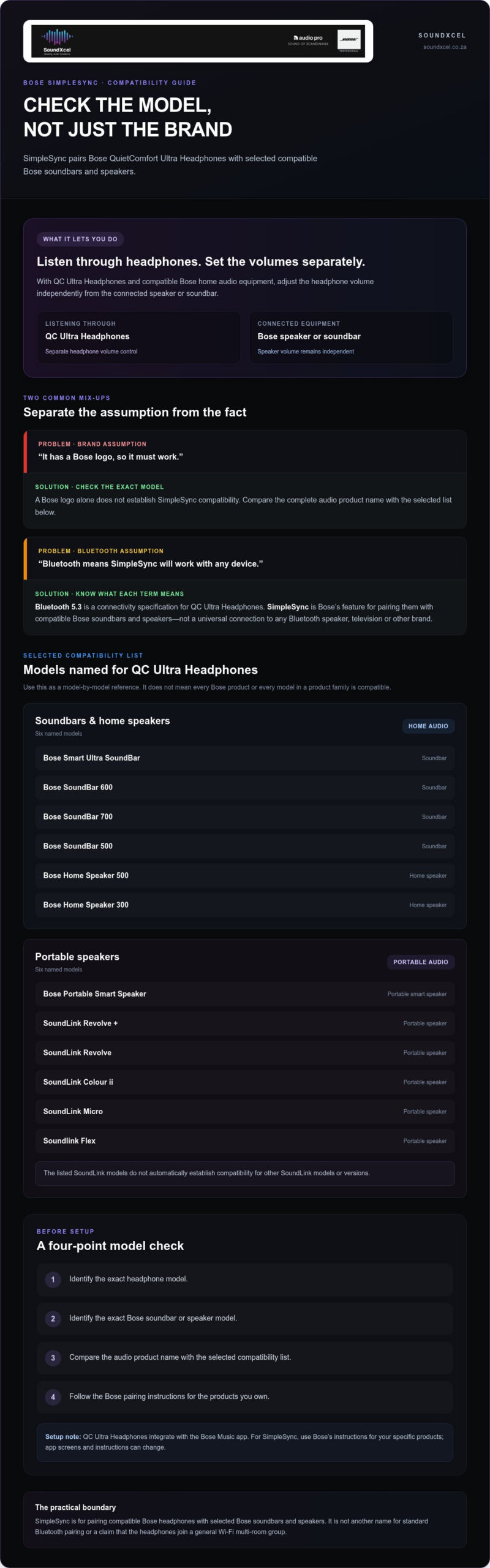
Bose SimpleSync explained in plain English: it pairs compatible Bose headphones with selected Bose soundbars and speakers. With Bose QuietComfort Ultra Headphones, SimpleSync lets you listen through the headphones and adjust their volume separately from the connected speaker or soundbar.
SimpleSync and ordinary Bluetooth describe different things. Bluetooth 5.3 is a connectivity specification for the Bose QuietComfort Ultra Headphones. SimpleSync is Bose’s feature for pairing the headphones with compatible Bose audio equipment. A Bose logo alone does not establish compatibility, so check the exact model names before planning your setup.
SimpleSync can suit personal listening at home when you want to use headphones with compatible Bose audio equipment. Its stated benefit is independent volume control for the headphones and speaker. This guide explains how that differs from Bluetooth, lists the products named as compatible with QC Ultra Headphones and offers a practical checklist for choosing a setup.
Key Takeaways
- SimpleSync pairs compatible Bose headphones with selected Bose soundbars and speakers.
- With QC Ultra Headphones, the feature enables separate volume control for the headphones and connected audio equipment.
- Use the selected compatibility list to compare exact model names, rather than assuming every Bose product supports SimpleSync.
- Bluetooth 5.3 is a headphone specification; it does not establish SimpleSync compatibility with other devices.
What is Bose SimpleSync, and what does it let you do?
Bose SimpleSync explained: it pairs compatible Bose headphones with selected Bose soundbars and speakers. With Bose QuietComfort Ultra Headphones, the stated benefit is separate volume control, so you can adjust the headphone level independently from the connected speaker or soundbar.
For example, you could pair Bose QuietComfort Ultra Headphones with a compatible Bose soundbar or speaker for personal listening. SimpleSync lets you adjust the headphone and speaker volumes separately, rather than requiring both devices to use the same level. It is a feature for compatible Bose products, not a universal connection for every wireless device. It sits within the audio technology developed by Bose Corporation.
For a visual overview, watch this Bose Product Support guide:
What does SimpleSync do during everyday listening?
Imagine listening through your headphones while using compatible Bose home audio equipment. SimpleSync pairs QC Ultra Headphones with selected Bose soundbars and speakers, and lets you set the headphone and speaker volumes independently. This is useful when you want your headphone listening level to differ from the speaker level.
The practical point is compatibility. A wireless connection on its own does not mean that two products support SimpleSync. Both the headphones and the Bose soundbar or speaker need to be compatible with this feature.
Is Bose SimpleSync the same as Bluetooth?
No. Bluetooth 5.3 is listed as a connectivity specification for the QC Ultra Headphones. SimpleSync is Bose’s feature for pairing the headphones with compatible Bose soundbars and speakers. One describes Bluetooth connectivity; the other describes a specific Bose-to-Bose listening connection.
That distinction sets a useful boundary: SimpleSync does not mean the headphones can use this feature with any Bluetooth speaker, television or product from another brand. To check a potential match, start with the exact headphone and audio equipment models, then compare them with the selected compatibility list below.
How Bose SimpleSync pairing works with QC Ultra Headphones
To use SimpleSync, Bose QuietComfort Ultra Headphones must pair with a compatible Bose soundbar or speaker. Begin by identifying the full model names on both products. A Bose logo, or a similar name elsewhere in a product range, is not enough to establish compatibility.
What should you check before trying SimpleSync?
Check the complete model name of your QC Ultra Headphones and the Bose soundbar or speaker you want to pair. Compare the audio product with the selected compatible-product list in the next section. This helps you distinguish a named match from an assumption based on the brand or a similar product name.
Once you have identified a listed combination, follow the pairing instructions for those products. Use this checklist first:
- Identify the exact headphone model.
- Identify the exact Bose soundbar or speaker model.
- Compare the audio product’s name with the selected compatibility list.
- Follow the relevant Bose pairing instructions for the products you own.
Checking the models before setup helps keep the instructions relevant to your equipment. It also avoids relying on controls or steps intended for a different Bose product.
What can you say about the Bose Music app?
The QC Ultra Headphones integrate with the Bose Music app. For SimpleSync setup, use Bose’s instructions for your specific products rather than relying on an assumed menu name or button sequence. App screens and instructions can change, so the exact steps should come from the guidance for the models you are pairing.
Keep the feature’s role clear: SimpleSync pairs the headphones with compatible Bose soundbars and speakers. It is not another name for standard Bluetooth pairing or a claim that the headphones join a general Wi-Fi multi-room group. For a third-party perspective on the feature in use with a Bose soundbar, read CNET’s discussion of SimpleSync compared with Bluetooth.
If you are considering QC Ultra Headphones for a Bose home audio setup, explore Bose audio at SoundXcel. Compare the exact models first, then follow the relevant Bose pairing instructions.
Which Bose products are listed as SimpleSync compatible?
The selected list below names Bose soundbars and home speakers, as well as portable speakers, for use with Bose QuietComfort Ultra Headphones through SimpleSync. Treat it as a model-by-model reference. It does not mean every Bose product or every model in a product family is compatible.
Which Bose soundbars and home speakers are named?
These soundbar and home speaker models are explicitly named in the selected list:
| Product name | Category |
|---|---|
| Bose Smart Ultra SoundBar | Soundbar |
| Bose SoundBar 600 | Soundbar |
| Bose SoundBar 700 | Soundbar |
| Bose SoundBar 500 | Soundbar |
| Bose Home Speaker 500 | Home speaker |
| Bose Home Speaker 300 | Home speaker |
Which Bose portable speakers are named?
The selected list also names these portable speakers. Their inclusion applies to the products shown here, not automatically to other SoundLink models or versions.
| Product name | Category |
|---|---|
| Bose Portable Smart Speaker | Portable smart speaker |
| SoundLink Revolve + | Portable speaker |
| SoundLink Revolve | Portable speaker |
| SoundLink Colour ii | Portable speaker |
| SoundLink Micro | Portable speaker |
| Soundlink Flex | Portable speaker |
Compare the model name on your audio equipment with the names in these tables. Similar names are not proof of compatibility, and the selected list does not make a claim about third-party audio products. If your model is not shown, do not infer SimpleSync support from the brand or product family alone.
In practical terms, SimpleSync has a specific list of named compatible equipment, rather than a blanket promise that Bose products connect to one another. Check the model before planning your listening setup, then use the relevant Bose pairing instructions.
SimpleSync compared with Bluetooth and multi-room audio
These terms describe different aspects of audio connectivity. The Bose QuietComfort Ultra Headphones have Bluetooth 5.3 connectivity listed as a product specification. Bose SimpleSync is a feature for pairing the headphones with selected compatible Bose soundbars and speakers. The Bluetooth specification alone does not establish whether another product works with SimpleSync.
In brief: SimpleSync pairs QC Ultra Headphones with compatible Bose audio equipment and allows separate volume control. It does not establish universal Bluetooth compatibility or describe a multi-room audio setup.
Does SimpleSync work with any Bluetooth speaker?
No. The selected list names particular Bose soundbars and speakers, not all Bluetooth speakers or products from other brands. Check the exact model against the list rather than treating Bluetooth connectivity as proof of SimpleSync compatibility.
Keep the specifications separate: Bluetooth 5.3 is listed for the headphones, while SimpleSync describes a Bose-to-Bose pairing feature. One does not confirm the other. If you are comparing equipment, identify the headphone and speaker models first, then use the named compatibility information to guide your decision.
Is SimpleSync the same as Bose multi-room audio?
The confirmed role of SimpleSync with QC Ultra Headphones is pairing them with compatible Bose audio equipment and allowing separate volume control. That is a headphone-and-speaker use case, not a general description of how to group speakers throughout a home.
The product information does not define SimpleSync’s multi-room behaviour, its connection method or how a pairing might relate to a wider speaker group. Avoid treating these as interchangeable features. When assessing SimpleSync, focus on the specific pairing and the compatible models named above.
For Bose SimpleSync explained as a practical choice, ask two questions: do you want to pair QC Ultra Headphones with a compatible Bose soundbar or speaker, and is your exact model named in the selected list? If so, the feature aligns with the use described here. If you are exploring the headphones for your Bose audio setup, explore Bose audio at SoundXcel.
How to decide whether Bose SimpleSync suits your setup
Start with the equipment you own or plan to add. SimpleSync is relevant if you want Bose QuietComfort Ultra Headphones to pair with a compatible Bose soundbar or speaker and separate volume control would be useful. Because compatibility depends on the model, do not assume products will connect simply because both carry the Bose name.
A simple checklist before choosing headphones or speakers
- Identify both exact models. Write down the full name of the headphones and the Bose soundbar or speaker, not just the product family.
- Compare the audio product with the selected compatibility list. Look for the exact model name above. A similar name or another product in the same range does not establish support.
- Think about how you listen. Would it help to adjust headphone and speaker volumes separately? If so, that stated SimpleSync benefit may be relevant to your choice.
This checklist gives you a practical basis for deciding without relying on assumptions about Bluetooth or broader multi-room audio. If your audio model is not named in the selected list, treat compatibility as unestablished by that list rather than inferring it from the brand. Once you have identified a listed combination, use the Bose pairing instructions for your products.
Explore Bose listening options with SoundXcel
SoundXcel specialises in premium Bose audio solutions in South Africa. For wider system-selection context, refer to the Bose sound system guide alongside the model-specific compatibility information in this article. Explore Bose audio solutions.
Make your Bose setup work for your listening routine
Bose SimpleSync explained: it is a feature for pairing Bose QuietComfort Ultra Headphones with selected compatible Bose soundbars and speakers. It provides separate volume control for the headphones and connected audio equipment. Compatibility depends on the exact models, so use the selected list rather than assuming that every Bose product connects.
If personal headphone listening alongside compatible home audio suits your routine, SimpleSync may be a useful feature to consider when choosing equipment. SoundXcel specialises in premium Bose audio solutions in South Africa, including Bose QuietComfort Ultra Headphones.
Explore Bose QuietComfort Ultra Headphones and premium Bose audio solutions at SoundXcel.
Frequently Asked Questions
What is Bose SimpleSync?
Bose SimpleSync pairs compatible Bose headphones with selected Bose soundbars and speakers. With Bose QuietComfort Ultra Headphones, it enables listening through the headphones alongside compatible Bose audio equipment, with separate volume control for the headphones and speaker. It is model-specific, not a promise that any two wireless devices will connect because they use Bluetooth.
How do I connect Bose QuietComfort Ultra Headphones to a Bose soundbar?
First, identify the exact model names of your Bose QuietComfort Ultra Headphones and soundbar, then compare the soundbar with the selected compatible-product list in this guide. If it is listed, follow the Bose pairing instructions for your equipment. The headphones integrate with the Bose Music app, but use the instructions for your products rather than relying on an assumed menu or button sequence.
Which Bose soundbars are compatible with SimpleSync?
The selected SimpleSync-compatible list names the Bose Smart Ultra SoundBar, Bose SoundBar 600, Bose SoundBar 700 and Bose SoundBar 500 for pairing with QC Ultra Headphones. These are the specifically named soundbars, not proof that every Bose soundbar is compatible. Compare the full model name on your equipment with the list, then follow the relevant Bose pairing instructions.
Can Bose SimpleSync connect to any Bluetooth speaker?
No. The compatibility information names selected Bose products, including specific soundbars and speakers. It does not establish support for every Bluetooth speaker or third-party equipment. Bluetooth connectivity is separate from SimpleSync compatibility. Bluetooth 5.3 is listed for the QC Ultra Headphones, but that specification alone does not mean they can use SimpleSync with any Bluetooth audio device. Check the exact model against the selected list.
Can you control headphone and speaker volume separately with SimpleSync?
Yes. Separate headphone and speaker volume control is a stated SimpleSync benefit for compatible Bose products. You can adjust the QC Ultra Headphones’ volume independently from the connected Bose speaker or soundbar. This can be useful when you want a different level for headphone listening. First check that your exact audio equipment model appears in the selected compatibility information.
Is Bose SimpleSync the same as multi-room audio?
The information here describes SimpleSync as pairing compatible Bose headphones with Bose soundbars and speakers, with separate volume control. It does not define SimpleSync as a general multi-room audio system or explain how it interacts with speaker groups around the home. Keep the uses distinct: SimpleSync’s stated role is headphone-and-audio-equipment pairing. Do not assume multi-room features from SimpleSync compatibility alone.
Does Bose SimpleSync work with Bose QuietComfort Ultra Headphones?
Yes. Bose QuietComfort Ultra Headphones support SimpleSync pairing with compatible Bose soundbars and speakers. The selected list names products such as the Bose Smart Ultra SoundBar, Bose SoundBar 600, Bose Home Speaker 500 and Bose Portable Smart Speaker. Compatibility is model-specific, so compare the exact name of your Bose audio product with the list rather than assuming every Bose speaker or soundbar will connect.
