

Best Office Conference Call Headphones: 2026 Buying Guide
September 29, 2026
Bose Multi-Room Audio Setup: A Practical Guide for 2026
October 1, 2026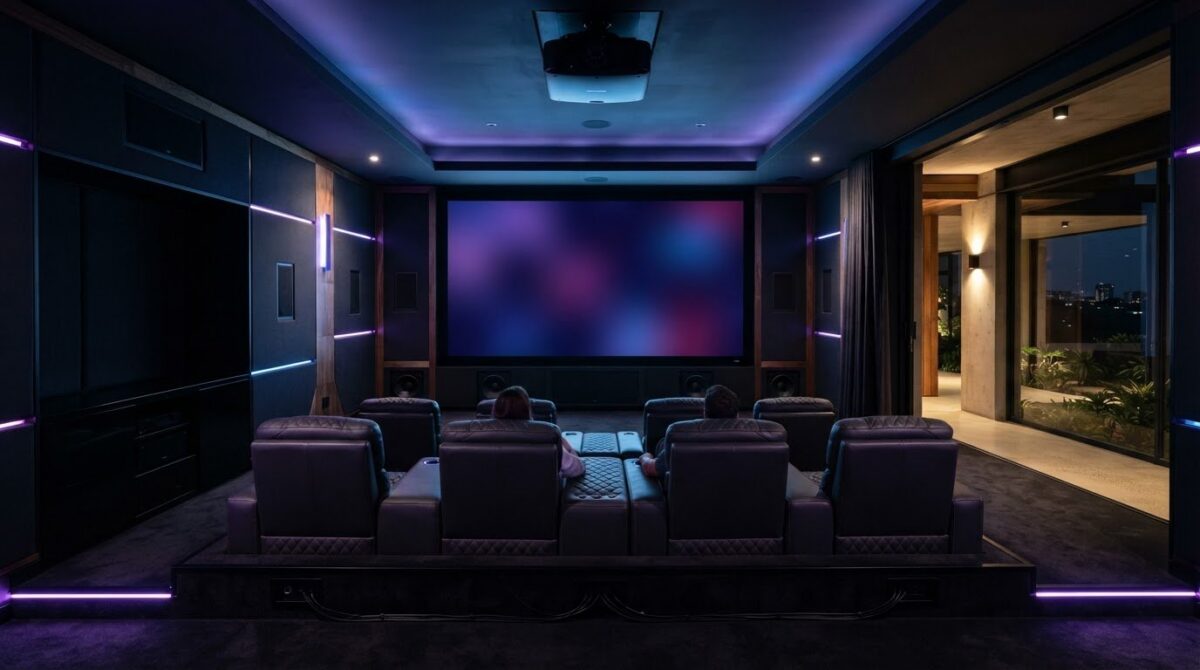
A cinema-grade room isn’t built by buying the biggest screen and loudest speakers. It takes a balance of picture, sound, acoustics and comfort. That’s the principle behind a successful dedicated home theatre room setup, and why premium equipment can disappoint when the room hasn’t been planned around it.
You may know you want immersive picture and sound, but terms such as Atmos, eARC and lumens can make equipment choices feel complicated. Add questions about echo, viewing distance and power stability in South Africa, and it’s easy to worry about investing in a setup that won’t deliver.
This guide takes you from planning the room to shaping the finished experience. Learn how to assess your space, improve acoustics, choose Epson Home Cinema projection and Bose audio options, and plan power sensibly. We’ll explain the essentials in plain language so you can create a comfortable space for films and other entertainment.
Key Takeaways
- Plan your dedicated home theatre room setup around room shape, light control and seating before choosing equipment.
- Compare Epson home cinema projectors and Bose audio options to find a picture and sound foundation suited to your space.
- Understand surround-sound configurations, then use speaker placement and acoustic treatments to improve listening.
- Check power protection and connection compatibility to help your system work reliably in a South African home.
- When choosing equipment, check compatibility and consider whether Bose headphones suit quieter viewing.
Planning Your Dedicated Home Cinema Space
A successful dedicated home theatre room setup starts with the room, not the equipment. Shape, light, airflow and seating all influence what you’ll see and hear, so assess the space before choosing a screen or planning cable routes. A home cinema brings picture, sound and viewing comfort together; the room needs to support all three.
Basements and windowless spare rooms can be easier to darken, but check ventilation, moisture and access before committing. A sealed room that traps heat can become uncomfortable during a long film and may not provide enough airflow for equipment.
See a home theatre room come together in this room design and system setup example:
Room Dimensions and Acoustic Potential
A rectangular room is generally easier to plan acoustically than a square one. Equal opposing dimensions can cause low-frequency reflections, or standing waves, to build up in the same areas. Bass may then sound uneven from one seat to another. Room treatments and speaker placement can help, but a suitable room gives you a stronger starting point.
Before work begins, sketch the screen, seating, projector position and speaker locations. Mark cable paths and plan concealed routes with accessible points for maintenance or changes. Avoid putting equipment in a sealed cupboard, as projectors and amplifiers need clear airflow. Follow the projector manufacturer’s guidance on placement and ventilation.
Total Light Control for 4K Clarity
Ambient light washes out projected blacks and reduces perceived contrast. Fit blackout curtains or blinds over windows, then use matte wall and ceiling finishes to limit light reflecting back onto the screen. Dark, non-reflective colours around the viewing area can help keep attention on the image. Automated window coverings can close as part of a theatre-start routine, making it easier to move from everyday use to film viewing.
Plan seating around the image. Mark the intended screen size on the wall and test viewing positions before fixing seats in place. Check that everyone can see the full image comfortably without craning or looking past another row. The best distance depends on screen size, resolution and personal preference, so consult the projector or screen maker’s guidance and try a temporary layout first.
Selecting the Visual and Audio Foundation
Picture and sound work best as a system. For a dedicated home theatre room setup, choose a display and audio solution that suit the room, then check how your sources will connect to both. Epson Home Cinema Projectors and Bose audio options are a useful starting point, but compatibility and placement matter as much as the equipment itself.
Projector or TV? Choose for the Room
A projector can create a cinema-scale image on a large screen, making it a strong fit for a dedicated room with controlled light. An Epson 4K projector can deliver detailed, large-format viewing, but performance depends on the model, screen, setup and content. Check the projector’s throw distance against the room before buying. This confirms whether it can produce your chosen image size from the planned position. Compare models, including how each achieves 4K presentation and which picture adjustments it offers.
A television may suit a room that needs to handle daylight or everyday viewing, whilst projection brings scale to a space designed for films. Neither is automatically the right choice. Match the display to how you’ll use the room.
Match Bose Audio to Your Priorities
The Bose Lifestyle Collection is an option to consider for a premium system designed to integrate discreetly into a room. The Bose Smart Ultra Soundbar offers a simpler, more compact route to TV audio. Choose according to the experience you want, the room layout and how much equipment you want to incorporate. Check the specific model’s features and connections before planning around them.
Dolby Atmos can create a three-dimensional soundscape, placing effects around and above the listener when the content and system support it. Speaker positions affect the result, so use Dolby’s Dolby Atmos installation guidelines when planning a compatible setup. When comparing formats, check that your source device, connections and audio system support the same capabilities.
Plan the source chain deliberately. A 4K Blu-ray player can serve a disc collection, whilst a streaming device provides access to online services. Connect sources through the display or audio system according to their supported inputs and outputs, and check that the route carries the picture and sound formats you want.
To compare Bose and Epson home cinema options, consider how each component will fit your room and work with the rest of the system.
Optimising Room Acoustics and Speaker Placement
Even capable equipment can sound uneven if speakers interact poorly with the room. In a dedicated home theatre room setup, aim for clear dialogue, smooth bass and spacious effects without overwhelming the seating area. The right configuration depends on room dimensions, speaker locations and listening positions, not simply on choosing the largest channel count.
Choose a Layout That Fits
In a 5.1.2 system, the first number refers to five ear-level speaker channels, the second to one subwoofer, and the final number to two height channels. A 7.1.4 system adds two ear-level channels and two height channels. This can create a more enveloping presentation in a room with space for the extra speakers. Plan around the seating and obstacles such as doorways, beams and furniture. CEDIA’s Immersive Audio Design Recommended Practice offers a professional reference for immersive system design.
Control Reflections and Bass
Start with the first reflection points on the side walls: these are the spots where sound from the front speakers reflects towards the main seat. Ask someone to move a mirror along each wall. When you can see a speaker in the mirror from the listening position, mark the spot as a potential treatment area. Absorptive panels there can reduce distracting reflections. Diffusion scatters sound rather than absorbing it, while bass traps in corners can help manage low-frequency build-up that makes bass sound muddy. Fabric-wrapped panels can help acoustic treatment feel considered rather than utilitarian.
For subwoofer placement, try different positions and listen from the main seat. One practical method is to temporarily place the subwoofer at the seat, play familiar bass-heavy content, then check possible subwoofer locations around the room for the smoothest response. Bass is less directional than higher frequencies, but room modes can make it boom in one seat and seem weak in another. Check the result from other seats before settling on a position.
Calibrate for the Room
If your compatible Bose system supports ADAPTiQ, follow its instructions to connect the calibration headset and take measurements from the specified listening positions. Keep the room quiet and place the headset as directed. Calibration can adjust system performance for the listening space, but it won’t replace acoustic treatment or correct every reflection from hard surfaces such as glass and tiles. After calibration, listen to familiar dialogue and music. Adjust bass and treble in the Bose Music app only if your system offers those controls, and make small changes rather than chasing a dramatic effect.

Essential Infrastructure: Power, Seating, and Connectivity
Plan the supporting systems alongside your screen and audio. A dedicated home theatre room setup needs thoughtfully managed power, comfortable seating and connections that carry the formats your equipment supports. In South Africa, consider power interruptions from the outset rather than treating protection as an afterthought.
Power Protection and Load Shedding
Use a correctly rated surge protector for your Bose and Epson equipment, and check its specifications, earthing requirements and suitability with a qualified electrician. A UPS may provide time to shut equipment down safely during an outage. For a projector, check the manufacturer’s instructions first: some models need a cooling cycle before power is disconnected, so don’t assume a UPS will provide enough backup time. Size power protection for the connected load and keep ventilation clear around equipment.
Where practical, keep mains cables separate from HDMI and audio runs, crossing them at right angles if they must meet. This keeps the installation organised and can reduce the chance of interference. A surge protector or UPS isn’t a substitute for appropriate wiring and electrical advice.
Connectivity That Matches Your System
HDMI 2.1 features such as 4K at 120Hz and eARC are useful only when the source, display, audio system and cable all support the required feature. eARC carries compatible high-bitrate audio between devices. Check the ports and formats on each component before choosing a connection path. Choose cables to match the equipment and run, and verify their certification and supported bandwidth rather than paying extra for claims you can’t confirm.
For long runs, plan cable routes before closing walls or fitting cabinetry. Use labelled conduits where possible, leave access for replacement and avoid tight bends. Wired Ethernet can offer a more consistent connection for a streaming device, especially where Wi-Fi coverage is weak. Test the network at the device location before installation.
Comfort and Simple Control
Home theatre seating should support a relaxed viewing position, with a clear view of the screen and enough space to recline without blocking walkways or speakers. Try the layout before fixing equipment in place. A single-touch scene for lights, sound and screen can make operation easier, but check that the chosen devices and control platform are compatible.
For advice on choosing Bose and Epson equipment for your room, explore SoundXcel’s home cinema equipment.
Professional Integration with SoundXcel
A dedicated home theatre room setup is easier to plan when the projector, audio system and accessories are considered together. SoundXcel is an authorised Bose retailer and offers Epson Home Cinema Projectors, Bose audio options, pre-loved Bose equipment and specialised Bose repairs. Before buying, check the product information and any applicable warranty terms for the specific equipment.
Choose Equipment That Works Together
Think beyond individual specifications. Match the projector to your screen and room, then check that your audio system and source devices support the connections and formats you plan to use. SoundXcel’s Bose and Epson product range gives you options to compare against your room plan. Check which models are currently available before making your shortlist.
For late-night viewing, Bose SimpleSync may let compatible Bose headphones pair with a compatible Bose speaker or soundbar. Compatibility varies by product, so check the SimpleSync list and connection instructions for both devices before buying. Bose QuietComfort Ultra Headphones are one option to consider, subject to compatibility confirmation.
Build in Stages and Maintain Your System
Pre-loved Bose equipment can be a practical way to expand an existing system or explore a different setup. Before purchasing, check the item’s condition, included accessories and compatibility with your current equipment. Confirm any applicable warranty or return terms with the seller. A lower-cost component is only good value if it works with the rest of your system.
SoundXcel also provides Bose repairs. If a Bose component develops a fault, check whether it can be assessed or repaired before replacing it. Follow the manufacturer’s care guidance and keep purchase and repair records with your equipment details. These habits can make future troubleshooting easier and help you make informed decisions about maintaining your system.
For sound beyond the cinema, Bose DesignMax Series speakers are another option to explore for spaces such as a home bar. Check that the intended use and installation requirements suit the specific product. If you’re planning a combined projection and audio system, read this guide to Bose Lifestyle and Epson projector setup and compare the components against your room plan.
Bring Your Home Cinema Vision to Life
A dedicated home theatre room setup works when every choice supports the experience: plan the room before selecting equipment, match picture and sound components to your space, and give acoustics, power and connectivity the same care as the screen. Decisions such as speaker placement and light control can make a real difference to how the finished system feels.
Build a room that suits your viewing habits and home rather than chasing specifications you may not need. Choose equipment that works together, check compatibility before buying and make comfort part of the plan. The result can be more than a place to watch films. It can become a welcoming space to unwind and enjoy entertainment.
Explore SoundXcel’s Bose and Epson home cinema range to compare equipment for your room and take the next step towards your theatre setup. SoundXcel also offers pre-loved Bose equipment and specialised Bose repairs.
Frequently Asked Questions
What is the minimum room size for a dedicated home theatre?
There’s no single minimum room size; the right dimensions depend on your screen, seating, projector and speaker layout. Start by checking the projector’s throw distance and the screen size you want, then allow enough room for comfortable viewing and clear speaker positions. A rectangular room is often easier to plan acoustically than a square one. Map the layout before buying equipment, including walkways and cable routes.
Should I choose a 4K projector or a large-screen TV?
Choose a 4K projector if you want a cinema-scale image and can control the room’s light. A large-screen TV may suit a space used in daylight, where ambient light can reduce a projected image’s perceived contrast. Compare display size, viewing distance, room brightness and installation position. For a projector, confirm that its throw distance works in your room. For either option, check that your sources support the picture formats you plan to watch.
How do I protect my home theatre equipment from power surges in South Africa?
Use appropriately rated surge protection and ask a qualified electrician to check your installation, earthing and equipment load. A UPS may provide time for an orderly shutdown during an interruption, but confirm its capacity and suitability for each device. Projectors may need a cooling cycle before power is disconnected, so follow the model’s instructions. Keep power and signal cables organised, and don’t treat a surge protector as a substitute for safe wiring.
Can I use wireless speakers for a dedicated cinema room?
Yes, wireless speakers can reduce visible cabling, but check that the system supports the channels and audio formats you want. Wireless components still need power, and performance depends on reliable connections and device compatibility. For a dedicated cinema, consider whether wireless placement offers enough flexibility without introducing delays or drop-outs. Compare the manufacturer’s setup guidance with your room layout, and confirm how the speakers connect to the source or main audio system.
What is the difference between Dolby Atmos and standard surround sound?
Standard surround sound typically sends audio through channels assigned to speakers around the room. Dolby Atmos can position sounds as individual objects, including overhead effects, when the content and equipment support it. The result can feel more three-dimensional, but it depends on compatible playback equipment, suitable speaker placement and Atmos-enabled content. Check the full signal path, from streaming device or disc player through the audio system to the speakers.
Is it worth buying pre-loved Bose equipment for my setup?
Pre-loved Bose equipment can be a worthwhile way to add to a system, provided it suits your needs and works with your existing components. Before buying, check the model, condition, included accessories, connection options and compatibility. Confirm any applicable warranty or return terms with the seller. SoundXcel offers pre-loved Bose equipment, so compare available items against your room plan and intended use.
How often do I need to replace the lamp in an Epson projector?
Replacement timing depends on the specific Epson projector, its light source, usage and operating conditions, so there isn’t one interval that applies to every model. Check the user manual for lamp-life guidance and replacement instructions for your unit. Some Epson projectors use a different light source, so first confirm whether your model has a replaceable lamp. Follow the projector’s warnings rather than waiting for image failure.
Do I need professional installation for a Bose Lifestyle system?
Not necessarily. Whether you need professional help depends on your room, system configuration, cable routing and confidence with setup. A straightforward arrangement may be manageable by following the product instructions; built-in wiring, concealed equipment or complex speaker placement can make expert assistance useful. Before purchase, confirm what the specific system includes, its connection requirements and any installation guidance. SoundXcel offers Bose products in South Africa, and you can check product information with the team.
