

Bose Speaker Repair Costs: South African Owners’ Guide
July 28, 2026
Bose Soundbar Troubleshooting: A Professional Guide to Restoring Your Audio
July 30, 2026
What if that frustrating distortion isn’t a sign of a broken driver, but simply a digital hiccup or a minor environmental conflict? You invested in Bose for its legendary clarity, so hearing a persistent buzz or pop is deeply disappointing. It’s natural to worry about expensive repair bills or complex technical jargon whilst you’re just trying to enjoy your favourite playlist. This guide shows you exactly how to fix crackling Bose speaker issues using professional diagnostic steps that restore your audio to its original, pristine state. You want your crystal clear audio back without the stress of “impedance” talk or “interference” confusion.
We’ll explore the latest July 2026 firmware updates, such as version 22.0.40, and check your Bose app version 13.1.7 settings to ensure everything is optimised. You’ll learn to identify whether the culprit is a loose cable, a software glitch, or a hardware fault that requires a specialist touch. Follow these methodical steps to bring back the seamless, high-end sound you love and know exactly when to call in the experts. It is time to reclaim the sophisticated listening experience you deserve.
Key Takeaways
- Learn how to distinguish between digital stutter and mechanical rattles to pinpoint the exact source of your audio distortion.
- Master the essential software updates and app settings that frequently resolve complex digital signal processing errors.
- Perform a thorough physical inspection of your cables and environment to fix crackling Bose speaker interference caused by nearby devices.
- Identify specific signs of hardware fatigue, such as blown drivers, that indicate when your system requires expert intervention.
- Discover why specialised repairs for your Bose equipment offer a more sustainable and cost-effective solution than buying new.
Identifying the Source: Why Is Your Bose Speaker Crackling?
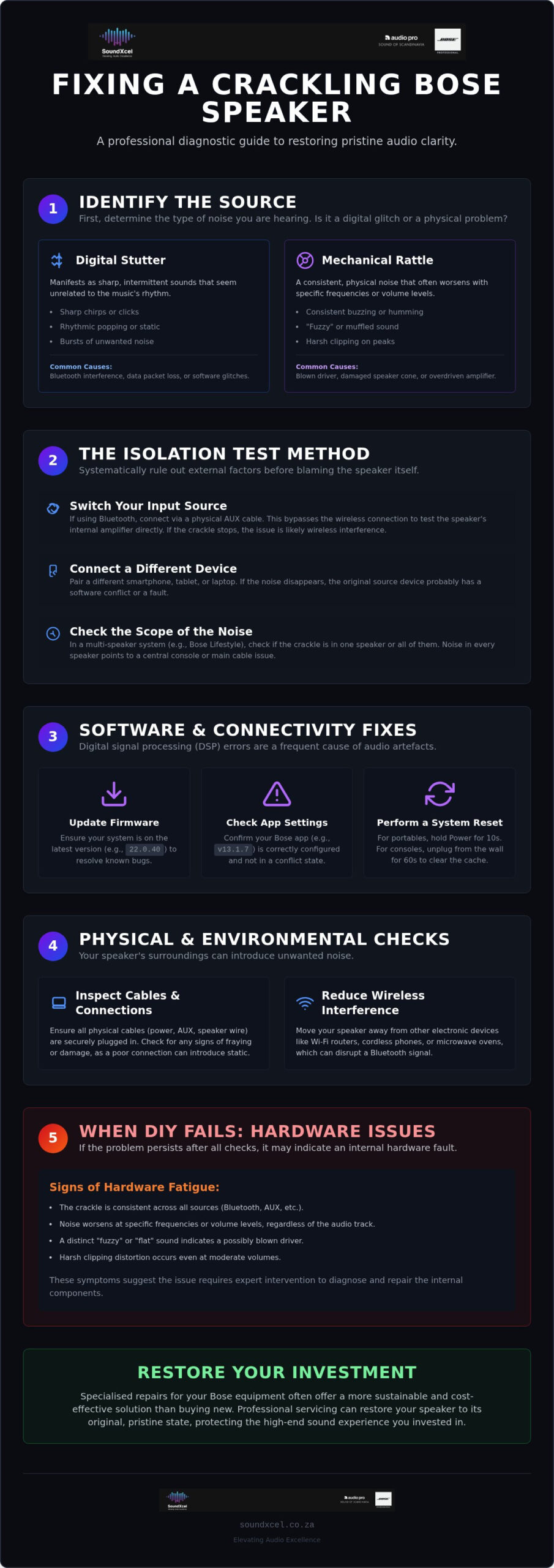
Audio crackling is any unwanted noise, static, or popping that disrupts the intended sound profile of your music. To fix crackling Bose speaker problems, you must first understand that audio distortion can stem from several distinct sources. Premium Bose systems are engineered with a high signal-to-noise ratio, meaning the audio signal should remain crisp whilst background noise stays imperceptible. When this balance shifts, the resulting crackle usually falls into two categories: digital stutter or mechanical rattle. Identifying which one you are hearing is the first step toward restoring your audio clarity.
Bose systems rely on precise electrical signals to move the speaker cones. If that signal is corrupted before it reaches the driver, you hear a digital artefact. If the signal is clean but the speaker itself is damaged, you hear a physical rattle. Distinguishing between these two sounds allows you to choose the correct troubleshooting path. It prevents you from wasting time on software resets when the problem is actually a frayed cable amongst your wiring.
Digital Static vs. Physical Distortion
Digital issues often manifest as sharp chirps, rhythmic stutters, or bursts of static. These are frequently caused by Bluetooth interference or data packet loss between your device and the speaker. In contrast, physical hardware damage sounds like a consistent buzzing or rattling that intensifies at specific frequencies. A blown driver occurs when the speaker cone or the flexible surround is physically compromised, leading to a “fuzzy” sound. Clipping is the harsh distortion that occurs when you overdrive an amplifier beyond its clean power limits, often resulting in a flat, squashed audio profile.
The Isolation Test Method
Isolate the problem before assuming your hardware is at fault. Follow these steps to determine if the issue lies with your speaker or your playback device:
- Switch your input source: If you are currently using Bluetooth, connect via a physical AUX cable. This bypasses the wireless radio and tests the internal amplifier directly.
- Connect a different device: Pair a different smartphone, tablet, or laptop to the speaker. If the crackle disappears, the original source device likely has a software conflict or a hardware fault.
- Check the scope of the noise: Determine if the crackle is limited to a single speaker or persists across the entire system. In a Bose Lifestyle Collection setup, a crackle in every speaker usually points to a central console or cable issue rather than individual driver failure.
If the noise vanishes when you change the source or the cable, your speaker is likely healthy. However, if the crackle persists across all devices and inputs, it is time to look deeper into the software settings and physical connections. Use this methodical approach to fix crackling Bose speaker issues without unnecessary stress or expense.
Software and Connectivity Fixes for Bose Audio
Many users assume a crackle means a blown driver, but digital signal processing (DSP) errors are often the true culprit. Modern Bose systems, including the Bose QuietComfort Ultra Headphones and the Bose Lifestyle Collection, rely on complex software to manage audio output. If this software encounters a bug, it manifests as audible artefacts that mimic physical damage. Before you conclude that your hardware is failing, focus on the digital “handshake” between your devices. A glitch in how your speaker interprets data can easily be mistaken for a mechanical fault.
Wireless stability often hinges on audio codecs like AAC or SBC. Whilst AAC offers superior quality for Apple users, SBC is the standard for broader compatibility. If your speaker struggles to decode these streams, you might hear rhythmic popping or static. Clearing your Bluetooth pairing list is a quick way to resolve these handshake errors. By removing all stored devices and reconnecting from scratch, you force the system to establish a fresh, clean connection. This is a vital part of troubleshooting speaker distortion before moving to physical inspections.
Performing a Bose System Reset
A system reset should be your first diagnostic step. For portable speakers like the SoundLink series, this usually involves holding the Power button for ten seconds until the status lights indicate a restart. If you own a Bose Lifestyle console, perform a full power-cycle by disconnecting the power cord from the wall for at least sixty seconds. This clears the internal cache and resets the DSP, often resolving “ghost” crackles that persist across different inputs. If these basic steps don’t resolve the issue, you may need to consult a specialist for professional Bose repairs to ensure your premium gear receives expert care.
Updating Firmware via the Bose Music App
Keeping your hardware current is essential for peak performance. As of July 2026, the Bose app version 13.1.7 has been released to address key stability issues and improve the overall user experience. For those using the Bose Portable Smart Speaker, ensure you have updated to firmware version 22.0.40, which includes critical bug fixes and security updates. Use the Bose Music App on your smartphone to check for these updates automatically. For legacy products that lack app connectivity, visit the Bose BTU (Bluetooth Updater) website on a PC or Mac. These patches often contain specific fixes for “popping” bugs discovered in newer models, providing a simple way to fix crackling Bose speaker problems at home.
Physical Inspections: Cables, Interference, and Environment
Physical hardware often bears the brunt of environmental stress. If your software is up to date, it is time to look at the tangible components. A crackle is frequently just electrical noise or a weak connection leaking into the signal path. Inspect every cable for signs of fraying or oxidation amongst the metal contacts. In South Africa, the unique challenge of power fluctuations can degrade internal components over time. These surges often cause the power supply to struggle, resulting in a low-level hum or sudden pops. Even a small amount of debris or dust accumulation within the speaker ports can disrupt airflow, creating a sound that mimics a mechanical rattle. To fix crackling Bose speaker problems, you must ensure both the signal and the surroundings are pristine.
Cable Management and Shielding
Premium systems like the Bose Lifestyle Collection require high-quality shielded cables to maintain their signature sound. Unshielded wiring acts like an antenna, picking up stray signals from other electronics. Examine your 3.5mm jacks and optical cables for any signs of bending or loose housing. Use the “wiggle test” by gently moving the cable near the input port whilst music is playing. If the noise fluctuates or cuts out as you move the wire, you have identified an intermittent connection break. Swapping a damaged lead is an easy way to restore clarity without calling for professional help.
Managing Wireless Interference
Wireless signals are susceptible to electromagnetic interference (EMI) from everyday household items. Wi-Fi routers, microwaves, and even cordless phones often operate on the same 2.4GHz bands as your Bluetooth audio. This creates a “crowded” spectrum that forces your Bose speaker to drop data packets, causing a digital crackle. Place your speaker away from large metal objects and at least one metre from your internet router. Whilst you are testing the system, disable other nearby Bluetooth devices to see if the signal improves. Small adjustments to physical placement can often eliminate the need for more complex repairs.
When DIY Fails: Internal Hardware Issues
If software resets and cable swaps don’t resolve the noise, the issue likely resides within the speaker’s internal architecture. To fix crackling Bose speaker problems at this level, you need to understand how the components interact. A common culprit is the crossover circuit, which directs specific frequencies to the appropriate drivers. If this circuit fails, it can send low-frequency signals to a tweeter, causing a harsh, crackling distortion. In older Bose Wave systems, failing capacitors in the power module are a known issue, often manifesting as a persistent low-level pop or hum that doesn’t change with input.
Identifying these faults requires a methodical approach because Bose equipment is engineered with incredibly tight tolerances. Opening these units without specialised tools often leads to more harm than good, especially amongst the delicate ribbon cables found in modern units. Whilst a loose wire might seem simple to solder, the internal layout is incredibly dense and requires expert precision to navigate.
The Blown Driver Symptom Checklist
A blown driver or a perished foam surround is a mechanical failure that software cannot fix. Use this checklist to confirm if your hardware is physically compromised:
- Volume sensitivity: Does the crackle become more pronounced as you increase the volume? Mechanical rattles usually intensify with the physical movement of the cone.
- Frequency gaps: Is the sound unusually “thin”? If the bass has vanished or the treble sounds muffled, a specific driver may have failed.
- Physical rasping: Do you hear a scraping sound even at low volumes? This often indicates the voice coil is rubbing against the magnet.
Understanding how these components work together is easier when you consult a Bose sound system guide, which details the sophisticated engineering behind the brand’s signature audio.
The Risk of Unauthorised Repairs
Attempting to fix crackling Bose speaker issues by opening the casing yourself carries significant risks. Bose speakers often use acoustically sealed chambers to achieve deep bass from small enclosures. Breaking this seal without the correct gaskets or adhesives can permanently degrade the sound quality, making the speaker sound hollow. The internal acoustic pressure is carefully balanced; even a tiny air leak around a screw hole can introduce new whistling or buzzing noises.
Safety is another critical factor. Active subwoofers and Lifestyle consoles contain high-voltage components that can hold a charge even after being unplugged. Professional technicians also use calibration equipment to ensure that replaced drivers match the original factory specifications. If your troubleshooting has led you to a hardware fault, the most reliable path forward is to book a specialised Bose repair with an authorised expert.
Professional Bose Repairs: Restoring Your Investment
Premium audio equipment is an investment in your lifestyle. Discarding a high-performance system because of a minor audio artefact is often an unnecessary expense. Specialised Bose repair is significantly more cost-effective than replacing your setup with inferior brands. Choosing to fix crackling Bose speaker faults professionally protects your initial investment and maintains the resale value of your pre-loved Bose equipment. It is the most sustainable way to ensure your audio remains as crisp as the day you bought it.
SoundXcel operates as the national authority for Bose maintenance in South Africa. We understand the nuances of the local environment, from power surge damage to the specific needs of legacy hardware. Our team focuses on restoring the seamless, high-fidelity experience that the brand is known for. We provide a reliable path forward when home troubleshooting reaches its limit, ensuring your sophisticated technology receives the care it deserves.
SoundXcel’s Expert Diagnostic Process
Our bench-test procedure for Bose Lifestyle and DesignMax systems is rigorous and methodical. We don’t just swap parts; we identify the root cause of the failure amongst the complex internal circuitry. This approach ensures that once a fault is cleared, it stays cleared. We use only genuine or certified replacement parts to maintain the precise Bose sound signatures you expect. This commitment to quality ensures your gear returns to you with its original premium feel and performance intact. Every repair is handled with the precision of a high-end consultant who values your time and your listening experience.
Get Your Sound Back to Perfection
Whether you are struggling with a modern set of QuietComfort Ultra headphones or a legacy home cinema system, our technicians have the expertise to help. We bridge the gap between complex technical faults and your daily enjoyment of music. Don’t let a persistent crackle ruin your favourite playlist or home cinema experience. Our efficient repair process is designed to get your sound back to perfection with minimal disruption to your routine. Reclaim the clarity and sophistication of your audio system today. Reach out to our specialist team for a comprehensive assessment and professional restoration. Book your professional Bose repair with SoundXcel today.
Reclaim Your Pristine Audio Experience
Distinguishing between a digital stutter and a mechanical rattle is the essential first step toward restoring your system’s legendary performance. Most audio distortions vanish with a strategic firmware update or a simple cable swap; however, internal hardware fatigue requires a more technical approach. You now possess the professional diagnostic tools to identify when a quick reset suffices and when your premium equipment needs a specialist touch. These techniques provide a clear, methodical path to fix crackling Bose speaker issues without the stress of unnecessary guesswork.
SoundXcel serves as your specialised Bose repair centre and an authorised retailer of Bose and Epson products. We provide a comprehensive national South African service dedicated to preserving the longevity of your high-end audio gear. Restore your premium audio with SoundXcel’s Bose repair services and return to the crystal clear sound you expect from your system. Your investment in quality sound is worth protecting. With the right care, your Bose hardware will continue to enhance your daily life for years to come.
Frequently Asked Questions
Why does my Bose speaker crackle only at high volumes?
Crackling at high volumes is typically caused by amplifier clipping or mechanical fatigue in the speaker driver. When the volume is pushed beyond the system’s clean power limits, the audio signal becomes distorted and “squashed”. Physical damage to the speaker surround can also cause the cone to rattle against the housing during large excursions. Reducing the volume or adjusting your equaliser settings often provides a temporary fix whilst you assess the hardware.
Can a faulty Bluetooth connection cause static in my Bose headphones?
A faulty Bluetooth connection frequently causes static or “chirping” sounds in Bose headphones due to data packet loss. This is often the result of electromagnetic interference from other wireless devices or physical distance from the source. To fix crackling Bose speaker or headphone issues related to connectivity, try clearing the pairing list and re-establishing a fresh link with your smartphone or tablet.
Is it worth repairing an older Bose Lifestyle system?
Repairing an older Bose Lifestyle system is highly recommended because these units were built with premium components that often outperform modern entry-level alternatives. Restoring a legacy system is significantly more cost-effective than purchasing a new high-end home cinema setup. Professional maintenance ensures that your investment continues to provide the sophisticated audio performance you expect for many more years.
How do I know if my Bose speaker driver is blown?
You can identify a blown driver by listening for a consistent buzzing, rasping, or “fuzzy” sound that persists even at low volumes. If the audio suddenly lacks bass or sounds unusually thin, it suggests the voice coil or cone surround has physically failed. A blown driver will produce these artefacts across all input sources, confirming that the issue is mechanical rather than digital.
Can a firmware update fix a crackling sound?
A firmware update can resolve crackling sounds if the issue is caused by a software glitch or a digital signal processing error. Manufacturers regularly release patches, such as the July 2026 update for the Bose app, to fix known audio bugs and improve connectivity stability. Always check the Bose Music App or the BTU website to ensure your hardware is running the latest software version.
Does static in my Bose speaker mean it is permanently broken?
Static does not necessarily mean your speaker is permanently broken; it is often a symptom of a solvable external conflict. Many audio issues stem from poor cable shielding, wireless interference, or outdated firmware rather than catastrophic hardware failure. Following a methodical troubleshooting guide helps you fix crackling Bose speaker problems without the need for a full replacement, saving you time and money.
How much does it typically cost to fix a Bose speaker in South Africa?
The cost of repairing a Bose speaker in South Africa depends entirely on the specific model and the nature of the fault identified during a diagnostic evaluation. Factors such as the availability of genuine replacement parts and the complexity of the internal circuitry influence the final quote. It is best to consult a specialised repair centre for a professional assessment to understand the requirements for your specific system.
What is the best way to clean my Bose speaker to prevent audio issues?
The best way to clean your Bose speaker is to use a dry, lint-free cloth to gently remove dust from the exterior and grille. Avoid using liquids, sprays, or solvents, as moisture can seep into the speaker ports and damage the delicate internal electronics. Regularly removing dust accumulation amongst the ports prevents airflow obstructions that can sometimes lead to rattling or muffled audio performance.
