

How to Fix a Crackling Bose Speaker: The Expert Troubleshooting Guide
July 29, 2026
Professional Bose QuietComfort Headphones Repair: Restoring Premium Audio in South Africa
July 31, 2026
You settle in for a cinematic evening, but instead of immersive sound, you face a frustrating silence or a stuttering HDMI ARC connection. It’s a common headache for many South African homeowners who expect seamless performance from their premium gear. We agree that technology should enhance your life, not complicate it. Mastering Bose soundbar troubleshooting allows you to reclaim your audio experience and avoid the anxiety of a potential hardware replacement.
This professional guide provides a clear diagnostic framework to resolve audio dropouts and unresponsive apps. You’ll learn how to restore high-fidelity sound immediately and recognise the specific signs that indicate a professional repair is required. We also share essential tips to protect your Bose Lifestyle or Ultra system from local power fluctuations. Follow these steps to ensure your home theatre remains a reliable sanctuary of sound.
Key Takeaways
- Learn the difference between a standard standby restart and a professional “Cold Boot” protocol to clear persistent system errors.
- Resolve common HDMI ARC and eARC handshake failures by identifying and managing CEC conflicts between your TV and soundbar.
- Simplify your Bose soundbar troubleshooting by distinguishing between temporary software glitches and critical hardware failures that require expert attention.
- Protect your premium audio investment from the damaging effects of South African load shedding cycles and voltage spikes.
- Discover why choosing specialised repair for your Bose Lifestyle or Ultra system is a sustainable and cost-effective alternative to hardware replacement.
Essential Bose Soundbar Troubleshooting: The Initial Diagnostic Protocol
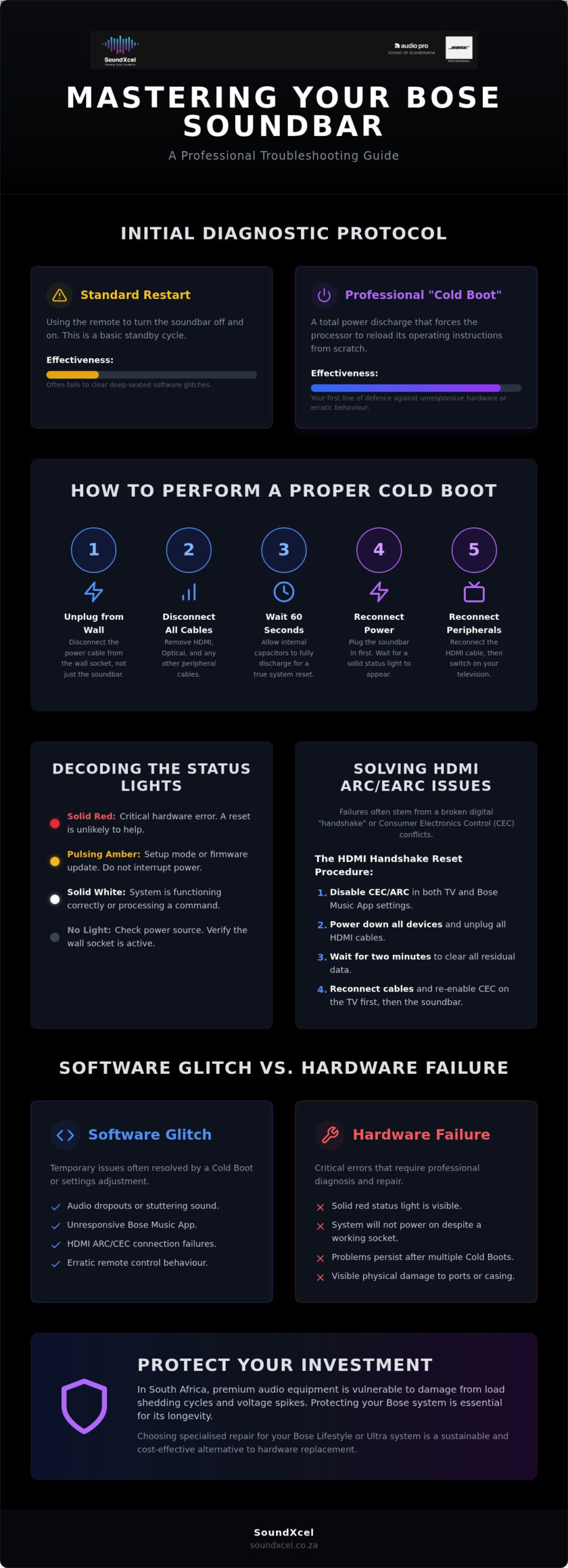
Effective Bose soundbar troubleshooting begins with a clear understanding of your system’s current state. Most users rely on a standard standby restart using the remote, but this often fails to clear deep-seated software glitches. A “Cold Boot” is different. It involves a total power discharge that forces the internal processor to reload its operating instructions from scratch. This process is your first line of defence against unresponsive hardware or erratic audio behaviour.
Before diving into hardware adjustments, open the Bose Music App on your mobile device. It serves as a digital diagnostic window, often revealing firmware version mismatches or network connectivity hurdles that aren’t visible on the soundbar itself. If the app cannot “see” your device, you’ve narrowed the problem down to a power or network issue rather than a simple audio setting error. Always check for physical obstructions; even a small decorative item placed in front of the soundbar can block the infrared sensor and make the system appear faulty.
The 30-Second Power Cycle
To perform a proper cold boot, follow a precise sequence. First, disconnect the power cable from the wall socket. Don’t just pull the plug from the back of the soundbar; ensure the entire power supply is de-energised. Wait for at least 60 seconds to allow the internal capacitors to discharge fully. This brief wait is essential for a true system reset.
Crucially, you must remove all peripheral cables, including HDMI and Optical connections, during this minute of silence. This breaks the digital “handshake” between your TV and the soundbar. When re-powering, plug the soundbar in first and wait for a solid status light before reconnecting the HDMI cable and switching on your television. This methodical approach ensures a fresh start for the CEC protocol, which often gets “stuck” during rapid power cycles.
Interpreting Bose Status Indicators
The light bar on your Bose system is a sophisticated communication tool. A solid red light is the most serious indicator, typically suggesting an internal hardware error that might require professional repair. If you see this, a simple reset is unlikely to solve the problem. If the light is white, the system is usually functioning correctly or processing a command.
An amber pulse usually means the system is in setup mode or currently downloading a firmware update. Never interrupt the power during an amber pulse, as this can corrupt the software. For deeper insights, the Bose Music App can often provide specific error codes that explain why a connection is failing. If the light bar remains dark despite power being present, verify that the wall socket is active, especially if you’ve recently experienced a power surge.
Resolving HDMI ARC and eARC Connectivity Issues
Modern audio relies on a complex digital “handshake” between your TV and the soundbar. This communication protocol, known as HDMI ARC (Audio Return Channel) or the more advanced eARC (Enhanced Audio Return Channel), allows a single cable to transmit high-quality sound whilst synchronising power and volume controls. When this handshake fails, your soundbar may disappear from the TV menu entirely. Effective Bose soundbar troubleshooting requires a deep dive into these digital connections to ensure your system remains the centre of your home entertainment.
Consumer Electronics Control (CEC) conflicts are the primary cause of connectivity failures. Whilst CEC allows your TV remote to control the soundbar, different manufacturers use proprietary versions of this technology that often clash. If you have a decoder, gaming console, or streaming stick connected to other HDMI ports, these devices can “pollute” the CEC bus, causing the TV to lose track of the Bose system. Using high-speed, eARC-compatible cables is essential for modern units like the Bose Ultra range, as standard HDMI cables lack the bandwidth to handle uncompressed Dolby Atmos signals. Additionally, ensure you organise your cables to prevent physical strain on the ports; the weight of a hanging cable can eventually damage the delicate internal pins of the HDMI socket.
The HDMI Handshake Reset Procedure
If your TV fails to recognise the soundbar, follow this specific reset sequence to force a fresh digital handshake. First, navigate to the settings menu on both your TV and the Bose Music App to disable all CEC and ARC functions. This clears the active communication path. Second, power down all connected devices and remove the HDMI cables from both ends. Wait for two minutes to ensure all residual data is cleared. Finally, reconnect the cables and re-enable the CEC settings on the TV first, followed by the soundbar. This structured order forces the devices to re-establish their connection from a neutral state.
Advanced CEC and Optic Alternatives
Sometimes, complex HDMI environments make a stable handshake impossible. If you continue to experience audio drops despite resetting the connection, consider switching to a Digital Optical connection. Whilst this removes the ability to use eARC features like Dolby Atmos, it provides a rock-solid audio signal that is immune to CEC interference. You can still manage your experience by adjusting “Audio Delay” or “Lip Sync” settings within the Bose Music App to ensure the sound matches the on-screen action perfectly. For those who refuse to compromise on high-fidelity performance, professional Bose repairs can identify if a faulty HDMI controller chip is the true culprit behind persistent connection failures.
Software Glitches vs Hardware Failure: Identifying the Root Cause
Distinguishing between a transient software glitch and a terminal hardware failure is a critical step in Bose soundbar troubleshooting. A “soft” glitch often manifests as app lag, where the Bose Music App fails to adjust the volume or toggle inputs despite the soundbar producing audio. These issues are typically resolved through firmware management. Conversely, a “hard” failure involves a total loss of power or physical damage to internal components. If your soundbar shows no signs of life even after testing different wall sockets, you’re likely facing a hardware-level event rather than a software bug.
Firmware updates play a vital role in maintaining the health of modern units like the Bose Smart Soundbar 900 or the Ultra model. Manufacturers frequently release patches to resolve known audio-sync bugs or improve network stability. If your system behaves erratically, check the app for pending updates. However, physical symptoms require a different approach. A damaged HDMI port often feels loose or intermittent, whilst a failing internal power supply might cause the unit to shut down unexpectedly during high-volume passages. For those investing in pre-loved Bose equipment, pay close attention to the capacitors. In older systems, these components can degrade over time, leading to a slow “death” where the unit takes longer and longer to boot up each day.
Performing a Factory Reset
When a standard power cycle fails, a factory reset is your final software-based option. To trigger this on most modern Bose soundbars, press and hold the Power and Volume Down buttons on the unit for 10 seconds until the light bar pulses. Be aware that this process wipes all your settings. You’ll lose your ADAPTiQ audio calibration and saved Wi-Fi credentials, requiring a full reconfiguration through the app. If the soundbar remains stuck in a “boot loop” where the light bar cycles endlessly without the unit turning on, the flash memory may be corrupted, necessitating expert intervention.
Signs Your Bose Hardware Needs Professional Attention
Some symptoms cannot be fixed with a button press. Persistent cracking or popping sounds that occur across all inputs, including Bluetooth and HDMI, usually point to failing output transistors or damaged speaker drivers. Excessive heat radiating from the rear of the unit or a faint electrical smell are immediate red flags. These signs suggest that internal components are operating outside their safe parameters. If the soundbar fails to power on despite using a verified power cable, the internal fuse or power board has likely succumbed to a voltage spike, a common occurrence in the South African electrical environment.
Protecting Your Bose System from Power Surges and Load Shedding
In South Africa, the greatest threat to your audio investment isn’t a software bug; it’s the national grid. Frequent load shedding cycles create a volatile environment for sensitive electronics. When the power cuts abruptly, your soundbar’s processor is forced into an uncontrolled shutdown. This can lead to firmware corruption whilst the unit is in standby, particularly if it was performing a background network check or preparing for an update. These sudden interruptions disrupt the internal logic, often requiring a deep reset to restore functionality.
When the electricity returns, it often arrives with a high-voltage surge. This “dirty power” can overwhelm the delicate capacitors inside your unit. Standard multi-plugs offer minimal protection against these massive spikes as they are designed for basic appliances rather than premium circuitry. Comprehensive Bose soundbar troubleshooting often reveals that persistent connectivity issues or “ghost” inputs are actually the result of cumulative damage from these power fluctuations. Over time, these small surges degrade the internal components until the system fails completely.
Surge Protection and Power Conditioners
A basic surge protector is essentially a one-time fuse. Once it takes a hit, its protective capabilities vanish. A professional power conditioner, however, actively filters the incoming voltage to ensure a steady stream of clean electricity. We strongly recommend unplugging your Bose sound system entirely before a scheduled outage. For the ultimate peace of mind, an Uninterruptible Power Supply (UPS) provides enough battery runtime to shut the system down safely. This prevents the data corruption that occurs when power is ripped away from the internal logic board during operation.
Recovering After a Power Outage
Do not switch all your entertainment components on simultaneously when the lights come back. Follow the “Sequential Power-Up” rule to avoid the HDMI handshake errors discussed in earlier sections. First, ensure your router is fully rebooted and the Wi-Fi signal has stabilised. Only then should you power up the soundbar, followed by the television. This methodical approach allows the devices to recognise each other in the correct order. If your soundbar fails to respond or shows no LED activity after a blackout, it may be “Dead on Arrival” due to a blown internal power board. If your system has been affected by a power surge, contact us for professional Bose repairs to restore your high-fidelity audio sanctuary.
When to Seek Professional Bose Repair Services
If you’ve followed our Bose soundbar troubleshooting steps and the system remains unresponsive, professional intervention is the logical next step. Restoring a premium audio system is a sustainable and sophisticated alternative to the “throwaway” culture of modern electronics. High-end systems like the Bose Lifestyle Collection represent a significant financial investment in South Africa. Discarding such a system due to a failed capacitor or a corrupted HDMI controller is unnecessary. Specialised repair services can breathe new life into legacy hardware, ensuring your home theatre remains a centre of excellence for years to come.
SoundXcel provides a national repair footprint, catering to both the latest Ultra ranges and beloved legacy systems. We understand the nuances of South African power conditions and the specific failures they cause, such as logic board damage from load shedding surges. Our technicians use advanced diagnostic protocols to isolate faults at the component level. This precision allows us to offer cost-effective solutions that maintain the acoustic integrity of your Bose equipment without the need for expensive, entire-unit replacements. Maintaining these systems requires a deep understanding of proprietary link cables and digital processing standards that generic repair shops simply do not possess.
Professional Repair vs DIY Risks
Resist the urge to open the chassis yourself. Bose soundbars utilise high-density internal architecture with delicate ribbon cables and proprietary connectors. A single slip of a screwdriver can cause irreparable damage to the logic board or the acoustic seal of the speaker chambers. Professional workshops use specialised diagnostic software and oscilloscopes to identify overheating components without compromising the unit’s structural integrity. Choosing an expert repair also ensures that any replaced parts meet original specifications, preserving the system’s resale value and performance. DIY attempts often void any remaining warranty and can turn a simple fix into a total hardware loss.
Next Steps: Restoring Your Sound
Before sending your unit for service, document the symptoms clearly to help our technicians. Note the colour and pulse pattern of the LED light bar and record any specific error messages shown in the Bose Music App. When organising transport, use the original packaging if it’s available. If not, wrap the soundbar in multiple layers of heavy-duty protective cushioning and ensure the bass module is secured in an upright position. These components are precision-tuned and require secure handling to prevent internal shifting during transit. Contact SoundXcel for Expert Bose Repairs to begin the restoration process and reclaim your high-fidelity audio experience.
Reclaim Your Premium Audio Experience
Restoring your home theatre’s performance starts with a methodical approach. By mastering the initial diagnostic steps and understanding the nuances of HDMI handshakes, you’ve gained the tools to resolve most common software glitches. Protecting your investment from the unique challenges of the South African power grid ensures long-term reliability for your premium gear. These practical steps empower you to maintain the sophisticated sound quality you expect from the Bose brand without unnecessary frustration.
When Bose soundbar troubleshooting reveals a deeper hardware fault, choosing an expert repair is the most sustainable path forward. Our specialised technicians provide national service coverage across South Africa, offering unmatched expertise in both modern Ultra models and legacy Bose Lifestyle systems. Don’t let a technical hurdle silence your favourite films or music. Book a Professional Bose Repair Service today to ensure your audio sanctuary remains at its peak. We’re here to help you return to the immersive, high-fidelity experiences you love.
Frequently Asked Questions
Why is my Bose soundbar blinking amber and not producing sound?
A blinking amber light typically indicates that the system is in setup mode or is currently downloading a firmware update. If the light persists for more than 20 minutes without producing audio, the system may have stalled during the digital handshake process. Restart your router and ensure the soundbar has a stable connection to complete the update cycle.
How do I perform a factory reset on my Bose soundbar?
To trigger a factory reset, press and hold the Power and Volume Down buttons on the unit for 10 seconds until the light bar pulses. This action clears all user settings, saved Wi-Fi credentials, and custom calibrations. You will need to recalibrate your room using ADAPTiQ and reconnect to the Bose Music App once the reset is finished.
Why does my Bose soundbar keep disconnecting from the TV?
Disconnections are often caused by Consumer Electronics Control (CEC) conflicts between your TV and other connected peripherals. Devices like satellite decoders or gaming consoles can interfere with the HDMI ARC signal. To solve this during Bose soundbar troubleshooting, try disabling CEC on your other devices or use a high-quality eARC-certified cable to ensure a stable handshake.
Can I fix a Bose soundbar that won’t turn on after a power surge?
A soundbar that remains unresponsive after a surge usually requires a professional hardware assessment rather than a software reset. Voltage spikes often damage the internal power supply board or the primary fuse, which are not user-serviceable. Attempting to open the unit yourself can lead to further electrical damage or irreparable ribbon cable tears.
Why is there no audio from my Bose bass module or surround speakers?
Audio loss in expansion speakers is frequently due to wireless interference from nearby routers or heavy appliances. Ensure your bass module is within 9 metres of the main soundbar and has a clear line of sight. If the status light on the rear of the module is amber, use the app to remove and re-add the accessory to refresh the connection.
How do I update the firmware on my Bose soundbar without the app?
You can update your firmware manually by connecting the soundbar to a computer via the service port and using the Direct IP method. Access the internal web server by entering the device’s IP address into a browser whilst the unit is in service mode. This bypasses the app entirely, which is useful if you are experiencing persistent network timeout errors during Bose soundbar troubleshooting.
Is it worth repairing an older Bose Lifestyle system?
Repairing a Bose Lifestyle system is highly recommended as these legacy units offer premium acoustic performance that modern budget systems cannot match. Specialist technicians can replace specific components like power capacitors or optical drives. This sustainable approach preserves your high-end investment for a fraction of the cost of a new premium home theatre setup.
Why is the audio out of sync with the video on my Bose system?
Lip-sync issues occur when the TV’s video processing takes longer than the soundbar’s audio decoding. Navigate to the “Audio” settings in the Bose Music App and use the “Audio Delay” slider to align the sound perfectly with the on-screen action. Many modern TVs also have an “Auto Lip Sync” feature within their own HDMI settings that should be enabled for better synchronisation.
