


Authorised Bose Repair Agent in South Africa: A Clear Guide to Bose Repairs
October 15, 2026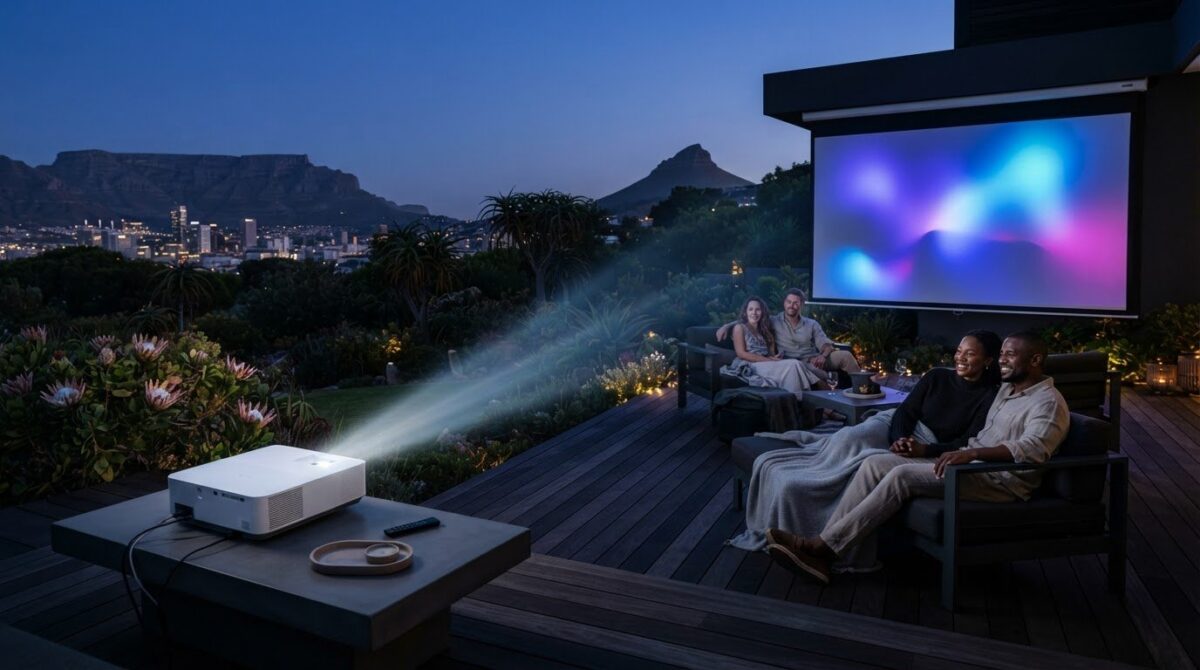
A brighter projector won’t automatically deliver a better outdoor picture. Ambient light, screen choice and the distance between the projector and screen all shape what you’ll see. Choosing an Epson projector for outdoor movies starts with matching its brightness and throw distance to your space, not simply looking for the biggest numbers on a specification sheet.
It’s easy to underestimate how dusk, garden lighting or a large screen will affect visibility. This guide helps you compare the specifications that matter and plan a practical setup around your viewing habits, whether you watch after dark or want to start earlier in the evening.
Explore how brightness and resolution affect image quality, how to plan projector placement, and why a suitable screen, power source and sound plan can make movie night more comfortable. You’ll also find guidance on choosing an Epson Home Cinema projector for outdoor viewing in South Africa.
Key Takeaways
- Choose an Epson projector for outdoor movies by considering the light around your viewing area and the size of the image you want.
- Compare brightness and resolution in context, including your viewing distance and expectations for detail.
- Match your setup to how often you watch outdoors, how much space you have and how easily you can control light.
- Plan projector placement, screen surface and power access before movie night, and keep equipment and connections dry.
- Use your viewing conditions and setup needs to narrow down Epson Home Cinema projector options for your space.
What changes when you use an Epson projector for outdoor movies?
An outdoor movie is shaped by more than the projector. Ambient light, the distance between projector and screen, the screen’s size and surface, and where viewers sit all affect the experience. A home cinema projector may produce an excellent picture indoors, but that doesn’t mean it will suit every garden, patio or viewing time. The same setup can look very different after daylight fades or nearby lights come on.
Ambient light reduces perceived contrast outdoors, making dark scenes look flatter and colours less distinct even when the projected image itself hasn’t changed. That’s why a product label alone can’t tell you how clearly a film will appear in your space. Outdoor cinema takes many forms, from informal garden screenings to drive-ins, as the overview of outdoor cinema illustrates. For a home setup, plan around your own surroundings.
Why ambient light changes the picture
Light from garden fittings, security lights or the last daylight in the sky competes with the projected image. It can make blacks appear grey and soften the distinction between bright and dark details. The effect depends on the projector, image size and surroundings, so don’t assume a particular brightness will deliver the same result in every garden.
Plan to begin the film after the sky has darkened, and switch off or redirect avoidable lights near the screen. If you prefer to start earlier, consider how much shade you can create and whether you can keep direct light off the image area. A short test before guests arrive can reveal distracting glare or an image that’s difficult to see.
What makes an outdoor viewing space workable?
Start with a clear, stable surface and enough room to position the projector at the distance needed for your chosen image size. A dedicated screen can provide a more consistent surface than an uneven or textured wall, but placement still matters. Check that plants, furniture or people won’t interrupt the image path between projector and screen.
Then consider the audience. Place seating where viewers can see the whole image comfortably, without looking past obstacles or sitting too close to the projector. Wind can move a screen or disturb the picture, while nearby lighting can distract viewers as well as reduce contrast. A sheltered, uncluttered spot can make the screening more comfortable.
Before settling on an Epson projector for outdoor movies, think about when and where you’ll use it. A household that watches after dark in a small, controlled space has different needs from one planning regular screenings for a larger audience. Measure the available distance and image area, note nearby light sources, and decide how you’ll keep the projector and its connections dry. These details give you a practical basis for comparing specifications.
Which Epson projector specifications matter for outdoor movies?
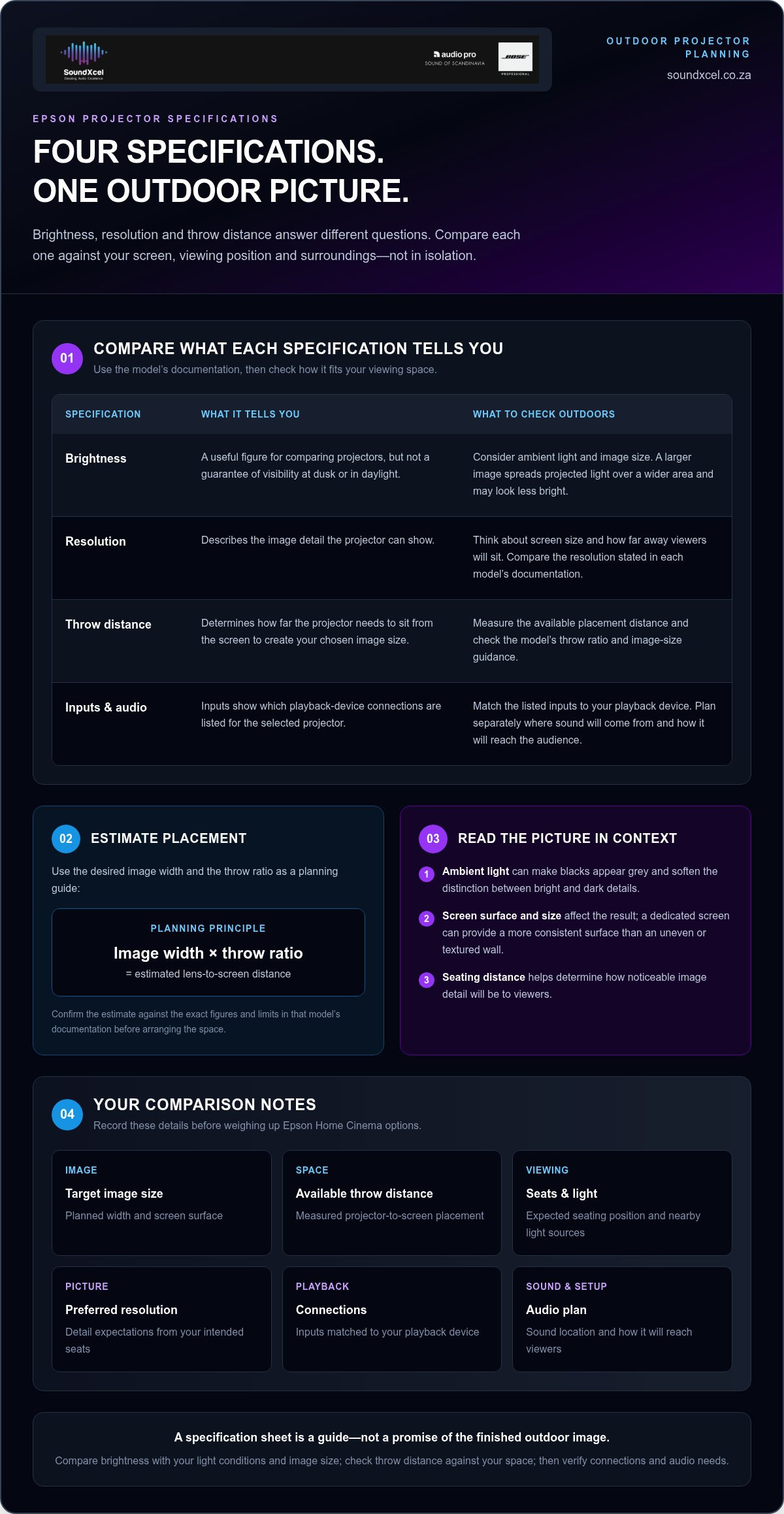
Read a specification sheet as a guide to what a projector can support, then relate it to your screen and viewing position. Brightness, resolution and throw distance answer different questions: how the image may hold up in your conditions, how much detail it can show, and where the projector can sit. No single figure captures the result of your complete outdoor setup.
A projector’s listed specification describes the device under stated conditions; the image your outdoor setup delivers also depends on screen size, placement and surrounding light. Keep that distinction in mind as you compare Epson options. An impressive figure on paper won’t remove the need to plan for your actual space.
Brightness, resolution and image size
Brightness is useful for comparing projectors, but it isn’t a guarantee of visibility at dusk or in daylight. A larger image spreads the projected light over a wider area, so it may look less bright than a smaller image from the same projector. Screen material and ambient light also affect the result. Compare brightness figures alongside your planned image dimensions and viewing conditions instead of treating one number as a promise.
Resolution describes image detail. How noticeable that detail is depends partly on screen size and how far away viewers sit. Finer detail is easier to appreciate when the image is large or the audience is closer. Decide what level of detail you want from your intended seats, then compare the resolution stated in each model’s documentation. Don’t assume a resolution or performance level from a range name alone.
Throw distance, connections and sound
Throw distance determines how far the projector needs to sit from the screen to create your chosen image size. Check the model’s documented throw ratio and image-size guidance, then measure your available placement distance. As a planning principle, multiply the desired image width by the throw ratio to estimate the lens-to-screen distance. Confirm the result against the exact figures and limits in that model’s documentation before arranging the space.
Check the selected projector’s listed inputs against the playback device you intend to use. This helps you avoid discovering during setup that your preferred connection needs an adapter or a different source. Plan audio separately, too. Decide where sound should come from and how it will reach the audience, without assuming that a particular projector has built-in speakers or a specific audio output.
For a sensible comparison, note your target image size, available throw distance, expected seating position, preferred resolution and playback connections. Then weigh brightness against the conditions in which you’ll watch, rather than relying on the specification alone. If you’re exploring Epson Home Cinema options, SoundXcel’s Epson projectors are a useful place to start comparing the product category.
Which outdoor movie setup suits your viewing habits?
The right setup depends on how often you watch outside and how much effort you want to spend preparing the space. An occasional film night may call for equipment that can be brought out and put away easily. A regular outdoor cinema benefits from a consistent position, a repeatable image size and planned access to power. Think through your habits before comparing individual Epson projector models.
Occasional movie nights or a regular outdoor cinema?
For occasional use, prioritise convenience. Think about where the projector will be stored, how easily you can position it for a screening, and whether your space can accommodate the image without major rearrangement. For frequent viewing, consider how to return the projector and screen to the same positions each time. Marking placement points can help make alignment and setup more predictable.
| Planning factor | Occasional movie nights | Regular outdoor viewing |
|---|---|---|
| Viewing frequency | Plan for a flexible arrangement that suits occasional use. | Prioritise a setup that’s straightforward to repeat. |
| Light control | Choose viewing times and surroundings that let you reduce distracting light. | Consider how light conditions vary across your usual screening times. |
| Available space | Work with a clear area that can be prepared for each screening. | Plan stable positions for the screen, projector and seating. |
| Setup permanence | Convenient positioning and storage may matter most. | Consistent placement and planned power access can simplify setup. |
Neither pattern makes one projector universally best. A compact space with controlled light presents different requirements from a larger area used at varied times. Use the table to clarify the priorities you’ll bring to your model comparison, then check each device’s specifications against your intended use.
How to assess Epson projector categories
Epson offers home projector options as well as high-brightness projector ranges positioned for well-lit environments, including large venues. These category descriptions provide useful context, but they don’t establish how every projector will perform in a particular garden or at a chosen screen size. Treat them as a starting point, not a guarantee of suitability.
For each candidate, check the individual model’s documentation for brightness, resolution, throw distance and relevant connections. Compare those details with your space, viewing frequency and plans for controlling light. A category name can help narrow the search, but the model specifications and your viewing conditions should shape the final decision.
For broader home cinema context, the related guide Bose Lifestyle and Epson Projector Setup: The Ultimate 2026 Home Cinema Guide considers how a projector fits into a wider home entertainment setup. Use it alongside this practical comparison as you decide what an Epson projector for outdoor movies needs to support in your space.
How to plan an outdoor Epson projector setup step by step
A successful outdoor screening starts with the space, not the power button. Map out the screen, projector, seating and power access before setting anything up. Follow the selected Epson model’s instructions for placement and operation, including any environmental limitations. This sequence helps you prepare a practical setup without relying on assumptions about a particular model or accessory.
- Assess the space. Choose a spot with a clear view of the screen and enough room for the audience. Note nearby light sources, possible obstructions and a dry location for the projector and connections.
- Measure placement. Measure the available distance between the projector position and the viewing surface. Compare it with the selected model’s documented throw guidance for your intended image size.
- Prepare the surface. Select a stable screen or suitable flat surface. Check that it’s positioned securely and that people, plants or furniture won’t interrupt the projected image.
- Position the equipment. Place the projector on a stable support and align it with the screen as directed by the model instructions. Plan access to power and arrange cables so they don’t cross the main walking route.
- Test the complete setup. Connect your playback device using a supported input, then check the image, playback and audio. Make adjustments before guests arrive, while there’s still time to resolve placement or connection issues.
Position the projector and viewing surface
Use your measurements to find a position that fits the selected projector’s documented throw range. A surface that’s too close or too far away may not produce the image size you have in mind. Keep the projector’s image path clear, and check that its support remains stable once cables are connected. Project an image before the screening, then adjust the position if the picture doesn’t fit the surface as planned.
Prepare for safe, comfortable viewing
Keep the projector and its connections in a dry location, and consult the model’s instructions about operating conditions. Plan cable routes before arranging the seating, keeping them out of walkways where possible. Place viewers so they can see the full image without blocking the beam. During your test, check the framing, playback and sound from the seating area so you can address distractions before the film begins.
A little preparation makes the evening easier to manage. Run through the setup in your own space, then choose an Epson projector for outdoor movies based on the documented requirements that fit. Explore Epson Home Cinema projectors at SoundXcel as you consider the options.
Explore Epson Home Cinema projectors for your outdoor movie plans
Choosing an Epson projector for outdoor movies is a practical decision about your viewing conditions, available space and habits. Start with when you expect to watch and how much surrounding light you can control. Then work through the image size you want, the distance available for projector placement and the model specifications that support those requirements.
Bring your viewing requirements together
Before comparing models, make a simple plan for your screening area. Note the surface you’ll use, the approximate image size, where viewers will sit and how far the projector can be placed from the screen. Consider whether you’ll watch only after dark or at different times, and how frequently you plan to set up outdoors. These details turn broad preferences into useful comparison criteria.
Use each candidate’s documentation to assess brightness, resolution, throw guidance and inputs. Match the figures to your intended image and playback equipment, rather than assuming every Epson projector in a category has the same capabilities. If your space or routine changes, your requirements may change too. An occasional setup might prioritise flexibility, while regular screenings may make consistent placement and power access more important.
- Viewing conditions: Consider when you’ll watch and how much light you can reduce around the image.
- Image and seating: Set a realistic image size for the available surface and audience position.
- Placement: Compare the measured projector-to-screen distance with the selected model’s throw guidance.
- Frequency: Decide whether you need a flexible arrangement or a setup you can repeat.
Treat the checklist as a way to narrow your search, not a substitute for model-level information. A range description can provide context, but the exact specifications and operating instructions help you judge whether a particular projector suits your outdoor plans.
Choose a clear next step with SoundXcel
SoundXcel offers Epson Home Cinema projectors in South Africa. Use your notes as you explore the range, focusing on the viewing conditions, image requirements and placement constraints that matter to your space instead of choosing by a label alone.
Sound is another part of the overall experience. Plan how audio will reach your audience and how it will work alongside your playback setup. For broader home cinema audio context, The Ultimate Guide to Choosing a Bose Sound System in South Africa can help frame that separate consideration without taking focus away from your projector decision.
Use your viewing plan to guide your comparison, then explore Epson Home Cinema projector options through SoundXcel.
Make your next outdoor screening a reality
Turn your plans into a setup you’ll enjoy using, not a project that feels complicated every time. Start with one clear goal for your first screening, such as a comfortable view from your usual seating area. That gives you a practical reference point as you settle on an Epson projector for outdoor movies and prepare the space.
As your viewing habits develop, refine the arrangement around what works for your household. A reliable place for the screen, projector and seating can make future movie nights easier to organise. Keep the model’s guidance close as you make decisions, and let your space shape the experience.
SoundXcel offers Epson Home Cinema projectors to customers across South Africa. Explore the Epson Home Cinema projector range at SoundXcel and choose a model to compare against your outdoor viewing plan.
Frequently Asked Questions
Is an Epson projector suitable for outdoor movies?
Yes, an Epson projector can suit outdoor movies if its specifications match your viewing conditions and setup. For an Epson projector for outdoor movies, consider when you’ll watch, your intended image size, throw distance and available connections. A small evening screening with controlled light has different demands from a large image watched at dusk. Check the individual model’s documentation against your space before deciding.
Can I use a home cinema projector outside?
Yes, you can use a home cinema projector outside for a screening, provided you follow the model’s operating instructions and protect it from outdoor conditions. Treat the setup as temporary unless the manufacturer’s guidance says otherwise. Before moving it outdoors, check placement and operating limitations, and arrange a dry, stable position. Bring the projector back inside after use rather than leaving it exposed between movie nights.
How many lumens do I need for an outdoor movie projector?
There isn’t one brightness figure that guarantees a clear outdoor image. The right choice depends on surrounding light, image size, screen surface and how dark the viewing area will be. Compare the brightness specifications of individual models against your planned setup. For more dependable visibility, schedule the film after dark and reduce nearby light where possible.
How do I calculate the throw distance for an Epson projector?
Use the throw ratio in the selected model’s documentation: multiply the desired image width by that ratio to estimate the lens-to-screen distance. Measure the screen width first, then apply the documented ratio and compare the result with your available space. Check the manual for the model’s specific image-size and placement guidance, as lens position and supported range can vary between projectors.
Can an Epson projector be used outdoors in daylight?
Daylight can make a projected image difficult to see, and direct sunlight is generally not recommended for projection. Even a shaded area may need a projector suited to brighter viewing conditions, but no brightness figure ensures a clear picture in every setting. For a more reliable viewing experience, schedule the film after dark and reduce nearby light.
Are Epson projectors waterproof?
Don’t assume an Epson projector is waterproof or designed to withstand outdoor exposure. Check the exact model’s documentation for environmental limitations, and keep the projector, power connections and playback equipment dry. Avoid leaving equipment outside unattended, where rain, moisture or changing conditions may reach it. If the space could become damp during a screening, choose a sheltered position and follow the manufacturer’s operating guidance.
Can I use a projector without a screen for outdoor movies?
Yes, you can project onto a suitable wall, but the surface affects the picture. Choose a flat, smooth, light-coloured wall and avoid glossy finishes that may reflect light unevenly. Textured surfaces, marks or strong colours can distract from the image. A dedicated projector screen can provide a more consistent viewing surface, particularly if the available wall is uneven or its colour affects the picture.
