

Best All-Day Earbuds 2026: The Ultimate Comfort Guide
October 6, 2026
Background Music for Retail Shops: 2026 Buying Guide
October 8, 2026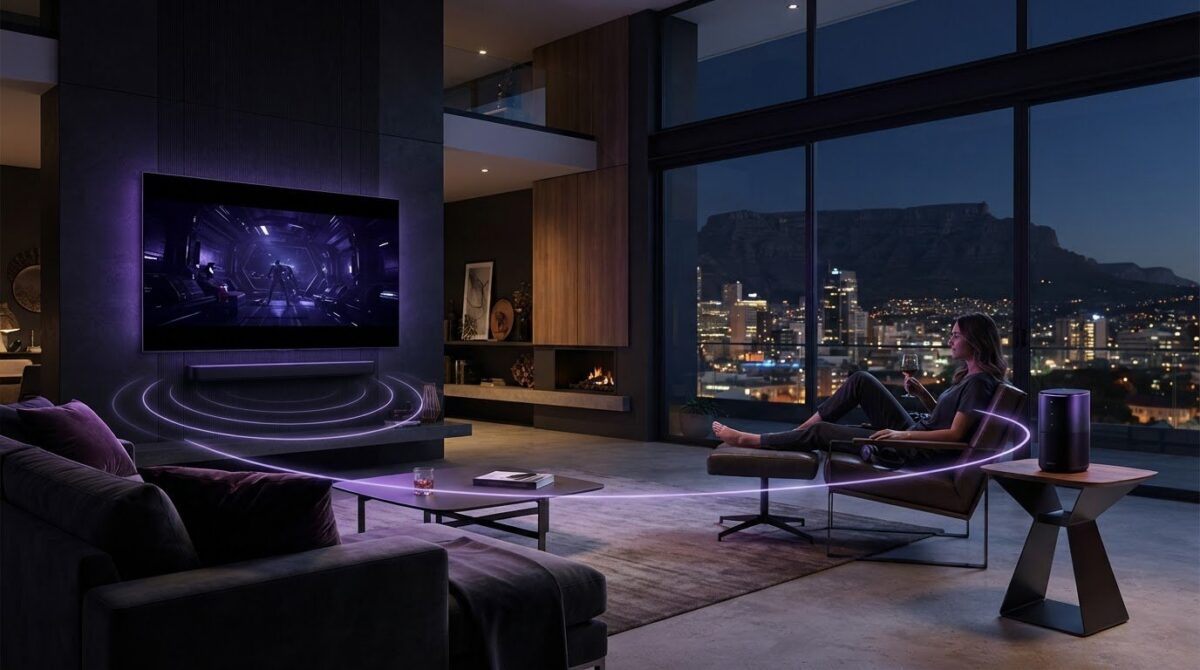
What makes a home audio setup work well is not one standout feature, but how each component fits your listening habits. A Bose smart home sound system can bring music and television audio into your daily routine, but a soundbar and a portable speaker have different roles. Wi-Fi, Bluetooth and AirPlay 2 add useful ways to stream, but it helps to know which connections each product supports before choosing.
A practical setup starts with the features you will actually use. This guide explains the roles of Bose soundbars and speakers, then helps you match them to your listening habits, audio sources and television use. You’ll see how options such as the Bose Smart Soundbar and Bose Portable Home Speaker fit different needs.
We’ll also explain the difference between wireless streaming and multi-room playback, including why compatibility matters before building a system. From television dialogue and certain Dolby Atmos-enabled content to music streaming and portable listening, you’ll find the key points to consider before choosing audio products for your home.
Key Takeaways
- Build a Bose smart home sound system around how you listen. Soundbars support television audio, while portable speakers suit flexible listening and may group with compatible products.
- Understand the different roles of Wi-Fi, Bluetooth and Apple AirPlay 2 before choosing how to stream.
- Match Bose soundbar and speaker options to your priorities, from television dialogue to portable listening.
- Plan your setup by identifying your listening habits, audio sources and preferred controls, then check product compatibility.
- Explore SoundXcel’s Bose home-audio range to find options suited to your everyday listening.
What Is a Bose Smart Home Sound System? Start With the Listening Experience
A Bose smart home sound system is a selection of audio products that can serve different listening needs. You might choose a soundbar for television sound and a separate speaker for music or portable listening. Some Bose products also support multi-room playback with compatible devices.
A connected audio setup uses products for different listening needs; a standalone speaker plays sound on its own. The connections between products depend on the specific models, so a shared brand name alone doesn’t mean they can all play together. For background on the company and its audio range, see the Bose Corporation Overview.
For a related look at Bose product ownership, watch this Bose Product Support video:
Smart speaker or soundbar: what role does each play?
A soundbar is a natural starting point when television audio is a priority. The Bose Smart Soundbar is suited to TV and music listening, with Dolby Atmos, TrueSpace and A.I. Dialogue Mode among its features. The Bose Smart Ultra Soundbar also combines Dolby Atmos with TrueSpace for home entertainment, including certain Atmos-enabled content.
For portable listening, the Bose Portable Home Speaker offers Wi-Fi and Bluetooth connectivity. Its smart functions require it to be within range of a configured Wi-Fi network. It supports grouping with compatible Bose smart speakers and soundbars, but that doesn’t mean it groups with every Bose speaker or other audio brand.
What does “smart” mean in a Bose audio setup?
“Smart” refers to the controls and connection options available on a particular product, not one universal feature set. Wi-Fi supports network-based functions; Bluetooth provides a wireless connection to compatible devices; Apple AirPlay 2 enables streaming from compatible Apple devices. The Bose Music app provides sound and music controls for supported models. Available options vary by product.
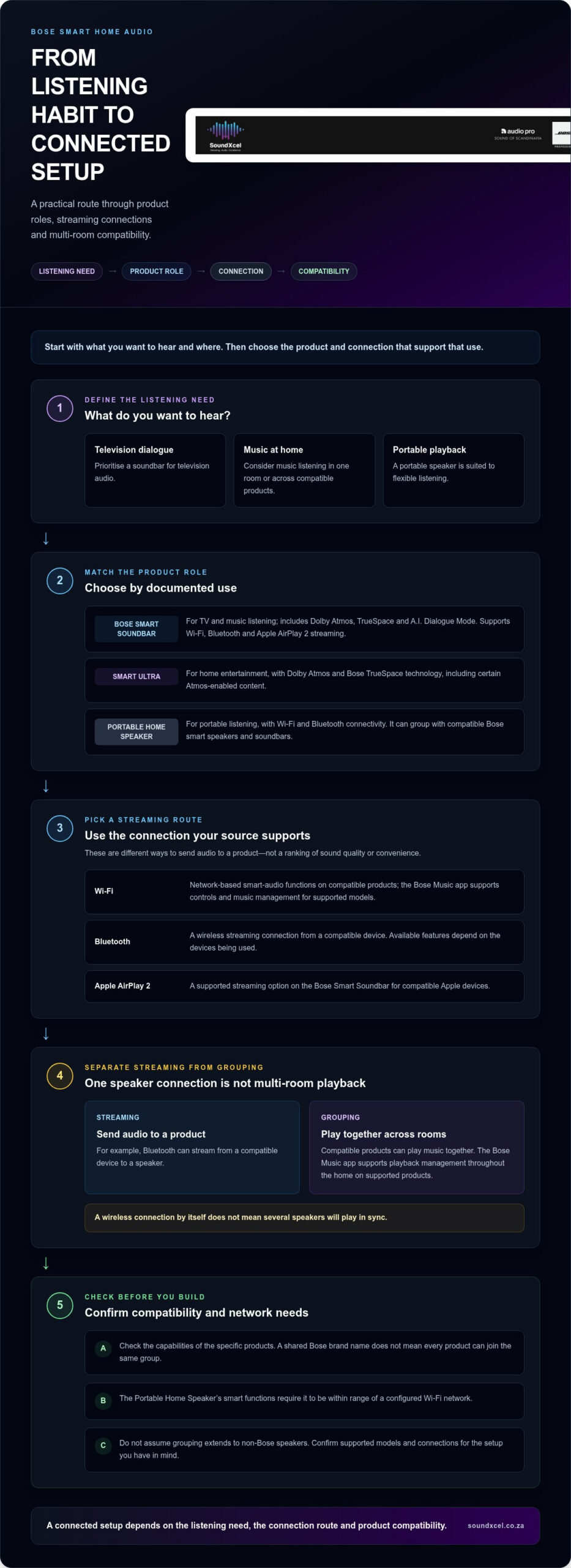
Start by deciding what you want to hear and where: television dialogue, music in one room, or portable playback. Then match those needs to the connections and compatible products that suit your setup. For a wider view of product types and selection considerations, explore the Bose sound system selection guide.
How Bose Smart Home Audio Connects: Wi-Fi, Bluetooth and Multi-Room Sound
Wireless streaming and multi-room playback are related but different capabilities. Streaming sends audio to a product; grouping lets compatible products play audio together across rooms. Knowing the difference helps you plan a Bose smart home sound system around your listening habits instead of assuming any wireless speaker can join the same group.
The Bose Smart Soundbar supports wireless streaming through Wi-Fi, Bluetooth and Apple AirPlay 2. These provide different ways to send audio to the soundbar. Choose based on your source, the content you want to play and the connections supported by your devices.
When should you use Wi-Fi, Bluetooth or AirPlay 2?
Think of each connection as a route for audio, rather than a ranking of sound quality or convenience:
- Wi-Fi: Part of the Smart Soundbar’s wireless smart-audio capabilities. On compatible products, it also supports network-based app functions.
- Bluetooth: A wireless streaming option for sending audio from a compatible device. The available features depend on the devices being used.
- Apple AirPlay 2: A supported streaming option on the Bose Smart Soundbar for compatible Apple devices.
These connections don’t automatically mean several speakers will play in sync. For a straightforward introduction to smart-speaker functions and connectivity, read Bose’s Understanding Bose Smart Speakers.
How does compatible Bose multi-room playback work?
Multi-room playback lets compatible products play music together, rather than simply connecting one device to one speaker. The Bose Music app supports music management and playback throughout the home on supported products. Check the specific products’ capabilities before planning a grouped setup.
The Bose Portable Home Speaker supports grouping with compatible Bose smart speakers and soundbars. Compatibility matters: don’t assume every Bose product can join the same group, or that grouping extends to non-Bose speakers. The Portable Home Speaker’s smart functions also require it to be within range of a configured Wi-Fi network.
For example, Bluetooth can stream from a compatible device to a speaker, but that alone doesn’t create a multi-room group. If you’re considering connected Bose products, browse the Bose home-audio options at SoundXcel and focus on the models and connections that match your listening plans.
Bose Smart Home Sound System Options: Match the Setup to Your Home
Choose according to your listening priorities, not the number of features on a product page. A television-focused setup calls for different capabilities from portable music listening or multi-room playback. This comparison focuses on documented features, without assuming a product suits a particular room size or that every Bose model works with every other one.
| Listening need | Option | Documented role or capability |
|---|---|---|
| Television and films | Bose Smart Soundbar | Dolby Atmos, TrueSpace and A.I. Dialogue Mode; Wi-Fi, Bluetooth and Apple AirPlay 2 streaming. |
| Home entertainment | Bose Smart Ultra Soundbar | Dolby Atmos and Bose TrueSpace technology. |
| Music and wireless listening | Bose Smart Soundbar | Wireless music streaming, with app controls and personalisation for supported products. |
| Portable listening and compatible grouping | Bose Portable Home Speaker | Portable speaker with Wi-Fi and Bluetooth; supports grouping with compatible Bose smart speakers and soundbars. |
Which Bose option suits television and film watching?
The Bose Smart Ultra Soundbar combines Dolby Atmos and TrueSpace for home entertainment. The Bose Smart Soundbar also features both technologies, and TrueSpace can upmix non-Atmos stereo and 5.1 content. Its A.I. Dialogue Mode balances voices with surround sound to support clear dialogue alongside other audio. Dolby Atmos applies only to compatible content: not every film or television programme is Atmos-enabled.
For a broader view of combining projection and audio in a cinema setup, explore the Bose Lifestyle and Epson projector setup guide.
Which Bose option suits music and flexible listening?
The Smart Soundbar can serve both television and music listening. It supports Wi-Fi, Bluetooth and Apple AirPlay 2 streaming, while the Bose Music app provides controls and personalisation for supported products. Music-service availability can vary, so consider the connection method and controls that suit your usual sources.
The Bose Portable Home Speaker brings together home-speaker and portable-speaker use. Wi-Fi and Bluetooth support different listening situations, while compatible Bose grouping can extend playback across products designed to work together. Its smart functions require it to be within range of a configured Wi-Fi network. These roles give you a practical starting point for shaping a Bose smart home sound system around everyday listening, without assuming that every model shares the same multi-room features.
Plan Your Bose Smart Home Sound System Around Compatibility and Everyday Use
Start with the listening moments you want to improve. Television dialogue, immersive film audio, music streaming and portable listening can call for different products and connections. Planning around those priorities helps you focus on features you’ll use in your Bose smart home sound system.
Which listening needs should you prioritise first?
Use this sequence to turn your habits into a practical setup plan:
- 1. Prioritise use: Decide whether TV dialogue, certain Atmos-enabled films, everyday music or portable listening matters most.
- 2. Identify sources: Note what you’ll play, such as television audio or music from a compatible device. Music-service availability can vary.
- 3. Choose controls: Consider whether you’ll stream over Wi-Fi, Bluetooth or Apple AirPlay 2, and whether app controls suit your routine.
- 4. Check compatibility: Match the exact models to the features you plan to use. Don’t assume every Bose speaker synchronises with every other one.
For TV and music, the Bose Smart Soundbar combines wireless streaming with features including A.I. Dialogue Mode, which balances voice and surround sound. If portability matters, the Bose Portable Home Speaker is IPx4 water-resistant against splashes, sprays and rain, but it isn’t designed for submersion. Its smart functions require it to be within range of a configured Wi-Fi network.
What should you check before combining Bose products?
Separate the role of each feature. The Smart Soundbar’s app controls and streaming capabilities support its listening functions. The Portable Home Speaker supports multi-room grouping with compatible Bose smart speakers and soundbars. These are model-specific capabilities, not a guarantee that all products share the same controls or group playback options.
Before choosing, compare each product’s documented connections with the sources you use. Wi-Fi, Bluetooth and AirPlay 2 describe ways to stream; multi-room grouping depends on compatible products. For the Portable Home Speaker’s smart functions, a configured Wi-Fi network must be in range. This distinction helps set realistic expectations for portable playback, app control and whole-home listening.
Quick checklist: Identify your listening needs first, match them to the connection options you’ll use, then verify compatibility between the specific products.
Ready to shape a setup around your listening habits? Explore Bose home-audio options at SoundXcel.
Explore Bose Smart Home Sound System Options with SoundXcel
The right setup starts with your everyday listening priorities. If television is central, consider a soundbar and the features that support the content you watch. If you want music streaming or portable listening, focus on the relevant speaker capabilities and wireless connections. Then consider compatibility, especially if you want multiple products to play together.
How SoundXcel can help you explore Bose home audio
SoundXcel is an independent authorised Bose retailer and installer in South Africa, with Bose home-audio options for different listening needs. The Bose Smart Soundbar combines television and music listening with Dolby Atmos, TrueSpace, A.I. Dialogue Mode, Wi-Fi, Bluetooth and Apple AirPlay 2. Its A.I. Dialogue Mode balances voice and surround sound, while TrueSpace can upmix non-Atmos stereo and 5.1 content.
For home entertainment, the Bose Smart Ultra Soundbar features Dolby Atmos and Bose TrueSpace technology. These features are relevant when you watch certain Atmos-enabled films or programmes, although not all content supports Dolby Atmos. The Bose Portable Home Speaker serves a different purpose: portable wireless listening, with Wi-Fi and Bluetooth connectivity. Its smart functions require a configured Wi-Fi network to be within range.
Before choosing, separate the features you want from the way you expect to use them. A soundbar’s television and streaming capabilities don’t automatically mean it shares every grouping feature with a portable speaker. Multi-room playback depends on compatible Bose products, so consider the specific models and the listening experience you want from them.
Choose your next step with confidence
Use your priorities as a guide. For television sound, compare the Smart Soundbar’s dialogue and audio features with the Smart Ultra Soundbar’s Dolby Atmos and TrueSpace capabilities. For music streaming, consider the Smart Soundbar’s Wi-Fi, Bluetooth and AirPlay 2 options. For portable listening, look to the Bose Portable Home Speaker and its distinct role. Check that the connections and grouping support the way you plan to listen.
A well-chosen Bose smart home sound system is built around products that suit your habits and work together for the uses you need. Explore Bose audio with SoundXcel.
Build a Sound Setup Around the Way You Listen
A connected audio setup works best when each product has a clear role. Start by deciding whether television sound, music streaming or portable listening matters most. Then compare the relevant wireless connections and check compatibility before combining Bose products. Multi-room playback depends on compatible models, not simply on owning more than one Bose speaker.
The Bose Smart Soundbar brings Dolby Atmos, TrueSpace and A.I. Dialogue Mode together with wireless streaming, making it an option to consider for television and music listening. A Bose smart home sound system can be simple or more connected; the right setup is the one that fits your everyday habits.
SoundXcel is an independent authorised Bose retailer and installer in South Africa. Explore its Bose audio options to find products that align with your listening priorities.
Explore Bose audio with SoundXcel
Frequently Asked Questions
What is a Bose smart home sound system?
A Bose smart home sound system is a collection of audio products chosen to suit different listening needs at home. A soundbar can serve television entertainment, while a compatible speaker can support music and multi-room listening. Features vary by model. Before combining products, check their documented connections and compatibility. Owning more than one Bose product doesn’t automatically mean they can play the same audio in synchronisation.
Can Bose smart speakers and soundbars play music in multiple rooms?
Compatible Bose smart speakers and soundbars can support multi-room listening. The Bose Music app provides the ability to play music throughout the home on supported products, and the Bose Portable Home Speaker can group with compatible Bose smart speakers and soundbars. Grouping depends on the specific models. Don’t assume every Bose product, SoundTouch device or third-party speaker can join the same synchronised playback group.
Does the Bose Smart Soundbar support Dolby Atmos?
Yes, the Bose Smart Soundbar supports Dolby Atmos with compatible content, but only certain films and television programmes are Atmos-enabled. Its TrueSpace technology can upmix non-Atmos stereo and 5.1 content into an immersive multi-channel experience. A.I. Dialogue Mode automatically balances voice and surround sound for clear dialogue. Consider the content you watch as well as the soundbar’s features when deciding what matters most.
Can I stream music to a Bose Smart Soundbar without Wi-Fi?
Yes, Bluetooth is a wireless streaming option on the Bose Smart Soundbar, so you can use it without Wi-Fi for Bluetooth playback from a compatible device. The soundbar also supports Wi-Fi and Apple AirPlay 2. These connections serve different uses, and the best option depends on your source and intended listening. Don’t assume every app or music service works through each connection in the same way.
Is the Bose Portable Home Speaker waterproof?
No, the Bose Portable Home Speaker is IPx4 water-resistant, not waterproof or submersible. It is designed to withstand splashes, sprays and rain, but shouldn’t be immersed in water. For smart-speaker functions, it also needs to be within range of a configured Wi-Fi network. Treat the water-resistance rating as a defined level of protection, not permission for underwater use.
Can I control a Bose Smart Soundbar with an app?
Yes, the Bose Music app supports sound and music management for the Bose Smart Soundbar. It also offers multi-user personalisation, one-touch access to playlists and presets, and the ability to play music throughout the home on supported products. Don’t assume every Bose speaker or soundbar has identical app controls. Music-service availability may vary, too.
How do I choose the right Bose home audio setup?
Start by deciding whether television dialogue, immersive film audio, music streaming or portable listening is your priority. Then compare the documented features and connections of the relevant Bose products. For television, consider the Smart Soundbar’s dialogue and TrueSpace features, and remember that only certain content supports Dolby Atmos. If you want multi-room playback, check compatibility between the specific models rather than assuming they’ll synchronise.
