

Bose Headphones Battery Replacement South Africa: The Complete Guide
August 2, 2026
Troubleshooting a Bose Remote Control Not Working: A Complete Guide (2026)
August 4, 2026
A silent Bose Lifestyle system is rarely a sign of total hardware death. Whilst the sudden loss of your premium audio experience is frustrating, the cause is often a simple communication error between components rather than a fatal blow to your investment. If you are currently facing a Bose Lifestyle system no sound issue, don’t assume you need a complete replacement just yet. Most audio failures stem from misconfigured settings, outdated firmware, or loose connections that you can easily rectify at home.
We recognise the confusion that complex cabling and intricate console menus can cause, especially when you simply want to enjoy your favourite films in high definition. You’ve invested in a sophisticated lifestyle, and you deserve technology that works seamlessly. This guide will help you diagnose the root cause of the silence and provide a clear path to restoring your audio performance. We’ll walk you through systematic isolation steps, from basic power cycles to identifying faulty cables, ensuring you understand whether a component is truly failing or merely needs a professional touch to return to its peak state.
Key Takeaways
- Learn to distinguish between a temporary software glitch and a hardware failure when your Bose Lifestyle system no sound issue occurs.
- Master the full system reset process to clear static and restore functionality without needing immediate technical support.
- Understand the specific roles of the Media Console and Acoustimass Bass Module to isolate exactly where the audio signal is being lost.
- Discover why premium AV equipment is sensitive to voltage fluctuations and how to protect your setup with high-quality surge protection.
- Recognise the signs of internal board failure and know when to seek specialised Bose repairs to preserve your legacy equipment.
Common Reasons Your Bose Lifestyle System Has No Sound
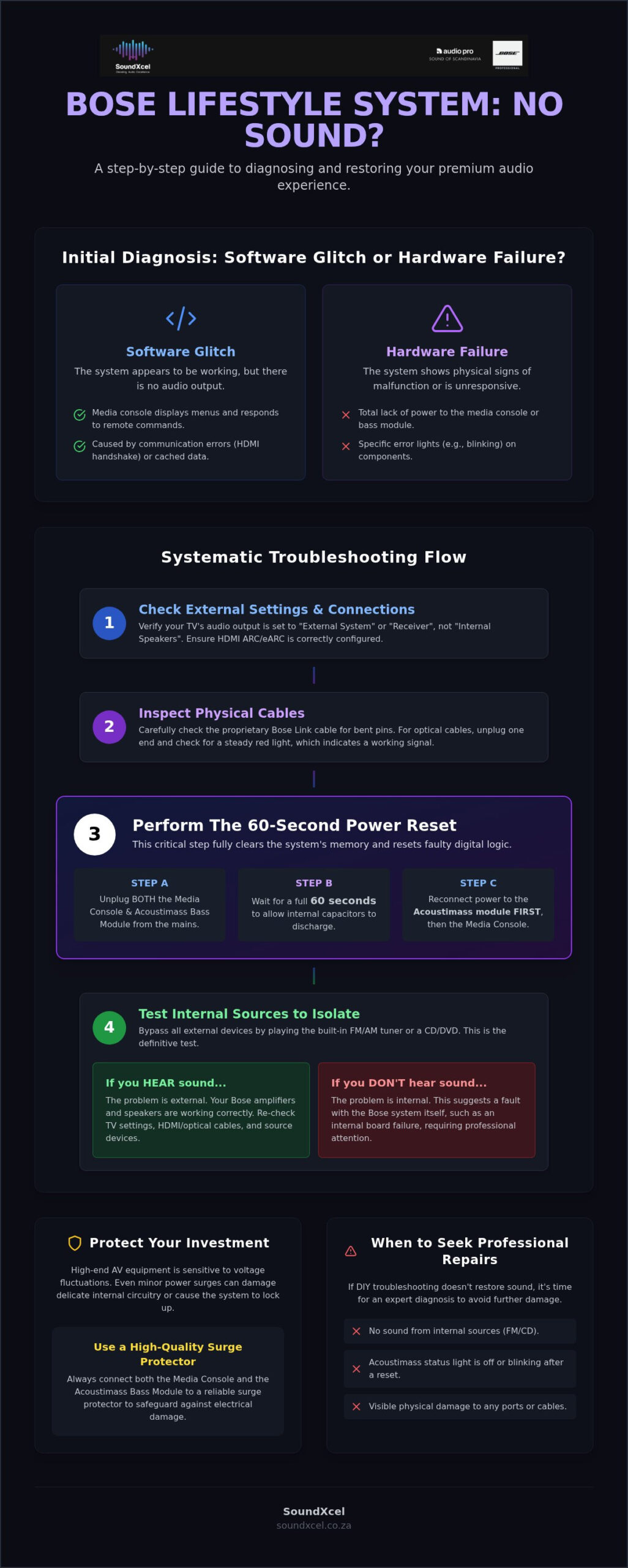
Silence from a premium audio setup is jarring. It often indicates a communication breakdown rather than a terminal hardware fault. You must first determine if you’re dealing with a software “hang” or a true hardware failure. A software hang usually allows the console to display menus whilst producing no audio. Hardware failure often results in a total lack of power or specific error lights on the media console or the Acoustimass bass module. This distinction is the first step in resolving a Bose Lifestyle system no sound scenario.
Understanding the relationship between these two components is vital. The Media Console acts as the system’s brain, processing signals from your TV and streaming devices. The Acoustimass module houses the amplifiers and power supply. If the proprietary link cable between them is loose or damaged, the signal simply cannot reach your speakers. These systems are sophisticated examples of modern consumer electronics, meaning they rely on every link in the chain to be perfectly secure.
Sensitivity to environmental factors is a hallmark of high-end equipment. Power surges can easily compromise the delicate internal circuitry of a Bose system. Even a minor voltage fluctuation can cause the digital signal processor (DSP) to lock up. This often creates a “No Response” state where the remote or console buttons fail to trigger any action. If your console responds to commands but remains silent, the issue likely lies within the signal path or software settings.
Software and Firmware Glitches
Digital handshaking errors between your television and the Bose console frequently cause audio drops. This happens when the HDMI ARC or eARC protocol fails to synchronise correctly. Regular system reboots help clear cached errors that accumulate over time. If your system is an older model, check for available firmware updates. For instance, the Lifestyle 535 series III received a final update (version 27.0.6) in late 2022 to maintain compatibility with modern television standards. Keeping software current prevents many common “No Sound” errors.
External Connectivity Failures
Check your HDMI ARC settings first. If the TV is set to the wrong output format, the Bose system cannot decode the incoming signal. Optical cables are another common failure point. These fibre-optic leads are fragile; a sharp bend can snap the internal glass core. Disconnect the cable and look for a steady red light at the end to verify the signal is passing through. Occasionally, an incomplete ADAPTiQ calibration can also cause the system to mute certain channels. Re-running the calibration often resolves these phantom audio issues.
Step-by-Step Troubleshooting for Bose Audio Issues
Begin your diagnostic journey by isolating the most common failure points. When you encounter a Bose Lifestyle system no sound issue, a methodical process is your best tool. Start by cross-referencing your television’s audio output settings with your Bose console’s source selection. It’s common for a TV firmware update to reset the audio output from “External System” or “Receiver” back to “Internal Speakers,” effectively cutting the signal to your Bose equipment.
Next, inspect the physical connections. Focus on the proprietary Bose Link cables that connect the console to the Acoustimass module. Check for physical damage or signs of oxidation on the multi-pin connectors. A single bent pin can prevent the “turn-on” signal from reaching the bass module. Observe the status light on the back of the Acoustimass module. A solid amber or white light indicates power and sync, whilst a blinking light or no light at all suggests a power delivery problem or a failed link cable.
The 60-Second Bose Power Reset
Disconnect the power cords from both the media console and the Acoustimass bass module simultaneously. You must wait at least 60 seconds before reconnecting them. This duration is critical because it allows the internal capacitors to discharge fully, which clears the system’s memory and resets any “stuck” digital logic. To properly re-sequence the system, plug the Acoustimass module back into the mains power first, followed by the media console. This order ensures the amplifier is ready to receive the handshake signal from the console the moment it boots up.
Testing Internal Sources
Use the built-in FM/AM tuner or the CD/DVD player to bypass all external cables. This step is vital for isolating the fault. If the radio plays audio through your speakers, you’ve confirmed that the internal amplifiers and speaker wiring are intact. This indicates the problem lies with your HDMI cables, the TV settings, or the external source devices. If the internal sources also produce no sound, the issue is likely an internal board failure or a faulty Acoustimass module. If these manual steps don’t restore your audio, you may be facing a hardware fault that requires specialised Bose repairs to resolve safely.
Navigation can be tricky if your remote feels unresponsive. Use the physical buttons on the front of the media console to cycle through sources and adjust volume. This helps you determine if the “no sound” state is actually a result of the console not receiving commands from the remote control. If the console responds to physical buttons but not the remote, try re-pairing the remote in the system settings menu.
Component Failure vs Connectivity: Isolating the Problem
Isolating a hardware fault requires a methodical process of elimination. Once you have ruled out software glitches and basic resets, you must determine which physical component has failed. A common pain point is the complexity of speaker wiring in a surround sound environment. Identifying a single faulty speaker wire amongst the intricate loom behind your media centre is tedious but necessary. Swap a known working speaker to the channel that is silent to verify if the issue is the wire or the console’s internal output channel.
Distinguishing between a dead remote and a dead system receiver is equally vital. If your console display remains dark or frozen despite new batteries in the remote, the communication link has likely broken. Use the physical buttons on the console itself to attempt a source change. If the console responds to manual input but ignores the remote, the fault is isolated to the controller or the infrared receiver. However, if the console remains entirely unresponsive to both, the internal mainboard or the external power supply is the probable culprit.
Diagnosing the Acoustimass Module
Examine the LED status indicator on the rear of the Acoustimass module. A solid amber light often suggests the module is in standby, whilst a blinking light indicates it is waiting for a signal from the console. If you hear a faint “thump” when you power the system on, it’s a positive sign that the power-on signal is reaching the internal amplifiers. Conversely, a complete lack of sound or a persistent hum often points to blown capacitors within the amplifier stage. These internal components are sensitive to heat and age, occasionally requiring professional intervention to replace aged circuitry.
Console and Controller Communication
The “No Response” error on a Lifestyle remote can be misleading. It often suggests the system is dead, but the issue frequently lies with the external power supply brick. These power bricks act as the first line of defence against surges; they can fail whilst the console itself remains healthy. Test the console buttons against the remote commands to see if the system’s “brain” is still processing logic. If the console powers up but the Bose Lifestyle system no sound persists across all inputs, the internal digital-to-analogue converter (DAC) may have suffered a hardware failure. In these instances, swapping the faulty unit for pre-loved Bose equipment can be a cost-effective and sustainable way to restore your premium audio experience.
Protecting Your Sound System from Power Surges
Bose Lifestyle systems are meticulously engineered for acoustic perfection. This high level of sophistication makes them particularly sensitive to voltage fluctuations. Whilst many modern appliances handle minor power dips with ease, the delicate digital signal processors within your media console require a consistent, clean stream of electricity. Unstable power leads to “dirty” electricity, where the sine wave of the current is distorted. This causes internal components to work harder, generating excess heat and eventually leading to hardware failure.
Organising your power setup is a vital step in ensuring system longevity. Avoid daisy-chaining multiple power strips, as this increases electrical resistance and fire risk. Ensure your media console and the Acoustimass module are plugged into a high-quality surge protector rather than a basic extension lead. For the best protection, disconnect your equipment entirely during predicted power outages or severe thunderstorms. This physical disconnection is the only absolute guarantee against a catastrophic high-voltage spike that could leave you with a dead system.
Load Shedding and Audio Hardware
In South Africa, the frequent cycle of power being cut and restored presents a unique challenge for home audio enthusiasts. The moment power returns, a massive “in-rush” current often surges through the grid. This sudden spike is a primary culprit for the Bose Lifestyle system no sound issue, as it can overwhelm the standby power circuits and fry sensitive components instantly. A simple power strip offers minimal protection against these repetitive, high-energy events.
Consider investing in an Uninterruptible Power Supply (UPS) for your home theatre. A UPS acts as a crucial buffer, filtering the incoming current and providing enough battery power to shut your system down safely during a sudden outage. This prevents software corruption and hardware strain. It ensures your premium equipment remains operational and protected from the volatile nature of the local power grid.
Preventative Maintenance Tips
Maintaining your system’s physical environment is just as important as protecting its power source. Regularly check for dust accumulation around the Acoustimass cooling fins and the console’s ventilation ports. Heat is the natural enemy of integrated circuits; restricted airflow will shorten the lifespan of your amplifiers significantly. Ensure there is at least 10cm of clearance around the bass module to allow for natural convection and cooling.
Keep an eye on cable tension. The proprietary Bose Link cables are heavy. If they hang unsupported, they can put undue stress on the internal solder joints of the connector ports. Use cable ties to organise and support the weight of your wiring loom to prevent physical port damage. If you suspect your system has already suffered damage from a power event, arrange a professional Bose repair to diagnose and fix the internal circuitry before further issues arise.
When to Choose Professional Bose Repairs Over DIY
Home troubleshooting has clear limits when dealing with complex integrated circuits. If the systematic resets and cable inspections outlined earlier haven’t resolved your Bose Lifestyle system no sound issue, the fault likely exists on a component level. Modern audio consoles are essentially specialised computers. Attempting to repair internal boards without the correct diagnostic equipment often leads to secondary failures that are more expensive to fix than the original problem. Professional intervention becomes necessary when the symptoms point toward hardware degradation.
Specialised Bose repair services provide the expertise needed for legacy Lifestyle systems. These units often suffer from specific component ageing, such as dried-out capacitors or failing digital-to-analogue converters. A professional technician can pinpoint these faults quickly using dedicated test benches. Choosing a repair over a full system replacement preserves your investment and maintains the specific acoustic signature of your home theatre setup. It is often more cost-effective to restore a high-end legacy console than to purchase a modern entry-level alternative.
The Risks of Amateur Repairs
Opening a Bose console carries significant risks for the untrained user. You risk permanent data loss if the system’s firmware chips are exposed to static electricity during a manual inspection. Sourcing genuine Bose internal components is notoriously difficult for the general public. This often leads people to install inferior third-party parts that compromise sound quality or cause overheating. Professional diagnostics save you money in the long run by identifying the exact failure point. This prevents the “parts cannon” approach where you waste money buying multiple replacement modules that don’t solve the root cause.
SoundXcel Specialised Service
SoundXcel supports Bose owners nationally with expert technical care. We focus on restoring the Bose Lifestyle Collection to its original performance standards. Our team understands the intersection of luxury and functionality, ensuring your system receives the respect it deserves. We maintain an extensive inventory of pre-loved Bose equipment to provide sustainable, high-quality alternatives to new purchases when a specific module is truly beyond repair. This approach ensures your system remains part of your home for decades rather than ending up in a landfill.
Contact our team for a professional assessment of your hardware. Whether you need a simple board repair or a replacement component, we provide a clear, reliable path forward. For those considering an upgrade or an additional setup, consult The Ultimate Guide to Choosing a Bose Sound System in South Africa to understand how different models integrate into your lifestyle. Expert intervention ensures your premium audio experience remains uninterrupted and your investment stays protected.
Restore Your Premium Audio Experience
Resolving a Bose Lifestyle system no sound issue requires a blend of systematic troubleshooting and an understanding of hardware limits. Start with the basics by performing a full power reset and verifying your cable integrity. These simple steps often clear the digital handshaking errors that cause sudden silence. If the fault persists, it likely stems from internal circuitry damage caused by power surges or natural component ageing over years of use.
Don’t risk permanent hardware failure with amateur repair attempts. SoundXcel provides specialised Bose repair expertise and national service coverage to bring your system back to peak performance. We maintain an extensive inventory of pre-loved Bose gear, offering a sustainable and reliable path to restoring your home cinema. Our team understands the nuances of legacy systems and modern configurations alike. Book a specialised Bose repair with SoundXcel today and return to the high-fidelity sound you love. Your premium audio investment is worth protecting, and help is only a click away.
Frequently Asked Questions
Why does my Bose Lifestyle system say “No Response” on the remote?
A “No Response” message typically indicates that the console is not receiving the radio frequency signal from your remote or the system’s logic has frozen. First, replace the batteries and ensure you are within range. If the issue persists, the external power brick may be failing to provide enough voltage to the console’s receiver. Perform a full power reset by unplugging the system for 60 seconds to restore communication between the handset and the media centre.
Can I reset my Bose Lifestyle system without the remote control?
Yes, you can initiate a full hardware reset using only the physical power cables. Disconnect the power leads from both the media console and the Acoustimass module at the wall socket. Wait at least one minute to allow the internal capacitors to discharge completely. Reconnect the Acoustimass module first, followed by the console, to clear the system memory and resolve software hangs without needing the remote.
How do I know if my Bose Acoustimass module is blown?
Check the status LED on the rear of the module for a lack of light or a persistent blinking pattern. If the media console functions correctly but the speakers remain silent or produce a heavy humming noise, the internal amplifier board has likely failed. You can also listen for a faint “thump” when the system powers on; its absence suggests the module’s power supply or amplifiers are no longer engaging.
Is it worth repairing a 15-year-old Bose Lifestyle system?
Repairing a legacy system is often a wise investment because the acoustic quality of these older units remains superior to many modern budget alternatives. Specialised repairs or sourcing pre-loved components can extend the life of your system for another decade at a fraction of the cost of a new premium setup. These systems were engineered for longevity, making them ideal candidates for professional restoration rather than replacement.
Does a red light on the Bose console mean it is broken?
A solid red light usually indicates the system is in standby mode or has encountered a minor handshake error with your TV. However, if the light is blinking rapidly, it signals a deeper hardware fault or a failed firmware update. This state often prevents the system from booting up entirely. If a standard power cycle doesn’t return the light to green or white, your console requires a professional diagnostic check.
Why is there no sound from my Bose system when using Netflix or YouTube?
This issue is frequently caused by a digital audio format mismatch between your TV and the Bose console. Many streaming apps default to Dolby Digital Plus, which older Bose systems may not decode via HDMI ARC. Access your television’s sound settings and change the digital audio output format to “PCM” or “Stereo.” This ensures a compatible signal reaches the console, resolving the Bose Lifestyle system no sound issue during streaming.
Can power surges cause my Bose system to lose sound permanently?
Yes, high-voltage spikes can fry the delicate digital signal processing chips or the internal power supply circuits. These surges often occur when power is restored after an outage, leading to a state where the console powers on but cannot process audio signals. Protect your investment by using a high-quality surge protector or an uninterruptible power supply (UPS) to filter the “dirty” electricity common in unstable power grids.
Where can I get my Bose Lifestyle system repaired in South Africa?
SoundXcel provides specialised Bose repairs nationally across South Africa. Our technicians possess the specific expertise required to diagnose and fix the complex internal boards found in the Bose Lifestyle Collection. We also maintain a comprehensive inventory of pre-loved Bose equipment to ensure that even discontinued models can be restored to peak performance using genuine parts and expert care.
